Search Archive

No the track info when i listen to cd's.

By mrgoodbar67 · Jan 09, 2008in General💬 13 posts👁️ 1,240 views
Posted Jan 09, 2008 · 16:55 UTC#1

on the d3...when i insert an original store bought cd, or a burned cd with the tracks named, are they supposed to be dispalyed on the screen?


currently when ever i insert any regualr music cd (store bought, or burned) it does not display track info, just the track 1, track 2, etc....

doesnt the d3 have ID3 technology that should be able to read song names off cd's?


or does this only apply to mp3 loaded cd's?

Posted Jan 09, 2008 · 17:07 UTC#2

It doesn't display track info from regular audio CD's. Only MP3's, because they are actually files with file names and info attached to them.

Posted Jan 09, 2008 · 17:17 UTC#3

I'm not sure that it will work on the D3, but there are some burning programs that will burn the song info into audio tracks of audio cd's. Before I got my D3, my OEM headunit couldn't play MP3's but I still got it to display the song title. I used Nero to burn those audio CD's.

Posted Jan 09, 2008 · 17:33 UTC#4

True, some burning programs will allow you to input CDtext when burning an audio CD. Will the D3 display it? I'd think it probably would.

Posted Jan 09, 2008 · 17:52 UTC#5

well i use iTUNES or windows media to burn cds on my computer, and whenever i play the burned cd on another cpu, the track info IS displayed.

shouldnt the d3 do the same.

Posted Jan 09, 2008 · 19:07 UTC#6

If you make a MP3 cd, the info will be available. Also, there are some newer CDs that carry the track titles. My wife put in the new Celine Dion CD into mine and when I pulled up the cd menu, there was all the track listings.

Posted Jan 09, 2008 · 19:18 UTC#7
well i use iTUNES or windows media to burn cds on my computer, and whenever i play the burned cd on another cpu, the track info IS displayed.

shouldnt the d3 do the same.

Hey, I've got an idea. TRY IT AND SEE IF IT WORKS.

Posted Jan 09, 2008 · 19:18 UTC#8

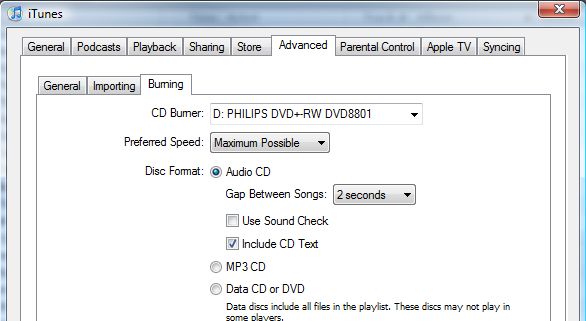
Like mrgoodbar67 said, iTunes will burn CDTEXT info. You have to have at least iTunes 6 (or maybe even 7... just make sure you're up to date). The setting is under Edit -> Preferences -> Advanced tab -> Burning -> "Include Cd Text" checkbox.

post-12328-12872753551983_thumb.jpg

Posted Jan 09, 2008 · 19:48 UTC#9

Will somebody just burn an audio CD with CDTEXT on it and try it out in their D3 so we can end this thing???? I'd do it, but thanks to my ipod I haven't seen a blank CD in months.

Posted Jan 09, 2008 · 20:18 UTC#10
Will somebody just burn an audio CD with CDTEXT on it and try it out in their D3 so we can end this thing???? I'd do it, but thanks to my ipod I haven't seen a blank CD in months.


Good point!


I know that burning an audio cd in iTunes with CDText reads track info in my Z series (obviously for CD's that aren't in Gracenote. I dont' have a D series to test on. As for retail CD's (that also aren't in Gracenote) I've never seen one with CDText from the factory, though I know they exist.

Posted Jan 10, 2008 · 23:29 UTC#11
Will somebody just burn an audio CD with CDTEXT on it and try it out in their D3 so we can end this thing???? I'd do it, but thanks to my ipod I haven't seen a blank CD in months.


Because I had nothing better to do I went and did it.

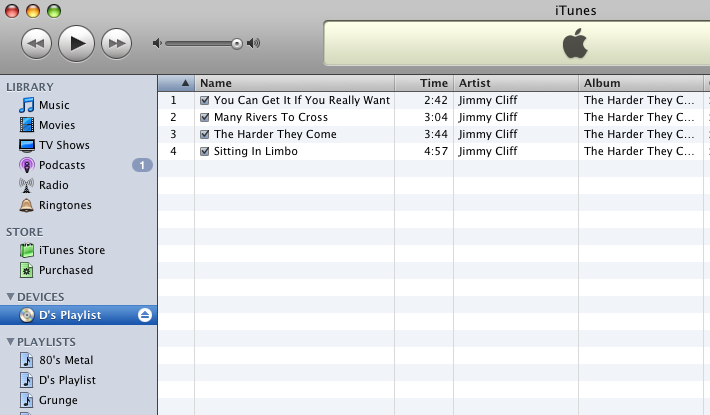
iTunes songs were in .m4a format. Have your iTunes BURN setup as Inferno suggests to CD format with CD Text checked.

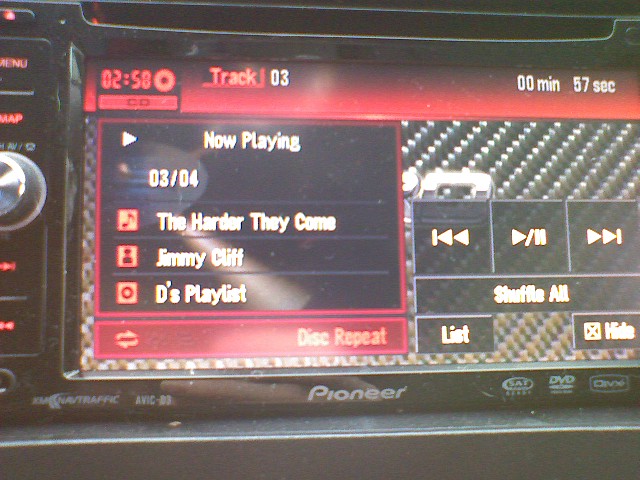
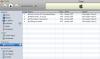
Bottom photo shows the disc after burning in iTunes.

Top photo shows CD Text does come across. Nice to know....I guess. For the life of me I can't understand why somebody would compress a cd quality song to a lossy format and then burn it back, of course unless you never had the original CD. I would suggest going the iPod route. Much more flexibility and convenient.


As far as store bought CD's it is very rare to have one that has CD text. I think I have an AC/DC disc that has it and I was very surprised when that popped up on my Alpine in the 'lude.


My perfect world would have the D3 with USB and able to decode .flac and be able to handle a larger drive.
post-14294-12872753556245_thumb.jpg

post-14294-12872753556961_thumb.png

Posted Jan 11, 2008 · 00:05 UTC#12
It doesn't display track info from regular audio CD's. Only MP3's, because they are actually files with file names and info attached to them.


Some store bought cd's have text. Not many, but some! CD text works fine on my D2!

Posted Jan 11, 2008 · 00:55 UTC#13

thank you very much fellas