Search Archive

XM Icon adding / hacking

By inferno999 · Jan 23, 2008in Hacks/Mods💬 18 posts👁️ 4,262 views
Posted Jan 23, 2008 · 21:27 UTC#1

So, as far as I can tell, the Z2 is missing some XM icons:

2, 45, 59, 73, 93, 130 to name a few.


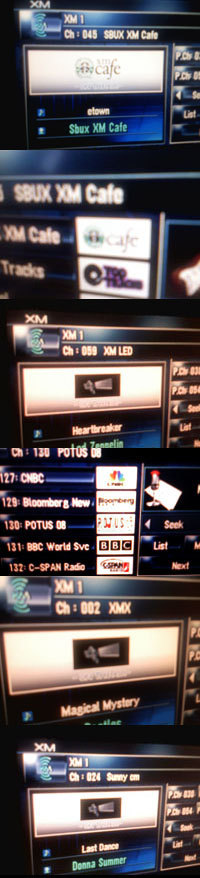
I had this great idea - since most of these stations have official icons on XMRADIO.COM, and since my HDD's unlocked, why not just make them and see what happens. So I made a few and copied them over to the directories with all the icons:

missingIcons.jpg

SDATA:\AV\XMDPS (for now playing icons) and

SDATA:\AV\XMLPS (for list-view icons).

Each file is apparently formated DPS###.bmp, where ### is the channel number. I copied the new BMP's over with their relative names but I still just get the generic satellite icon for those stations.


So I dug around more and found a file "IMAGETBL.DAT" in SDATA:\AV\XMDAT\ which, based off it's name and contents, is probably a table of which images to display for which channel.


I've gone into the file with a HEX editor and started the process of trying to make sense of everything. It appears each channel entry starts with 3 ID characters, then has 16 spaces for the station name (filled in with hex 00's to complete 16 spaces), then another hex 00 as a spacer between channels.

hexfile.gif


The three ID numbers seem like the important part -- as far as I can tell, they read "Channel number, spacer, channel number". For example, chanel 82 (the system) reads as follows:

52 0A 52 54 68 65 20 53 79 73 74 65 6D 00 00 00 00 00 00 00

Decoded, this reads:

82 .  82 T h e  S y s t e m        

The 0A(hex) is a 10 in Decimal, and it doesn't seem to match anything. Other channels have a 07, or 08, etc, but there doesn't seem to be any pattern - they're just characters that equate to a space, so I'm guessing it's just a placeholder?


Now, I looked for an entry for station 02. There isn't one - I'm in the process of trying to correctly add it - but there are others for which there are entries and the new icons still don't show up, XMCAFE for example.


Anyway, I was wondering if anyone out there who understood HEX a bit more might be able to shed some light. Maybe even pick up where I left off and figure it out? I'll attach the icons I made for troubleshooting.

XMicons.zip

Posted Jan 24, 2008 · 01:47 UTC#2

Can you also upload the "IMAGETBL.DAT" file?


Thanks

Posted Jan 24, 2008 · 01:59 UTC#3
Can you also upload the "IMAGETBL.DAT" file?


Thanks


Sure thing.


I tested the channel "002 XM Exclusives"I created on the way home. No dice. I noticed, however, that the name on the actual channel is "002 XMX" so now I'm wondering if it polls the IMAGETBL by channel name rather than number. Additionally, channel channel 045 (Starbucks XM Cafe) had an icon on the HDD (an out of date one, but one nonetheless) which wasn't showing. It doesn't show despite being official, and I wonder if, like my guess with 002, it's because the name is supposed to be "SBUX XM Cafe".


The next step will be matching the over-the-air names with the IMAGETBL.DAT to see what happens. After that, we need to isolate what exactly the TBL provides (is it the image map? or does it provide channel names?) with a series of edits.


No more time today though.


And of course, any help is appreciated, I'm in just a little over my head ;)

IMAGETBL.DAT

Posted Jan 24, 2008 · 04:26 UTC#4

My knowledge of hex goes about as far as editting a Motorolla cell phone...but if you would, what hex editting S/W are you using?

Posted Jan 24, 2008 · 06:06 UTC#5
My knowledge of hex goes about as far as editting a Motorolla cell phone...but if you would, what hex editting S/W are you using?


Ah, the old days of SEEM editing. I did plenty of that too back when I had a RAZR.


Anyway, I'm currently using XVI32, just cause it's free and easy to use. There are other nicer ones out there like hex workshop, but frankly, XVI32 is just easier to use. You can download it here:

http://www.chmaas.handshake.de/delphi/f ... m#download


[/url]

Posted Jan 24, 2008 · 09:19 UTC#6

The second hex is the length of the text, including spaces, i.e 0A (10) for "XM Preview", 07 (7) for "The 40s", and so on. More to come

Posted Jan 24, 2008 · 17:24 UTC#7
The second hex is the length of the text, including spaces, i.e 0A (10) for "XM Preview", 07 (7) for "The 40s", and so on. More to come


Ah, brilliant! Never would have caught that.


I'm going to start making some corrections to my IMAGETBL, but won't be able to test today. Soon.

Posted Jan 25, 2008 · 01:39 UTC#8

Okay, using the attached edited IMAGETBL, I was able to get a couple icons to show up! But why the rest didn't work, and why now one of the original icons no longer works, I dont' know. More research must be done.

post-12328-1287275359285_thumb.jpg

IMAGETBL.DAT

Posted Jan 25, 2008 · 04:18 UTC#9

which one is not working?

Posted Jan 25, 2008 · 06:41 UTC#10
which one is not working?


sorry, I should have explained the pics.


2, 59, 93 are not working at all.

73 I forgot to check on

130 works for the list icon, but not the Now Playing, larger icon

45 is working


There must be some sort of pattern...

Posted Jan 25, 2008 · 09:32 UTC#11

Can you upload all the icons?

Posted Jan 25, 2008 · 16:08 UTC#12

Okay, 73 is working, so that's


2, 59, 93 are not working at all.

130 works for the list icon, but not the Now Playing - larger icon

45 & 73 working properly for both


The icons are attached to the first post, and the latest IMAGETBL.DAT is a few posts up.


If you mean ALL the icons, um, yes I can, but not right now. My HDD's in the car ^.^

Posted Jan 25, 2008 · 16:16 UTC#13

My guess is that it's something with the .bmp.....maybe try to copying and renaming one that is working, to one that isn't. Just to see if it's in the bitmap. I'm assuming they are all the same res...


OT: Wierd...I can see all the .gif's in the XMCAT directory on my machine by renaming them from CAT01.gif.000 to CAT01.gif


But can't see any of the .bmp's in the XMDPS or XMLPS directories.

Posted Jan 25, 2008 · 17:02 UTC#14
My guess is that it's something with the .bmp.....maybe try to copying and renaming one that is working, to one that isn't. Just to see if it's in the bitmap. I'm assuming they are all the same res...

I'm starting to think the same thing.


As for how the BMP's seem to work, they're 136 x 40, with a bit depth of 24. The Z2 treats true-black as transparent and as far as I can tell, there doesn't seem to be any other color limitations.


Maybe I missed something? I'll include the PSD file I used to make the icons. Maybe someone would like to try tweaking them a bit?


OT: Wierd...I can see all the .gif's in the XMCAT directory on my machine by renaming them from CAT01.gif.000 to CAT01.gif


But can't see any of the .bmp's in the XMDPS or XMLPS directories.


Hum, are you on a Z1 or Z2? I only started this after upgrading to a Z2 so I wonder if they changed how the icons are stored?

NewXMicons.zip

Posted Jan 25, 2008 · 17:35 UTC#15

Crap...I just realized that I was looking at the bypass update .iso that I downloaded from here.

http://www.avic411.com/forum/viewtopic.php?t=8783


my bad....I undoubtably extracted the bypass .iso to my backup folder here at work, in which was a backup I did of just the USER and MSV partiions, but because the .iso has a SDATA folder in it, I was thinking it was my full backup that I have at home...man do I feel dumb....


But, ideally...it should be the same....as I broke my original drive...upgraded(60gig) and installed the same Z2 image that's posted.

Posted Jan 25, 2008 · 19:19 UTC#16

Okay, a bit more info about the DAT file.

While it appeared the channel number was listed twice for each entry, it is not. The first instance is actually the icon number (filename) and the second is the channel number.


This is more obvious in the higher channels, like 247. Its entry reads:

00 F5 0F F7 45 6D 65 72 67 65 6E 63 79 20 41 6C 65 72 47 00

Which equates to:

 245 15 247 Emergency Alert 

The Emergency Alert channel is 247 but the icon is DPS245.BMP

So there we have it.


I also found a typo with ch. 130 which might explain why only the List icon was displaying. I'll give it a shot later today.


Also, I'm uploading the complete collection of official XM icons from the Z2 HDD image for diagnostic purposes.

oficialIcons.zip

Posted Jul 20, 2008 · 20:54 UTC#17

Just to give everyone a heads up, I am finishing up an application that will allow you to easily update the lists when the streams change. I used inferno999 information (Thanks) to build the application. I will release it to you all after I get my drive next week and making sure I got all the bugs worked out.


Ravenhawk

Posted Jul 21, 2008 · 23:29 UTC#18

*emerges from hiding*


Wow, I can't believe someone is actually following up on this. Awesome! I abandoned the project when I upgraded to the Z3, which fixed all the XM Icon problems. I'd like to see what you come up with though. Let me know if I can help over PM. I believe I left a few related items at the bottom of here if you're interested.


*back to hiding*