Search Archive

Display dimming at night

By Cabrio330 · Mar 14, 2008in General💬 12 posts👁️ 1,490 views
Posted Mar 14, 2008 · 13:24 UTC#1

Newbie here, just purchased a D3 and will have it installed professionally in a few days. When playing with the D3 unit in the retailer's showroom, I noticed that when you "hide" the menus on the display, the screen still "glows" fairly brightly, even though it is black. The Idrive screen in my previous BMW 545i would also glow like that and at night it can be pretty distracting (though there was a way to turn it down some). With the D3, is there a built in way to dim the display significantly, or is there something I need to tell the installer to do to improve the dimming ability?


I did search and read a lot about dimming on this forum, but since I don't have the D3 installed yet, I cannot really follow the discussions to know if my issue is what you are talking about.


Thanks for the help! :D

Posted Mar 14, 2008 · 13:26 UTC#2

if wired correctluy, when it detects the headlamps are on, ithe screen will dim


I just discovered that feature this morning 8)

Posted Mar 14, 2008 · 13:31 UTC#3

Does it dim enough so that it isn't distracting? I know that is subjective, but appreciate your opinion.


Thanks!

Posted Mar 14, 2008 · 13:40 UTC#4

I didnt even notice it myself. I drove last night with it the first time and it was dim enough that it didn't glare or annoy the hell out of me, But it was still bright enough to be clearly seen.


i think it also depends as you said on the relative ambient light. I usually keep my dash on full brightness so it was definately a lil dimmer than that.

Posted Mar 14, 2008 · 13:49 UTC#5

The screen has settings for brightness/contrast/dimming, that can be set independantly for daytime and nighttime modes. So you can turn the brightness all the way up for easy day viewing, and lower the brightness on the night setting so it's not too bright that it distracts you or hurts your eyes when you look at it, and it will change over automatically when you turn your headlights on and off.

Posted Mar 15, 2008 · 12:08 UTC#6

for those with daytime running lights....what is the deal then? My light switch in my car doesn't do anything, so just checking...


Paul

Posted Mar 15, 2008 · 20:04 UTC#7

Daytime running lights don't run the full system. So while you may not see a difference there is.


While your DRL are on, even if it runs your headlights on full, it doesn't usually run your outside marker lights. Turning that switch to ON will turn on your full cars lighting system. If yuo have automatic light controls than this is usually done for you automatically.


if connected correctly your D3 should be able to read when the system is on or off and dim itself accordingly.


This is how it works in my Vibe

Posted Mar 16, 2008 · 19:28 UTC#8

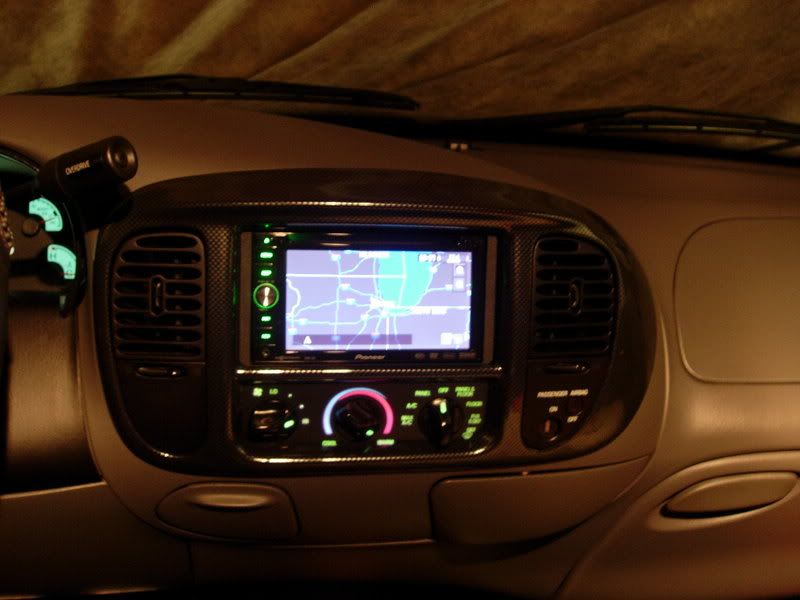
here is a pic of my D3 on the "night mode" it changes when the dash lights are on.


pioneerd3007.jpg

Posted Mar 16, 2008 · 20:17 UTC#9

Just replaced by D1 with a D3 (some punk thief broke the D1). I do notice the night mode on the D3 is brighter than the D1 was. I wish it would be quite a bit dimmer.

Posted Mar 16, 2008 · 20:31 UTC#10

Then why don't you go in and adjust the dimmer settings?


Just replaced by D1 with a D3 (some punk thief broke the D1). I do notice the night mode on the D3 is brighter than the D1 was. I wish it would be quite a bit dimmer.
Posted Mar 16, 2008 · 22:43 UTC#11
Then why don't you go in and adjust the dimmer settings?


I already have the night mode dimmer as low as it will go (+1). Still seems kinda bright to me, I think it's cause i haven't had anything other than stock radio in there for 3 months, my eyes got used to the darkness. I usually put my dash dimmer down to middle too. For the long dark highway drives I turn the screen off sometimes.

Posted Mar 16, 2008 · 22:46 UTC#12

You can adjust the brightness and contrast as well