Search Archive

Noise on RCA lines, yeah I tried everything else....

By unityracing · Mar 17, 2008in Problems/Troubleshooting💬 24 posts👁️ 8,928 views
Posted Mar 17, 2008 · 19:26 UTC#1

Ok, so first off, I have an AVH-P6800DVD. As you know its very similar in design to the avic units.

When run off the high level outs (speaker wires) it sounds great.

When attached to the rca's I get alt/engine whine bad.

Checked all grounds, good.

Regrounded everything, to the battery, then a common point for all items, then to just different bare metal places.

Tried the ground the rca shield trick, no go.

Even tried hooking the head unit up to a different car for power, still not good.

Also all of this was done with all pioneer accessories disconnected from the head unit to eliminate them as a problem.

Also tried ground loop isolators and no help there.

Sound goes away when the rcas are disconnected from the head unit (OR) from the amps.

I've read on here (searched for the last 3 hours) about an rca fuse ???

Never heard of one on any device with rcas.

I'm thinking maybe bad caps in the power supply of the head unit ??


HELP! I want to resolve this so I can sell it and get a d3/z1/z2 for my new ride. The p6800dvd doesn't have external remote jacks that I need for my steering wheel controls :(

Used to be a local installer but im stumped!


FWIW - the current setup :

97 eclipse gst spyder

avh-p6800dvd

avg-vdp1

i pod adapter

gex-p920xm

diamond audio d3400.4

diamond audio d3600.1

Posted Mar 18, 2008 · 21:20 UTC#2

I have a D3 with basically the same problem on my Lexus LX450. For mine, though, the alternator whine is reduced almost completely if the chassis of the stereo is not in contact with the vehicle metal...wierd stuff. Let me know if you have any luck. I am thinking this "microfuse" may be the culpret as well.

Posted Apr 28, 2008 · 16:16 UTC#3
Ok, so first off, I have an AVH-P6800DVD. As you know its very similar in design to the avic units.

When run off the high level outs (speaker wires) it sounds great.

When attached to the rca's I get alt/engine whine bad.

Checked all grounds, good.

Regrounded everything, to the battery, then a common point for all items, then to just different bare metal places.

Tried the ground the rca shield trick, no go.

Even tried hooking the head unit up to a different car for power, still not good.

Also all of this was done with all pioneer accessories disconnected from the head unit to eliminate them as a problem.

Also tried ground loop isolators and no help there.

Sound goes away when the rcas are disconnected from the head unit (OR) from the amps.

I've read on here (searched for the last 3 hours) about an rca fuse ???

Never heard of one on any device with rcas.

I'm thinking maybe bad caps in the power supply of the head unit ??


HELP! I want to resolve this so I can sell it and get a d3/z1/z2 for my new ride. The p6800dvd doesn't have external remote jacks that I need for my steering wheel controls :(

Used to be a local installer but im stumped!


FWIW - the current setup :

97 eclipse gst spyder

avh-p6800dvd

avg-vdp1

i pod adapter

gex-p920xm

diamond audio d3400.4

diamond audio d3600.1


Have you been able to resolve this issue? You described my current situation with my Z2 perfectly!

Posted Apr 28, 2008 · 16:51 UTC#4

what kind of RCA's also where is the power wire next to rca or other side of vehicle???

Posted Apr 29, 2008 · 15:06 UTC#5
what kind of RCA's also where is the power wire next to rca or other side of vehicle???


In my case, I have tried 2 different sets of RCAs (both Monster cable).


My power wire from the battery is run along the driver's side of the vehicle in the channel under the door sills.


My RCAs, XM IP-Bus cable & amp remote turn on wire are routed along the passenger side of the car under the door sills.

Posted Apr 29, 2008 · 15:27 UTC#6

Not that it would cause much if any interference, but I always run my turn on lead on the same side as the power wire. Because it's got an electrical current running through it I don't want it anywhere near the RCA's.


If you have an mp3 player or portable CD player or something that has RCA outputs on it you can hook it to the inputs on the amplifier and see if the noise is still there using an alternate audio source.

Posted May 02, 2008 · 16:29 UTC#7

I have the exact problem with my D3. I too have tried everything, and I too get no whine when not using the RCA's. I have tried two different amps, lots of RCA's speaker wire, ground locations, etc. When my amp is hooked up to the factory speakers, but the RCA is not connected, there is no whine. As soon as the RCA is connected and it is started back up, it whines like crazy.


Even when it is not in the dash (held in my hand) so the chassis is not touching metal so that cannot be it. I tried isolators, ground wires on the RCA's, EVERYTHING.

Posted May 02, 2008 · 17:00 UTC#8

Go to Best Buy, buy the Peripheal ISVE-61 4 channel line out converter, use that off the high level speaker outputs, turn the gains to 1/4, then rca plugs on the output side going to the 4 channel amp.

Problem solved.

Use this converter, not a cheap one online. You could also use two ground loop isolators, but it will kill your midrange.

Posted May 02, 2008 · 19:18 UTC#9

I thought about a LOC the other night... If that worked and there was no noise, it would prove a problem on the HU and I would think Pioneer would cover that under warranty... I will return the GLI I bought and get a LOC and try that.

Posted May 03, 2008 · 15:59 UTC#10

Just wanted to let you guys know, I tried the LOC last night and it works now without any whine. :roll:

Posted May 03, 2008 · 21:14 UTC#11

What if you're only trying to power a sub?


I'm using the speaker outputs from the Z2 to power the door speakers...and am only trying to use the subwoofer output RCAs to power my subwoofer's amp.


Is there a solution for me?


Thanks.

Posted May 04, 2008 · 15:57 UTC#12

I had mine like that for a while... I just turned on the LPF on my sub amp, besides, my sub won't play that high pitched sound.

Posted Jun 05, 2008 · 14:53 UTC#14

I bought the RCA inserts, grounded them, and ran my subwoofer RCAs through them before going to the amp.


The whining noise increased exponentially.


Does this mean that my engine whine/noise is being introduced from the chassis? What do I look for?

Posted Jun 05, 2008 · 14:59 UTC#15

WTF are RCA inserts???

Posted Jun 05, 2008 · 15:09 UTC#16

http://cgi.ebay.com/NEW-Petra-Keystone-Insert-RCA-Jack-A-V-Connector_W0QQitemZ150252949296QQihZ005QQcategoryZ61395QQssPageNameZWDVWQQrdZ1QQcmdZViewItem


I removed the connector from the wall plate insert, slid a ring terminal on the back, secured it with a nut, grounded it, plugged my RCAs from the HU into one side, and ran a set of RCAs from the other side of the connector to the amp.


This is not original with me. I found it in the link someone posted above.[/url]

Posted Jun 05, 2008 · 15:11 UTC#17

Which end of the RCA cable(s) are those installed and graounded? They should be on the head unit end, not the AMP end, and they should be grounded to the chassis of the radio not to a grounding point on the car.

Posted Jun 05, 2008 · 15:15 UTC#18

I installed it in the trunk (the amp end) and grounded to the chassis.


I will implement your suggestions this afternoon.


Thanks, and I'll update this thread this evening.

Posted Jun 05, 2008 · 15:45 UTC#19

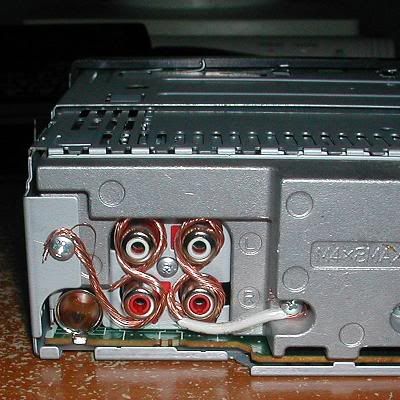
Yep. Just wrap a wire around those inserts and attach the ends of the wire to one or two of the screws on the back of the D3, kind of like in this picture. Then just plug the D3's RCA outputs in one end and the RCA cables in the other end.


PioneerFix.jpg

Posted Jun 05, 2008 · 21:44 UTC#20

This is a super common issue with Pioneer head units. 98% of the time it is related to a bad ground for the amp. When you hook RCAs up it damages the ground trace inside the unit. The other 2% of the time it was bad from the factory. It is something Pioneer warranty will cover. If you want to be without the unit for a while. Otherwise grounding the RCA at the RADIO will fix it.

Posted Jun 05, 2008 · 23:09 UTC#21

There's a design flaw with Pioneer products when it comes to noise issues.I have the Pioneer Premier KEH-M780 that I bought brand new in the late 80's or early 90's.I installed it with the Pioneer EQ-7000 and 12 disk cd changer.It was a straight forward install but I didn't get any sound.I checked and checked and rechecked still no sound so I figured it was the head unit because my EQ didn't display any band bars.So i'm pissed I ran back to the shop that sold me the unit, they took it out and grounded all of the Rca's to the chassis of the unit and the sound popped on.They said Pioneer for some unknown reason had to be grounded that way.I still had alternator whine,it wasn't too bad.When the car was parked the sound was crystal clear.You live and you learn.

Posted Jun 06, 2008 · 17:10 UTC#22

I moved the RCA ground to the HU chassis last night and that seemed to fix most of it. There is still a very slight whine that can be heard when the HU volume is turned down, but much more tolerable now.


I guess I need to send my HU in for repair to fix the real problem.


Thanks.

Posted Jun 06, 2008 · 17:40 UTC#23

Yeah, even with my RCA's grounded I get a small bit of whine from my speakers, but I can only hear it when the volume is all the way down, which is almost never.

Posted Mar 22, 2009 · 21:32 UTC#24
Yep. Just wrap a wire around those inserts and attach the ends of the wire to one or two of the screws on the back of the D3, kind of like in this picture. Then just plug the D3's RCA outputs in one end and the RCA cables in the other end.


PioneerFix.jpg


THANK YOU GUYS soooo much. :mrgreen::mrgreen:


I have an AVIC-Z2 and a while back I arced the 12v and ground cables accidentally while installing a PAC module. Ever since then I had this awful whine. I tried everything suggested on other sites to no avail. Once I tried this the whine when away COMPLETELY. This was a $0, 15 minute fix as opposed to paying $100+ to pay a guy to try and fix the internal ground loop.