I downloaded some music videos off lime wire..How do you burn them to work in the D3??
Posted Apr 21, 2008 · 23:33 UTC#1
I downloaded some music videos off lime wire..How do you burn them to work in the D3??
Ahead Nero
Convert them to divx and burn them to a disk.
I'd use Nero Vision. It's part of Nero 7, and I think it's the best way to do it. It lets you create menus, background music for the menus, and custom background pictures.
It also will determine the best quality for the number of music video's you have, and will warn you when the quality diminishes after you've added so many videos.
I've used DivX converters before, and the upside is you can get more video's on one disc, but if they are 4:3 videos and not wide screen, you can't get the videos to fill the whole screen.
Good luck.
Thanks for everyones help. But I'm a little slow with computers  But I do have Nero 8 I belive. How do you convert them to divx? Thanks again for your help.
Anyone???...
go to download.com and search for a divx converter.
Ok thanks I will try it.
Ok like I said I'm pretty supid with computers..Do I have to have a DVD CD to burn or can it just be a CD-R?
You can burn divx files on them and they will play on the D3. But you will only be able to put about 15% of the info on a CD that you would be able to put on a DVD. But I guess if you only have a CD burner and not a DVD burner you have no choice.
Use Ahead Nero and use Nero Vision, with this software it's convert all avi-mpeg divx... and some another popular video to a DVD format ( in setting choose DVD ) well after that you can create a beaufitull menu .... with previews of your videos .... and music ... animated menus ... also they can convert 4:3 to 16:9 to your avic screen and after when all completed the convert all your job to a DVD disc .. enjoy it !!
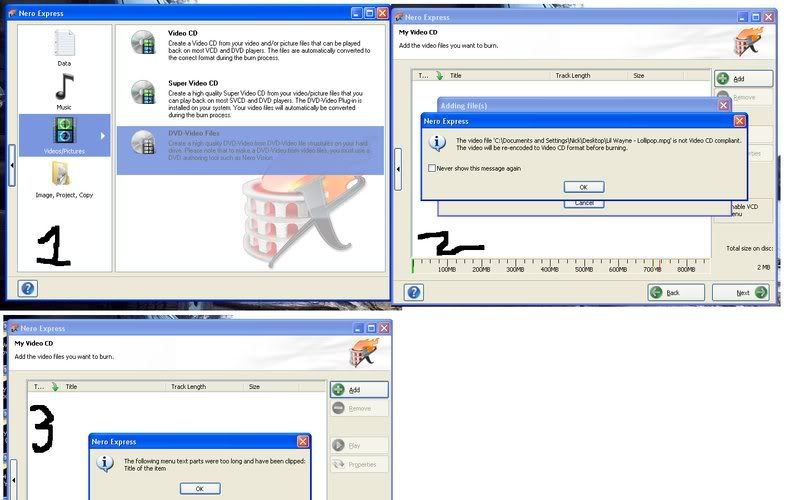
Ok bear with me please  ..I used Nero Starsmart it's called I see the cool meun thing you can put on to your disk..but once I put videos I want in to burn, witch is like 5-6 music videos ( little over 3mins long each)..It still doent pick up on the disk in my D3 same with my PS2 like I never burnt anything on it here are some picture that I have no idea of what it's asking me but I just hit ok maybe you can help me out?? Witch one do I click on Video CD, or Super Video CD?
Use Ahead Nero and use Nero Vision, with this software it's convert all avi-mpeg divx... and some another popular video to a DVD format ( in setting choose DVD ) well after that you can create a beaufitull menu .... with previews of your videos .... and music ... animated menus ... also they can convert 4:3 to 16:9 to your avic screen and after when all completed the convert all your job to a DVD disc .. enjoy it !!
That's assuming you have a drive capable of burning DVD-R's... That won't work with a CD-R.
Ok bear with me please
If you are using a CD-R, you have to use that first option (Video CD) not the third one (DVD video).
yeah it was just high lighted I tryed using the first one..I have a HP CD writer plus for my buner if that helps??
Any help for this jackass guys? hehe
Buy a DVD burner. You can get one for under $30 from newegg.com.
Edit: http://www.newegg.com/Product/Product.aspx?Item=N82E16827129018
Buy a DVD burner. You can get one for under $30 from newegg.com.
HiFiSi..Thanks for all your help!