Search Archive

MioMap install (SD card) on AVIC-S1

By sthomson1 · Apr 23, 2008in AVIC-S1💬 19 posts👁️ 18,941 views
Posted Apr 23, 2008 · 12:11 UTC#1

Download this unlocker, copy contents to the root of your SD card. Power on the AVIC-S1...then select Yes to All when asked.

http://benji46.free.fr/GPS/WinCE%20Unlocker%20V3.rar


download the following Miomap software and copy all the contents to your SD card :

http://www.mininova.org/tor/773165


Copy the maps into the MAPS folder :


maps - http://www.mininova.org/search/?search=miomap+220


Now, use the windows CE explorer to navigate to your storage card and run MNAVDCE


Contents of SD card :
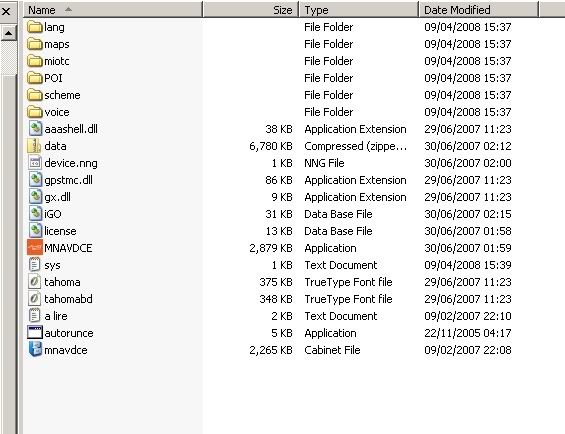
Image1.jpg


EASY !

Posted Apr 23, 2008 · 20:23 UTC#2

Can u receive the signal after u install everything??

Posted Apr 23, 2008 · 20:39 UTC#3

ooops, good point.

change the baud rate to 4800 in the sys.txt file


If you dont do this, miomap wont pick up a GPS signal. red light.

Posted May 29, 2008 · 18:46 UTC#4

When trying to run the mnavdce.exe file, I get a message that it's not a 32 bit application. Am I doing wrong?

Posted May 30, 2008 · 01:44 UTC#5

U have to run it on your GPS not on your PC

Posted May 30, 2008 · 02:08 UTC#6

Question? once I put the unlocker files on the sd card, should the GPS automatically boot from the card?

Posted Jul 05, 2008 · 02:08 UTC#7

I have had the mio map loaded on my s1 for more than 3 months now, but today when i powered it on, there was a red exclamation mark next to the satellite. I dont have signal, I know when my baud rate was wrong the satellite showed up in red , but i dont understand what the red exclamation mark is.Has anyone had this problem ?

Posted Aug 22, 2008 · 01:25 UTC#8

Hi. I am using Miomaps using the instructions in this thread. The program works great. Thanks to all who have explained in detail how to set it up and get it working. Only problem is I can't save any favorites (besides Home and Work). Does anyone have a solution to this limitation??? Thanks.

Posted Aug 24, 2008 · 12:43 UTC#9

Found the information I needed here:

http://mio.digiwalker.googlepages.com/pois

You can save your own favorites as a POI while in Map view. I was trying to save them while in Cockpit view and it wouldn't work. That is why I got confused. Now I know how to do it.

Posted Aug 31, 2008 · 14:25 UTC#10

Can i install mio maps on another sd card and switch back and forth when the better half uses the gps?

Posted Sep 01, 2008 · 13:41 UTC#11

Yes you can. In fact, that's exactly what I'm doing and it's working just fine for me. You have to do a hard reset (switch on the back) everytime you want to switch from the Pioneer software to Miomap, but no data is ever lost.

Posted Sep 22, 2008 · 15:05 UTC#12

Everything you posted works great, thanks! I'm unable to use any USA maps Any chance you have the hack to load these up! I tried running a hacked miomaps from another source and was not so lucky. Thank you.

Posted Sep 23, 2008 · 20:15 UTC#13

^ Are you putting the maps in the MAPS folder in the root of the SD card?

Posted Sep 24, 2008 · 01:09 UTC#14

Yes. If I put a map of any State in the US into the Maps directory, I receive the message "some of the map files are outdated, Please visit www.mio-tech.com. I hit OK, then I get a fatal error and the mnavdce.exe program crashes and the avic-s1 reboots. I removed the US map and added a map of the Netherlands to the Maps directory, and it works fine. I thought from reading the different discussion groups that the software is locked for different countries and won't allow you to use maps from other countries. I was hoping that someone new how to unlock the maps for this distribution.

Cheers. Bill

Posted Sep 24, 2008 · 23:21 UTC#15

You need to make sure the mio.exe, data.zip and License files are compatible with the map you are trying to use. I would try a different version of the map or replace the able files with one that is compatible to the map you have. What version map and Mio.exe are you running?

Posted Nov 14, 2008 · 22:07 UTC#16

would someone be so kind to post the original avic-s1 mnavdce.exe file located in My Flash disk>Navigation> mine was corrupted and now i got "fatal error" loading mnavdce.exe when i try to boot the pioneer firmware.

Thanks

Posted Nov 15, 2008 · 16:56 UTC#17

Check your pm box

Posted Nov 21, 2008 · 22:25 UTC#18

I was kinda pumped about doing this to my S1 and but it seems the Map file has 'disappeared' from the Torrent site.


Can anyone help me find this? I would really appreciate it!


regards,


B

Posted Nov 22, 2008 · 21:29 UTC#19
I was kinda pumped about doing this to my S1 and but it seems the Map file has 'disappeared' from the Torrent site.


Can anyone help me find this? I would really appreciate it!


regards,


B


write to me: [email protected]