Is it okay to place the GPS and the SIRIUS next to each other.?
I have them placed this way but I'm not sure if it's interfering with my SIRIUS signal? SIRIUS seems to have more signal dropouts than I like.
Is it okay to place the GPS and the SIRIUS next to each other.?
I have them placed this way but I'm not sure if it's interfering with my SIRIUS signal? SIRIUS seems to have more signal dropouts than I like.
It shouldn't matter as they are both receive only; no transmitting involved. I used to have problems with Sirius dropping out; turns out some of their antennas are crap to begin with; try and find an older one or a known working one and see if this helps at all.
Also make sure your antenna has a clear view of the sky with no metal even partly obscuring it. That included metal foil tints should your antenna be inside of the vehicle.
Whippers ok?
Im sorry Im not sure what you mean by whipper
I think he means wipers.
I wish somone would make a multi-band antenna so one antenna could be shared for both the NAV and the SAT..
make your own but really is there a need for it
You would have to have some sort of a splitter to go from one to the other, granted im not sure if the antennas are identical like it would be for a fm antenna.
/that would be nice, it is really kind of weird that you need two seperate antennas for sat reception. But yeah one goes to the sat receiver and the other to the head unit for gps.
GPS and satellite radio use different frequencies (otherwise there would be interference), so the antennas are tuned to different frequencies.
You could combine both antennas in one slightly larger housing though.
Just to let you know, from my own recent install, you'll want to space the antennas away from each other.
I am using XM, but the principle is the same. I had them both placed under the dash just beneath the dash skin, originally I had them next to each other on a the metal pad, and while my gps came in fine, the XM wouldn't just couldn't get a reliable signal.
I moved them away from each other, still under the dash skin about 14" and now I'm getting perfect signal on both. As a note: there is no metal above where I mounted them both... but the signal I'm getting seems as stable as when I test mounted the XM antenna on the roof of the car, so the problem was definitely that they were just too close to each other. I'd have to assume the GPS antenna was "stealing," for lack of a better word, and just absorbing too much of the XM signal when they were next to each other.
Just to let you know, from my own recent install, you'll want to space the antennas away from each other.
I am using XM, but the principle is the same. I had them both placed under the dash just beneath the dash skin, originally I had them next to each other on a the metal pad, and while my gps came in fine, the XM wouldn't just couldn't get a reliable signal.
I moved them away from each other, still under the dash skin about 14" and now I'm getting perfect signal on both. As a note: there is no metal above where I mounted them both... but the signal I'm getting seems as stable as when I test mounted the XM antenna on the roof of the car, so the problem was definitely that they were just too close to each other. I'd have to assume the GPS antenna was "stealing," for lack of a better word, and just absorbing too much of the XM signal when they were next to each other.
I don't agree with that statement. That is like saying having two fm antennas next to each other is "stealing" the signal" its just not possible. I have the XM and the sat nav antennas right next to each other touching in the back window. Zero problems with signal strength on either, unless of course the sky is being blocked by a tree or building. Unless you actually placed on on top of each other, thereby blocking it from the signal, odds are something was under the dash in that particular spot or something.
Too many variables but saying two of the antennas right next to each other "steals" the signal just sounds silly. Like one acts like a black hole or something.
Just to let you know, from my own recent install, you'll want to space the antennas away from each other.
I am using XM, but the principle is the same. I had them both placed under the dash just beneath the dash skin, originally I had them next to each other on a the metal pad, and while my gps came in fine, the XM wouldn't just couldn't get a reliable signal.
I moved them away from each other, still under the dash skin about 14" and now I'm getting perfect signal on both. As a note: there is no metal above where I mounted them both... but the signal I'm getting seems as stable as when I test mounted the XM antenna on the roof of the car, so the problem was definitely that they were just too close to each other. I'd have to assume the GPS antenna was "stealing," for lack of a better word, and just absorbing too much of the XM signal when they were next to each other.
I don't agree with that statement. That is like saying having two fm antennas next to each other is "stealing" the signal" its just not possible. I have the XM and the sat nav antennas right next to each other touching in the back window. Zero problems with signal strength on either, unless of course the sky is being blocked by a tree or building. Unless you actually placed on on top of each other, thereby blocking it from the signal, odds are something was under the dash in that particular spot or something.
Too many variables but saying two of the antennas right next to each other "steals" the signal just sounds silly. Like one acts like a black hole or something.
I agree completely... however the install I just finished speaks the contrary. Perhaps your area just has much stronger overall signal so you can get away with it moreso than I can. I live in a heavily wooded area. And this suggestion was almost made to me by another who encountered the exact same issue, so it wasn't even something I, like you, could have thought could be a problem, but apparently it can be.
This was just my recent personal experience with the install. One thing I will say in defense though is that the instructions for mounting typically requires you to mount any satellite antenna about 6" away from anything other than metal when mounting on the roof. Now most of us don't do that, but the simple fact is that the adhesive metal pad, or your roof, is meant to server as the dish to concentrate the signal back into the antenna. So it is possible, and as I encountered personally, an issue for some people if the antennas are too close together that the gathered signal just isn't strong enough if you are in a weak enough area to begin with.
They're affixed using magnets. Their proximity brings them within each other's magnetic field. Inside the casing, the antenna is sitting on a "rubberish" pad (I say rubberish because I don't know exactly what it's made of). The pad protects it's circuits from it's own magnets, and probably doubles as a shock mount. Though only weighing a few grams, there's not that much shock to absorb. When side by side touching, it may not have that much effect. But a small gap may "leak" magnetic field up over the top, hindering an antenna's effectiveness. A GPS antenna uses a constant signal to triangulate itself; not much data. The SAT Radio antenna receives continuously flowing, and changing information. A slight wavering in signal strength may be more noticeable on the SAT antenna.
OR... its JFM.
I wish somone would make a multi-band antenna so one antenna could be shared for both the NAV and the SAT.
Possible, but not effective. It wouldn't be able to receive both signals at once. A sync gate would have to switch between the two as needed, interupting one signal for the other.
But, like Skicrave said, you can combine the two into one housing. As long as the two circuitries are magnetically insulated together.
Just to let you know, from my own recent install, you'll want to space the antennas away from each other.
I am using XM, but the principle is the same. I had them both placed under the dash just beneath the dash skin, originally I had them next to each other on a the metal pad, and while my gps came in fine, the XM wouldn't just couldn't get a reliable signal.
I moved them away from each other, still under the dash skin about 14" and now I'm getting perfect signal on both. As a note: there is no metal above where I mounted them both... but the signal I'm getting seems as stable as when I test mounted the XM antenna on the roof of the car, so the problem was definitely that they were just too close to each other. I'd have to assume the GPS antenna was "stealing," for lack of a better word, and just absorbing too much of the XM signal when they were next to each other.
I don't agree with that statement. That is like saying having two fm antennas next to each other is "stealing" the signal" its just not possible. I have the XM and the sat nav antennas right next to each other touching in the back window. Zero problems with signal strength on either, unless of course the sky is being blocked by a tree or building. Unless you actually placed on on top of each other, thereby blocking it from the signal, odds are something was under the dash in that particular spot or something.
Too many variables but saying two of the antennas right next to each other "steals" the signal just sounds silly. Like one acts like a black hole or something.
maybe you've got a different type of GPS antenna than i have , but the one i have (the one included with AVIC-80dvd) contains active circuitry , and that means it is quite capable of causing interference to nearby antennas .
I am having this issue now. XM is dropping out. REal bad. The 2 antennas are mounted under my dash next to each other I believe. I did not do the install. I have 700bt.
Nav works fine with no drop out. XM drops out every few minutes... unacceptable.
I have a Honda 2008 CRV LX.
Do you recommend I tell the installer to mount the XM antenna on my roof now???
Or just separate them more under my dash.?
I too have both a GPS antenna as well as the XM one. In the installation instructions for the GEX-P920XM tuner, is specifically states:
"In order to prevent interference, set the following items as far as possible from this unit, its cables or leads
- TV antenna and antenna lead
- FM, AM antenna and its lead
- GPS antenna and its lead
In addition, route each antenna lead as far as possible from other antenna leads. Do not bind them together, lay or route them together or cross them over each other."
Take this with as large a grain of salt as you wish since other folks have probably done any or all of the above and will have any number of failure/success stories, but just thought I'd add what I had read.
Personally, I have my XM antenna on the driver's side of the dash, and the GPS antenna on the passenger's side. Pretty decent reception on both, though not perfect by any means.
YMMV
-Kev
I am having this issue now. XM is dropping out. REal bad. The 2 antennas are mounted under my dash next to each other I believe. I did not do the install. I have 700bt.
Nav works fine with no drop out. XM drops out every few minutes... unacceptable.
I have a Honda 2008 CRV LX.
Do you recommend I tell the installer to mount the XM antenna on my roof now???
Or just separate them more under my dash.?
I suggest you or your installer move the antenna to either outside your vehicle or along the back dash somewhere. You could cover it with matching carpet if it is too unsightly for you. This is how my install is done and I have no drop-outs unless my trunk is open.
As far as proximity of GPS and XM antennas, they are both set to recieve (no transmitting) and do so on different frequencies. The only thing that could possibly make either interfere with the other is the magnetic field of their base.. but I highly doubt this.
so i'm reading all of these comments about not getting the signal for the sat. radio or it drops in and out and that you are putting them under dash piece and such. Sat antenna should be mounted outside of the car, not inside. I'm pretty sure it says it rate in the install manuals and i know it say's it in the mecp certification book.
so i'm reading all of these comments about not getting the signal for the sat. radio or it drops in and out and that you are putting them under dash piece and such. Sat antenna should be mounted outside of the car, not inside. I'm pretty sure it says it rate in the install manuals and i know it say's it in the mecp certification book.
we know that 
some of us don't like those unsightly warts stuck to the outside of our vehicles since they don't match and they are prone to the weather (dry rotting) and vandalism.
Can someone suggest where the XM atenna should go on outside of my car. Right next to the anteanna shown here??? It is Honda CRV.
Terron suggested back dash. I don't think I have one -- no...
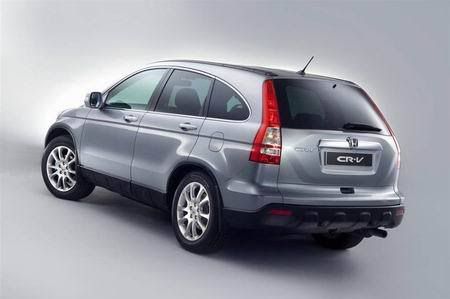
Can someone suggest where the XM atenna should go on outside of my car. Right next to the anteanna shown here??? It is Honda CRV.
Terron suggested back dash. I don't think I have one -- no...
lol good point
_anywhere_ on the outside is ok. As long as you don't have to cut the cord and it reaches without putting a strain on the cord, it is totally acceptable.