Search Archive

BLACKBERRY AND F-SERIES BLUETOOTH

By cgreen · Aug 08, 2008in General💬 15 posts👁️ 2,021 views
Posted Aug 08, 2008 · 17:54 UTC#1

The main reson I got this unit was because it was supposed to be sexy and functional.


Sexy it is... Functional it ain't :cry:


I have a BB 8100 and a F90. I am having many issues using the phone feature.


Am I the only one or is there a bunch of us in the same boat?


1. Phone doesn't always want to connect to the unit.

2. No dialpad on the screen AFTER a call is made (while speaking)

3. Contacts with multiple numbers (home, cell, office) become multiple contacts with the same name! This means that if I use the voice recognition for calling contacts - I don't have the choice to choose home or cell, or ... .

4. Volume cuts in and out - not clear and crisp as I would have expected.


I purchased my unit only after the update was done - so the update was factory installed.


What else am I missing :?:

Posted Aug 08, 2008 · 18:08 UTC#3

Thx for guiding me.


I called Pioneer Electronics and the rep pretty much cleaned his hands with the issue. I am now waiting for a supervisor to call me back


I'm new to Pioneer - is support really this crappy?

Posted Aug 08, 2008 · 18:20 UTC#4

lol, yeah. It's pretty bad.


I guess that's why this web site exists.

Posted Aug 08, 2008 · 18:54 UTC#5

Same issues with my 8830. I've found something weird as well. I never put any of my 130 or so contacts in any "category" on the phone. At that point the navi would sometime take a while to connect, show "connection failed" for a few minutes and then it would connect for good, no problems.


I read one of the threads about correcting BB bluetooth problems and started putting all my contacts into either business or personal contacts as suggested. I've only made it through categorizing about 60 of them, but it doesn't connect any quicker and now the bluetooth disconnects from time to time for about 10 seconds. That never happened before.


So if you are having disconnecting problems, maybe try taking your contacts out of categories.

Posted Aug 08, 2008 · 19:09 UTC#6

Contacts are NOT in categories - and I still have connection issues as well as addressbook transfer issues...


Is this an AVIC issue or a BB issue?

Posted Aug 08, 2008 · 22:40 UTC#7

I have the 8830 as well. Same problems, doesn't matter if they are in categories or not, unit will connect and disconnect. I have never been able to get it to work right, so basically I can't use the bluetooth. If anyone has any new tricks, let me know.


:)

Posted Aug 09, 2008 · 21:31 UTC#8

Do you update your phone software? Just a thought, can't hurt. Try deleting your phone book on the AVIC and see if it disconnects.

Posted Aug 09, 2008 · 21:37 UTC#9

same problem here


My 8830 connected when I first installed the unit and I made 2 calls with no problems. Then I put my phone in its case and it said "disconnected" on the navi.


Since then I have not been able to get it to connect. It just keeps saying "connected" / "disconnected" over and over for almost 30 minutes.


I tried re-sync'ing I also reset my phone. No luck.


I just turned off the bluetooth on my phone because the box would keep popping up and it would also slow my navi down.


:(

Posted Aug 10, 2008 · 21:47 UTC#10

So I made a discovery today.


I was having same problem most BB owners are. The phone keeps connecting and disconnecting.


Well today I was changing the oil in my STi and I got in the car and started it up. I was playing with navi and all of a sudden the screen said my phone was connected.....????..... and it stayed connected.


I then though to myself... "where in the world is my phone?".


My phone was in the garage, which is almost 20' from the car.. So I grabbed my phone and walked back to the car ans sat down. Guess what it disconnected, connected, disconnected... grrrr :(


so I threw my phone in the backseat and it connected again with no problems. I am thinking that maybe if the phone is to close to the head unit maybe this is causing the problem.


Just an idea.

Posted Aug 11, 2008 · 03:42 UTC#11

HEY cpages2 - GREAT OBSERVATION!


I realized that as well. If I keep my BB away from the unit - it connects more smoothly (however not all of the times - only more often)


This unfortunately is unacceptable to me as I have a center console where I like to place my phone when I'm driving.


Going into the back seat to fish out my phone every time I leave the car would get me equally frustrated.


The unit has to be fixed - either by software or hardware (unit replacement) in order for me to feel I get what I paid for and expected to work like it should.


Wouldn't you agree?

Posted Aug 13, 2008 · 18:04 UTC#12

I put mine under the tire it connected really fast. LOL


On the serious side, I have the same problem with my BB pearl connecting when ever it wants. Also I get a very high pitched sound during calls. Almost sounds like radio wave interference.

Posted Aug 13, 2008 · 18:50 UTC#13

Hey - another hiccup :(


My volume buttons don't work properly - when I lower the volume it goes higher. Sometimes the buttons don't respond to touch.


Also the hangup button doesn't want to respond sometimes.


Anyone else getting these errors?


Is it software related or is the whole bluetooth part of the unit full of sh!t?

Posted Aug 13, 2008 · 21:36 UTC#14
Anyone else getting these errors?


Yes

Posted Aug 14, 2008 · 02:04 UTC#15

The issues with the proximity of the phone must be phone specific. I have my Motorola E815 mounted in a cradle within a few inches of my F700, and have ZERO issues with connectivity.


You can see how close it is in the reverse camera video I posted a while back. The phone cradle is mounted to that bracket on the right hand side.


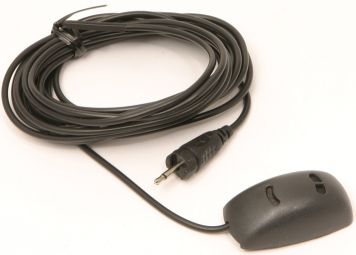
By the way, since the update, the bluetooth works fabulously! Audio quality is great on both ends of the conversation, although I'm NOT using the Pioneer mic. I thinks it's way too ugly, so I'm using a Nokia HFM-8 mic (see picture below). I have it mounted to the roof, just above my rearview mirror.


-Eric

post-19510-12872755045808_thumb.jpg