Search Archive

Bypass problem

By Progress · Aug 26, 2008in Hacks/Mods💬 24 posts👁️ 4,521 views
Posted Aug 26, 2008 · 20:49 UTC#1

I recently had a D2 installed. The parking brake bypass worked. Meaning that the car thinks the parking brake is activated although it is not.


However, once the car is put in motion, all the Nav options go grey, or whatever it is; they are useless.


Does this mean that the unit senses its in motion and stops those options?


The shop is under the impression that because I got the unit online, it may have been upgraded and the bypass no longer works.


What's my problem?

Posted Aug 27, 2008 · 11:25 UTC#2

Okay, so I did some research on this site. I was surprised to think that the shop that did the install did this incorrectly or incompletely as they had installed two prior navis in my car with the bypass (N1 and D1 - both eventually stolen). Anyway, I'm under the impression after reading this threads: that they didn't ground the empty plug. So I'm going to try to do this myself and I'm scared since I'm afraid I won't be able to put this thing back together properly or mess something up while doing it.


But is all I have to do is buy a piece of wire from Radio Shack or something and then strip the end and plug it into the open hole and strip the other end and put them under a screw or something? I mean how do I ground that exactly? Also, I read that you can take another wire or something instead of getting any wire but I'm afraid I'll pick the wrong wire or something.

Posted Aug 27, 2008 · 12:30 UTC#3
But is all I have to do is buy a piece of wire from Radio Shack or something and then strip the end and plug it into the open hole and strip the other end and put them under a screw or something? I mean how do I ground that exactly? Also, I read that you can take another wire or something instead of getting any wire but I'm afraid I'll pick the wrong wire or something.


You can use any wire on any of the 3 harnesses, as long as you're not using it. If you don't have an aftermarket blueooth unit, find the black and yellow wire on connector 1. And removing it is fairly easy, you simply list the plastic tab holding the wire in with a small sharp object (i use a pocket knife) and you push it in the new spot. then ground.

Posted Aug 27, 2008 · 14:09 UTC#4

Okay thanks. I am not using any bluetooth. So, will this wire be not connecting to anything currently and I take the end that is in a hole and move it to the empty slot and then take the opposite end and do what with it? Like what exactly does it mean to ground it? Do I wrap it around a screw and then tighten the screw? Where is the screw? Is it one of the ones in the bracket that is holding up the HU?

Posted Aug 27, 2008 · 14:13 UTC#5

grounding is tapping into a negative wire or tapping into bare metal. All you have to do is move the wire to the new spot and then take that wire and the parking brake wire, and tap into the black ground wire on the main harness.

Posted Aug 27, 2008 · 14:28 UTC#6
grounding is tapping into a negative wire or tapping into bare metal. All you have to do is move the wire to the new spot and then take that wire and the parking brake wire, and tap into the black ground wire on the main harness.


Okay cool. Now I don't even know which harness is which. I don't know which is the main one. They clearly did the e-brake ground since it says that it's on and the options are available even when the brake is off, while the car is not in motion. So, they must have tapped the e-brake wire into the black ground wire. So I just find that black ground wire and tap the "new wire" into that black ground wire?


So all I need is to get some quick tap things?

Posted Aug 27, 2008 · 14:33 UTC#7

Bingo.

Posted Aug 28, 2008 · 02:38 UTC#8

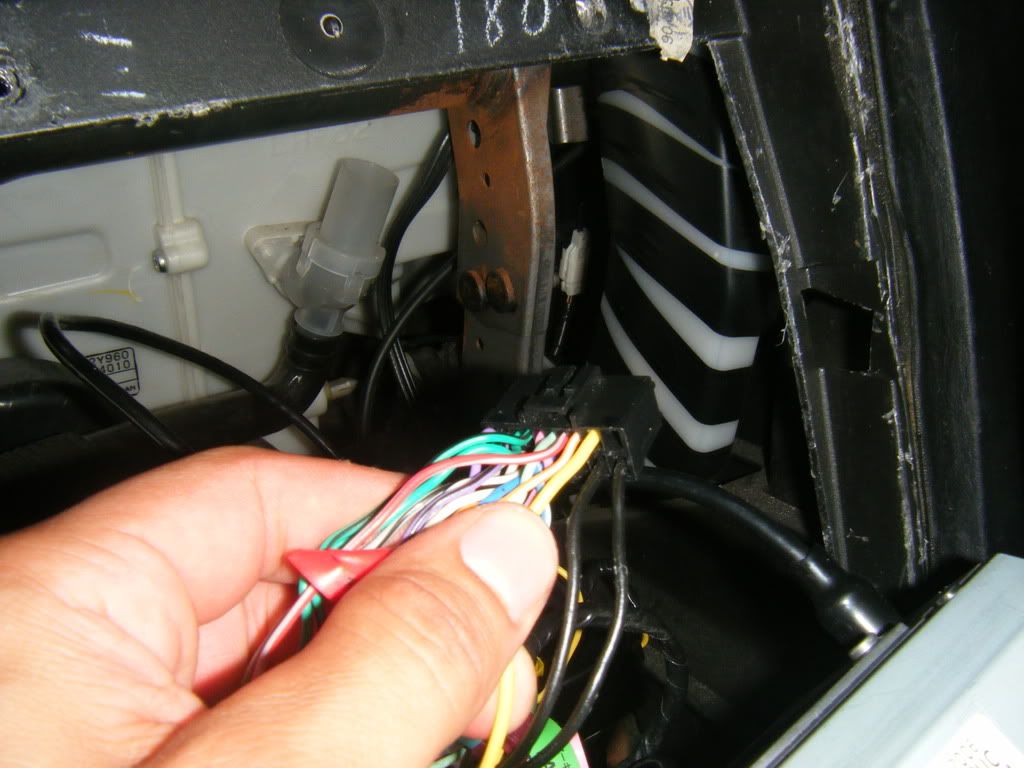
Okay, I got to the point where I was going to tap the one wire into the ground wire but what I see in the main harness are TWO black wires. Both are large and one on top of the other. They both go together with the battery wire into some black box thing.


Which black wire do I splice the "new" wire into?

Posted Aug 28, 2008 · 03:04 UTC#9

2 black wires coming from the HU? that's odd. There should only be one coming from the main harness of the HU.

Posted Aug 28, 2008 · 03:42 UTC#10

I'll take a picture to show you.


Compare to this picture:


avic_d2_harness_bypass_251.jpg


Where I'm assuming the "place wire here" hole is directly above the ground wire? Is that right? So that you plug the wire into the empty slot and then splice to the wire DIRECTLY below it as that is ground.


In my harness the wire DIRECTLY next to that black wire is also black. That's not normal?

Posted Aug 28, 2008 · 03:53 UTC#13
http://avic411.com/forum/viewtopic.php?t=7998&highlight=bypass


I know it says D3 but it;s the same method used for the D2


I can't see where the parking brake line is directly grounded to the black wire. But I know that when the car is NOT in motion and the parking brake is OFF, it will read that it is on. So that makes me think the parking brake is taken care of.


Should I just chance it and splice the "new" wire into the big black wire that's underneath it and hope that it works?

Posted Aug 28, 2008 · 03:55 UTC#14

Then just splice the mute wire to the parking wire, since we know it's grounded.

Posted Aug 28, 2008 · 04:22 UTC#15

Okay, I pulled a spare "mute" wire from another pioneer harness that I had. I cut the end off and spliced it to the parking brake wire and plugged the other end into the open hole but that did not fix it. At a crawl the car did not detect movement but after I hate about 5-10 MPH, the options became unavailable again.


I'm at a loss now.

Posted Aug 28, 2008 · 04:35 UTC#16

Then you either put it in the wrong slot or its not properly secured.. the new location is one of the end slots on connector 2 I believe

Posted Aug 28, 2008 · 04:57 UTC#17

In a normal bypass, am I correct in saying that this parking brake wire would just ground to the ground wire along with the mute wire in the open hole.


I mean I really don't know what I should do now. The "mute" wire is now in the new hole and spliced to the parking brake. I have no idea which is the ground wire, nor do I know where it goes.

Posted Aug 28, 2008 · 05:01 UTC#18
Then you either put it in the wrong slot or its not properly secured.. the new location is one of the end slots on connector 2 I believe


That first picture that I posted with the diagram that someone else posted in a how-to, is where I plugged it in. It made sold contact and "clicked" in there and won't come out with ease. The splice is directly into the parking brake line which I said in the post above goes somewhere I don't know. If it's to ground then I don't know where ground is.


I feel like the shop made things more complicated than they had to be and now I don't know what to do.

Posted Aug 28, 2008 · 05:03 UTC#19
Then you either put it in the wrong slot or its not properly secured.. the new location is one of the end slots on connector 2 I believe


That picture shows it as connector one.


Thank you for your help, BTW.

Posted Aug 28, 2008 · 12:20 UTC#20

No problem, man. I'm just tyring to get on the same page as you so that there's no confusion.


Lemme just ask you..how many harnesses did your D2 come with (not including the wiring harness to connect to the vehicle)..It should be 1 Main harness which is the big black one, then 2 small white connector harnesses, one with all the RCA's and one more with other wires. Because that first picture you posted in the actual thread is the MAIN harness and that slot is not where you put the mute wire.

Posted Aug 29, 2008 · 23:48 UTC#21
No problem, man. I'm just tyring to get on the same page as you so that there's no confusion.


Lemme just ask you..how many harnesses did your D2 come with (not including the wiring harness to connect to the vehicle)..It should be 1 Main harness which is the big black one, then 2 small white connector harnesses, one with all the RCA's and one more with other wires. Because that first picture you posted in the actual thread is the MAIN harness and that slot is not where you put the mute wire.


Hey, man. Thanks again. I haven't responded in a while because I went on a trip to go white water rafting. Got knocked out of the boat. Almost died. Good times.


Anyway, that first picture is what screwed me then. It says specifically to put the wire there and ground, so that is what I did.


Which harness do I plug the mute wire into? Will I know? I'm guessing it's white and not black, right? Will it be the only one with one missing plug?

Posted Aug 30, 2008 · 00:37 UTC#22

Okay, I took a look at the back of the unit. The second connector (the A/V connector) is smaller and white. The wires are much closer together and taped up. The only two open plugs are on the left side (looking from the POV of the wires) second from the left and they are both open (top and bottom).


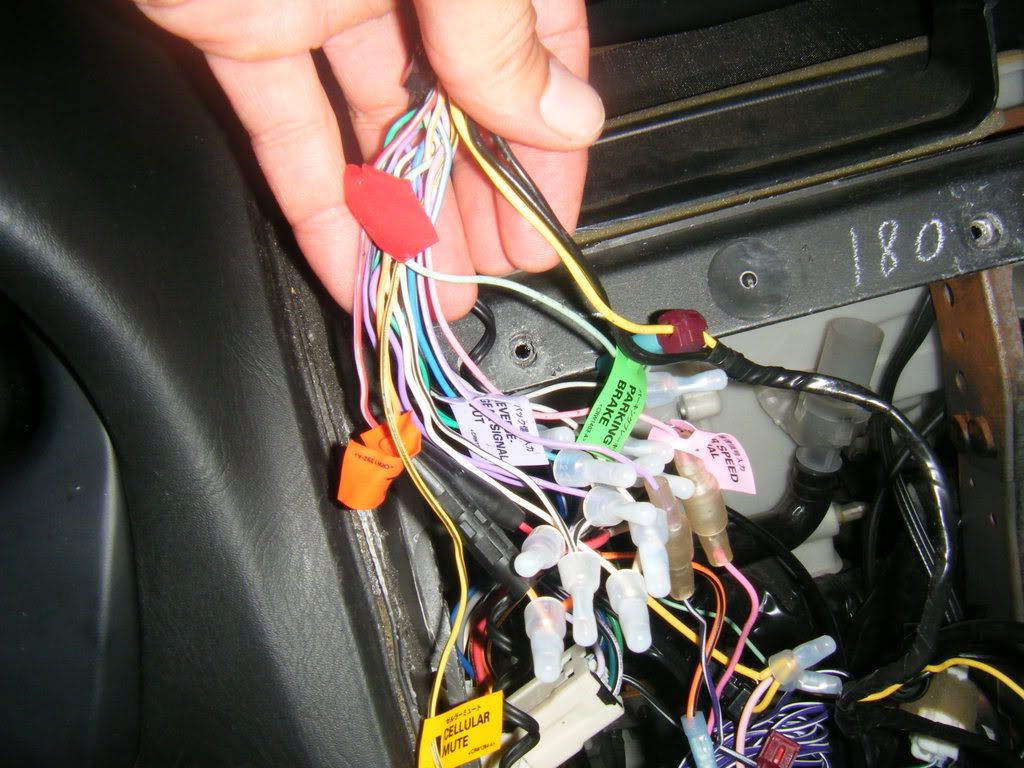
The original location of the mute wire (labeled "cellular mute") comes from the main harness. The hole on the right side of the harness that I plugged the spare wire into and grounded to the parking brake wire is in the main harness. I did this per the first picture. Is that first picture incorrect?. Isn't it for the D2? I mean that's what my harness looks like, not so much the one from the picture you posted since yours the mute wire comes from the second harness, not the main/black one.

Posted Aug 30, 2008 · 23:21 UTC#23

Just an update for everyone and especially for Catchme.


My car has two harnesses. One is the main one with everything. The other is simply A/V and the only hookup I have in that harness is for my iPod.


Anyway, I had moved the spare wire to the open whole and spliced it to the parking brake line which was grounded. This did not work.


So, instead, I cut the wire before the splice and connected it to a ground plug and actually grounded it to the car myself directly bolted to a piece of metal.

This finally fixed my problem and the bypass works now.

Posted Aug 31, 2008 · 02:18 UTC#24

good I'm glad to know that it works for you :D Enjoy!!