Search Archive

Custom Skin for VC Menu

By CatchMeIfYouCan631 · Aug 28, 2008in Hacks/Mods💬 25 posts👁️ 14,955 views
Posted Aug 28, 2008 · 00:41 UTC#1

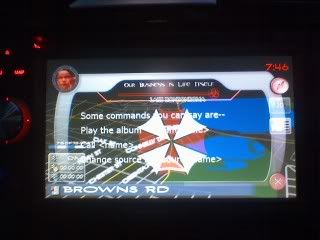
As I was looking through the Flash Disk today, I came across a folder titled "SKIN", and inside contained all the .bmp images to the Voice Command menu...of course, I couldn't resist...


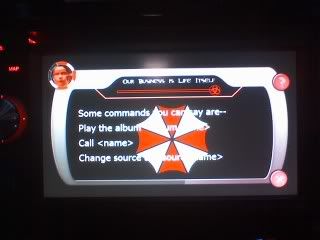
If you don't know already, I based the skin on the Umbrella Corporation from Resident Evil (Game and Movie) Everything still works as it should
VC.jpg


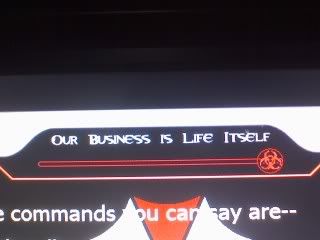
I got rid of the Voice Volume text and put in Umbrella's famous quote, made the rail red, and changed the slider to a biohazard symbol
BUSINESS.jpg


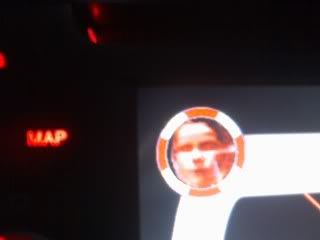
I took out that annoying blue Pac-Man and put in the Red Queen from the first Resident Evil Movie. It's as if she's talking with the TTS. and if you look closely, you'll notice i rotated the plates around the Red queen to be vertical rather than diagonal, and made them Red and White to symbolize the Umbrella Logo. Also they now progress clockwise.
REDQUEEN.jpg


And best of all...I did this all with MS Paint lol. If anyone is interested I'll make a HOW TO page to go along with Skicrave's tutorials.


PS: I'm an awesome photographer :lol:

sweeet.jpg

Posted Aug 28, 2008 · 00:56 UTC#2

Haha awesome! Yes "HOW-TO" this bad boy please!

Posted Aug 28, 2008 · 01:00 UTC#3

Neat!! :D

Posted Aug 28, 2008 · 01:12 UTC#4

You got it, tomorrow during work when I have time I will do it..

Posted Aug 28, 2008 · 01:32 UTC#5

This was the very first thing I thought about doing... It's just editing some BMP files, piece of cake! But then I remembered how little i use the voice commands and decided it wasn't worth the time.


But yeah, the Umbrella Corp. theme gave me a good laugh.

Posted Aug 28, 2008 · 04:09 UTC#6

Lol well I hope that was a "Haha Good Idea" laugh and not a "Haha that's so stupid".


But yes HiFi, it is easy, but it does have its challenging moments.

Posted Aug 30, 2008 · 03:19 UTC#7

I just wanted to make a simple skin, so i blacked out the buttons, and made a blinking "Listening" bmp and mazda slider. Now it matches the rest of what Ive got goin on. :D

post-20659-12872755279713_thumb.jpg

Posted Aug 30, 2008 · 03:42 UTC#8
You got it, tomorrow during work when I have time I will do it..


It appears that most do their 'work' while they are at work... HA!


BTW- I'm at work now...

Posted Aug 30, 2008 · 14:10 UTC#9
You got it, tomorrow during work when I have time I will do it..


It appears that most do their 'work' while they are at work... HA!


BTW- I'm at work now...


Lol well works been a little slow so I have time to write it out...which I know I haven't yet, because I'm trying to find all the info....IE yesterday I just found the pieces to the little menu that comes up and I want to find the script to erase the text


Indy if you wanna take a stab at the mini menu its in APL/image.res, use 7zip to extract it, and inside that folder it's under either AV or main, I forget at the moment.

Posted Aug 30, 2008 · 15:16 UTC#10

anyone know if there's a possibility to add a soft "sticky" button as a shortcut for the voice prompt? kindda similar to the abort route that Stephanie created?that would b awesome, i find it quite hard to deal with that big dial...

Posted Aug 30, 2008 · 15:18 UTC#11
anyone know if there's a possibility to add a soft "sticky" button as a shortcut for the voice prompt? kindda similar to the abort route that Stephanie created?that would b awesome, i find it quite hard to deal with that big dial...


of course there is, its just a matter of find the script for it and copying it to a button

Posted Oct 29, 2008 · 06:03 UTC#12

This might be a retarded question but how are you guys opening up your image.res file. After I extract it I have to manually select a program to open it which doesnt make sense its like im missing files or something

Posted Oct 29, 2008 · 07:18 UTC#13

Download 7zip. It extracts the .res into a folder that you can open. Just make sure you compress it again and rename it "Image.res" otherwise it won't work.

Posted Nov 11, 2008 · 04:41 UTC#14

When creating this custom background, do we need to edit every single file in the skin folder or just the main image? I would think we would have to do them all for when the screen changes...but I'm a newb to modding the AVIC so I ask about everything! :lol:

Posted Nov 11, 2008 · 22:47 UTC#15

you have to edit them all. That's why I posted in the beginning of this thread that it gets tricky because every time the Time Bar around the little blue guy adds one, it's a whole new image replacing its previous. If the images are not consistant, you will notice the difference between each .bmp

Posted Nov 14, 2008 · 21:43 UTC#16

This looks like an awesome mod!! Can't wait to find out how to do it!

Posted Dec 18, 2008 · 10:03 UTC#17

bump

Posted Dec 18, 2008 · 14:32 UTC#18

ok guys quick noob question if i am goin through the bmp.'s do i need to keep things like "corner 1" and "corner 2"or can i just delete it right out of "skins" and maintain full function?? thanx in advance

Posted Dec 21, 2008 · 21:00 UTC#19
ok guys quick noob question if i am goin through the bmp.'s do i need to keep things like "corner 1" and "corner 2"or can i just delete it right out of "skins" and maintain full function?? thanx in advance

anyone ?? the reason i ask is i made a sweet joker theme from dark knight and my sys started crashin.. don't know if it was cause i just deleted the files i didn't want from skins or what.. thanks in advance

Posted Dec 21, 2008 · 22:22 UTC#20

I wouldnt delete them. The unit gets confused when it calls for certain files and they aren't there. I would make them transparant in photoshop. I'm not exactly sure how to do that, but other members surely know how to.


But be sure to take pictures of that theme, the Joker was bad ass :twisted:

Posted Dec 22, 2008 · 02:34 UTC#21
I wouldnt delete them. The unit gets confused when it calls for certain files and they aren't there. I would make them transparant in photoshop. I'm not exactly sure how to do that, but other members surely know how to.


But be sure to take pictures of that theme, the Joker was bad ass :twisted:[/quot

thanx man appreciate it was diggin ur resident evil theme .......................................so how do i make them transparent... anyone????

Posted Mar 04, 2009 · 17:16 UTC#22

On the VR screen and image that has your face, how did you get it to show that same image when there is no bars, like while it is saying the phrase "say a command"??? it only shows the original image and in the file where i made my custom ones, there is not one that has no bars loaded.

Posted Mar 04, 2009 · 18:21 UTC#23

What do you mean? I don't know what exactly you're asking.

Posted Mar 04, 2009 · 22:37 UTC#24
On the VR screen and image that has your face, how did you get it to show that same image when there is no bars, like while it is saying the phrase "say a command"??? it only shows the original image and in the file where i made my custom ones, there is not one that has no bars loaded.


That one with no bars showing is part of the background.bmp file. Modify that file the same as you did your platex.bmp files.

Posted Mar 04, 2009 · 22:50 UTC#25

got it, thanks a ton...something so simple overlooked countless times. i have done numerous mods and seems like the easiest things are more over looked than anything.