In the manual it says it uses a pc card type. I've never seen that type of memory card. Would a pc card adaptor work? Or could someone point me in a direction?
Posted Aug 29, 2008 · 15:36 UTC#1
In the manual it says it uses a pc card type. I've never seen that type of memory card. Would a pc card adaptor work? Or could someone point me in a direction?
Just search for an ATA flashdisk. The interface type is PCMCIA. Here's an example from ebay :
Nice! Thank you very much! I almost picked up an adaptor card for compact flash.
You can use PCMCIA to CF or PCMCIA to SD adapters as well.
I already had an SD to CF adapter because many digital cameras ago, I had one that took CF but wanted to use the then cheaper SD cards in it. So since I already had that adapter, I bought a CF to PCMCIA adapter for $6 shipped on eBay. Now I have:
2GB MicroSD->SD->CF->PCMCIA, 3 adapters. 
It does work, but looks like the only thing you can do is load background pics off it. What I would like to do is use a 16GB SD card and copy BOTH East and West discs to it and try to boot off the PCMCIA. Unfortunately, the firmware doesn't seem to be able to boot off PCMCIA so that hope is dashed.
lol. Thats a lot of adaptors. But you are correct. I'm using a 5 in 1 adaptor card currently. You can load images with it and save your addresses to it. One issue I have about loading images. I tried some of the different sizes they have listed in the background section on this site, however my pics always end up centered with a huge border around it. Am I missing something?
I used 500x240 JPG and the image is fullscreen.
I may have been wrong about not being able to boot from the PCMCIA slot though. I got into Test Mode and saw the Boot option can be changed to [Disc & Card] or just [Disc]. Also, I was able to get the AVIC-N5 2008 map disc to work by copying some of the missing files from CNDV-70MTP over to my flash card and it was able to find them there. I think maybe it's just because my card is 2GB and I didn't copy over something important to get it to boot.
When 16GB SD cards get real cheap, I might just try it. It would be kind of cool being able to put both East and West discs on one card. It might even boot faster, and with no moving parts it should be more reliable.
West Coast Disc is on the way...how did you manage test mode for your Navi? I can get to my HU's test mode.
Just noticed you have a 9DVD and I have an 80..probably different..
9DVD and 80DVD are the same thing except 9DVD's drive has an MPEG2 decoder (for video playback).
2. Test Mode System Start-Up Method
Service Specification Version (ROM / SDRAM version):
1. Press both the RESET and EJECT buttons simultaneously, when +Battery and ACC are both in an ON
condition.
2. Release the RESET button only.
3. When the password entry screen is displayed, release the EJECT button.
4. Enter the password.
5. Once the password has been entered, press the OK button.
6. If the system matches the entered password the test mode menu will be displayed.
[Password]
The password is "2580456".
Enter the password using the ten-key pad, then press the OK button.
All the alphabetical characters displayed are dummy displays.
Seven digits are necessary for the password. Entering eight digits will result in a password error.
much appreciated sir. I'm going to try this out now 
Boo. My 6800 rempte won't work..lol. Thanks for the info.
Yeah, it has to be a navi remote. 
GnatGoSplat:
Sorry for inserting myself into this thread (need to recalibrate the LCD screen actually, but I'm trying to track down the proper instructions to get further into the service menu for a AVIC80-DVD, and then follow the calibration instructions from another few threads.
I can get into the service screen using the reset/eject buttons, but cannot type or continue using the LCD screen and buttons, or remote, or any buttons on the head unit (not any besides the eject & reset). The only button that works on the screen/remote is the NAV button which seems to be the "enter" one. The service screen only lists alpha characters, which are dummies as you had mentioned.
The AVIC80,88, & 90 don't have advanced controls like the later units. Can you help?
- Rich
Which remote are you using? If the head unit's remote, that one won't work, you need the actual navigation remote that came with the AVIC. I've made an upgrade file that you can program into a JP1 enabled One-For-All remote, but you'll need to be familiar with JP1 to use it.
There don't appear to be any LCD screen calibration options in the service menu. I believe that has to be calibrated on the head unit itself. Which HU do you have?
On an unrelated note, I just picked up an 8GB SDHC for $10 shipped after rebate. I'm going to see if I can copy the entire West disc to the 8GB SDHC card and see if it will boot. It will be a LOT faster than the built-in DVD drive, at least where transfer rate is concerned. Having the maps on flash memory might be pointless since having it on DVD is just fine, but I guess it's the nerd in me that thinks it would be really cool thing to try.
Shawn,
I am using the navigation remote, which operates via the LCD. There is no other remote that comes with it. The NAV remote does not have many functions, and lacks numerical buttons. Here is the parts menu, which doesn't show anything else. Look at what my remote looks like:
http://parts.pioneerelectronics.com/mod ... =AVIC80DVD
However, at looking at the parts for the AVIC9 & AVIC90, it does show a totally different remote. I guess the 9 & 90 come with advanced remote, and the 80 & 88 don't. Originally I posted this for you thinking your AVIC9 was exactly the same as mine, and it is not (though the service manual is the same for all 4 or these units).
http://parts.pioneerelectronics.com/mod ... m=AVIC9DVD
I am tempted to purchase the service manual (and not from Pioneer - it's $59), however I can't confirm that this will indeed solve my calibration issue with the LCD. Also, the service menu is on the head unit (and activated by head unit buttons), it's just displayed on the LCD. What do you mean by the LCD calibration being on the head unit vs. a service menu not. What is the difference?
Thanks,
- Rich
Ah, I see. Yes, you do need the more advanced remote with numeric keypad. They are rare and hard to find.
I have the service manual, I can send it to you via Rapidshare or something like that. There is no mention of touchscreen calibration in that manual.
I think the LCD calibration will be in the head unit, what I mean is you enter the head unit's Service Mode and not the navigation unit's Service Mode. For example, my AVH-P6800DVD has its own Service Menu with touchscreen calibration. From what I can tell, the touchscreen is only connected to the microprocessor of the head unit, and the HU and nav unit communicate via serial data. If the touchscreen works fine for all the audio functions, then maybe there's a problem with the RGB/data cable. On mine, I intermittently had a dim, flickering, out of sync picture. I noticed I could cause it by jiggling on the RGB/data cable behind the HU. Unplugging and replugging didn't help, but I saw a little oxidation on the gold contacts of the data cable. Not having any better ideas, I just took a toothpick and rubbed it across the contacts in the cable, plugged it in, and now I can jiggle all I want, the image is unaffected.
Many thanks to GnatGoSplat - I ended up purchasing the service manual for the head unit (AVD-W6210) for $7 and recalibrated the screen. That being said, if you need to recalibrate the LCD for this head unit , pm for instructions or I can e-mail you the service manual for this LCD - to get into it you need to press the NAVI/MENU and VOL- buttons simultaneously (you will need a working steering wheel remote to run the menu when entered), and then follow some instructions.
Also, with the AVIC-9 service manual, I plan to get a avic-9 remote to gain entry to the NAV unit service menu, to follow your lead into booting from a PCMCIA card. In the winter, my DVD gets stuck from the cold, and I have to re-eject it every three car starts, sometimes twice or thrice. Big pain in ass. I have cleaned the unit and greased the DVD eye threads, to no avail. I figure booting from flash memory will eliminate this.
How were you planning on combining both East & West on the memory card? Slipstreaming? Keep us posted. FYI eBay has a 16GB one for $69 now.
Hi there.
Sorry to bump this thread after a real long time, but was there any progress with getting the system to run direct from the memory slot?
The laser in mine has died and this would be a perfect work around.
No, sorry, I never made any progress. I was able to confirm that while it can read some needed files from the card slot, it doesn't work to copy ALL data over and run diskless. I tried that. It's too bad, 16GB SDHC is now real cheap, I picked up 3 for $20 after rebate. Something needs to be changed in the program code.
Thanks for the reply.
Looks like my AVIC-800DVD is pretty much dead then, laser repair here in UK is £160, which pretty much writes it off.
Never mind
No, sorry, I never made any progress. I was able to confirm that while it can read some needed files from the card slot, it doesn't work to copy ALL data over and run diskless. I tried that. It's too bad, 16GB SDHC is now real cheap, I picked up 3 for $20 after rebate. Something needs to be changed in the program code.
Do you know which ones it did or didn't read in general?
I'm guessing the unit has to have a DVD/CD disk in with some information on it.. even a bare disk with just DVI.DAT might be enough, but before I go toying around I wanted to find out what your experience was.
Thanks for anything you may remember.
I may have posted more detail here at some point, maybe in one of the CNDV-90DVD threads a year ago, but I've slept a lot since then and can't remember.
If you find out anything, please share. I'm still using the AVIC-80DVD.
So all we need are a "PCMCIA to SD adapter" and a "16GB SDHC" to get it to work?
I'm thinking it might be possible to put BOTH East and West disks on a 32BG memory card and just have the West disk in the drive. That way it can still boot and you might be able to have the whole country.
No, it won't read many files off the memory card. I don't remember it being able to read any of the maps off of it, just a few other files. Enough to get it to boot a newer disc from a D1/D2 (CNDV-80 and CNDV-90 which lack the 80DVD code). The firmware needs to be hacked to read the rest of the files off the SD card. A smart hacker could probably figure out what to change, but unfortunately, I'm not that smart.
You also can't combine both discs, because it has identical filenames on both. You'd have to somehow disassemble and reassemble the .kwi files as a combined map. All I know about the .kwi files are they're called KIWI files, an open standard for map discs.
http://www.kiwi-w.org/index_eng.html
I know doing both is technically possible, I just don't know how.
Very interesting and thanks for your help. I was having trouble loading the CNDV-80MT but thought it was because I burned it wrong or something. I called Pioneer and it is a $200 flat-rate service charge to fix a broken laser!
Can you tell us which files I need to copy over to the memory card and what memory card you are using?
Unfortunately, I don't remember that either. I'm pretty sure someone posted the info in the CNDV-90MT thread. I tried to find it, but the search function here sucks. I was able to find references to it in Google, but they don't work because they point to links from the old forum software. Anyway, I'm pretty sure the info is buried deep in this 42-page thread somewhere:
http://avic411.com/index.php?showtopic=24250
Any memory card in a PCMCIA adapter will work. I got a cheap Chinese SDHC to PCMCIA adapter from eBay and every card I put in it works fine, including MicroSD in an adapter.
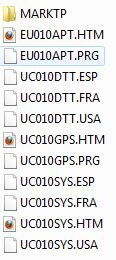
I sorted through all those pages and found out what you did which was put 3 missing files onto the memory card. (EU10APT.HTM, EU10APT.PRG, & DVI.DAT)
I tried this with a CNDV-100MT iso that I made from a friends DVD disk and got it working. But instead of putting the missing files onto a memory card, I used MagicISO to directly integrate the missing files, replacing the DVI.DAT file, and then burning the ISO. It's worth noting that the CNDV-100MT has even more files missing than the CNDV-90MT did. I've uploaded a picture of all the files you need to get the CNDV-100MT disk working...