Search Archive

A face lift for the D3

By fsuwade01 · Oct 09, 2008in General💬 15 posts👁️ 8,091 views
Posted Oct 09, 2008 · 05:04 UTC#1

in this i have bought a used d3 from ebay. then i ordered the parts for the d3 face lift.


the reason i am doing this is because the one i got had a huge gash in it and was scratched up. so i replaced the face of it and the volume knob becasue it did not come with one.


CXC7159

CXC7160


cost was 67 something shipped from pioneer.


no this is how you do this


you will need a d3

small screwdriver set. and steddy hands.


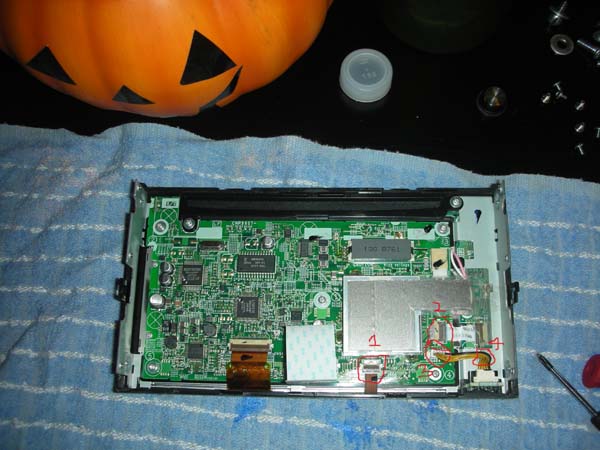
and just follow the pics and the info with the pics and ask questions if needed but its very doable for most users.


i feel that this would be rated as a level 5-6 for most, out of 10 being the hardest to do.


now if you would like to not do it and would like to have someone do it for you i could help you out.

post-22796-12872755761878_thumb.jpg

post-22796-12872755763637_thumb.jpg

post-22796-12872755764483_thumb.jpg

post-22796-12872755765034_thumb.jpg

post-22796-12872755766022_thumb.jpg

post-22796-12872755766599_thumb.jpg

post-22796-12872755767516_thumb.jpg

Posted Oct 09, 2008 · 05:15 UTC#2

then replace everything the way you did but backwards from what you saw. so that everything. now just remember that the touch screen also needs to lifted out carefuly so that you can put it back in the new frame. this is another way you can replace the lcd if needed or the touch screen if need also. so i hope that everyone can feel good about doing something for them selves with out havin to pay anyone to do it.

Posted Oct 09, 2008 · 15:32 UTC#3

Real nice DIY. We need more of this out here on the forum.

Posted Oct 09, 2008 · 21:36 UTC#4

yeah but alot of people don't want to take the time to give back and help out others. the main reason i did this is becasue i was needing help on my install and i found a post about a simlar truck i had and check his stuff. and it helped me out. but not many are still willing to put the time in.


it only took me like 30-45 mins to do the install but only 10mins to do the write up. so most want free but nothing to give back.


thanks for the post back to me

Posted Oct 09, 2008 · 21:43 UTC#5

it would be nice if they had a less glossy one to.

Posted Oct 10, 2008 · 00:39 UTC#6

yeah i know but its all good. but i kinda like it that way. it draws you eyes to it when you get in the truck

Posted Oct 12, 2008 · 20:08 UTC#7

Can you post the pictures again, I can't seem to see them. I just bought an AVIC-D3 from my friend and the faceplate is all scratched up but the screen is fine. I wanted to order a replacement but I wasn't sure how to remove the faceplate.


Also will I need a mounting kit for a 2006 Ford Explorer XLT?


Thanks,

-Sean

Posted Oct 12, 2008 · 20:10 UTC#8

Never mind, my browser just didn't load them the first couple of times I loaded the post. I do still need to know if I will need a kit for my Explorer.


-Sean

Posted Oct 13, 2008 · 02:49 UTC#9

well i am not sure but its really easy to get this up and runing so just follow the pics.


now on the ford thing i am a chevy guys so i would not know you might what to remove radio and see if you will need a kit to put in the unit with out any gaps and see if it works. and if it will then you will not need the kit but if it does then you will need the kit to get the gaps sealed up and looking great. so you might need to ask someone that might be a ford guy.

Posted Oct 20, 2008 · 14:40 UTC#10
it would be nice if they had a less glossy one to.


LOL, that's exactly what I was thinking!

Posted Oct 20, 2008 · 16:03 UTC#11

Great DIY. Thank you.

Posted Oct 20, 2008 · 16:24 UTC#12

thanks

Posted Jan 22, 2009 · 04:58 UTC#13

Back from the dead. I was just thinking about painting the faceplate to remove all the labels and color match all trim pieces with the rest of the dash.

It doesn't look complicated at all but it's nice to know exactly what's there before you do it.

Posted Nov 17, 2009 · 15:41 UTC#14

Great write-up!

Just to high-lite, you must lift up on the taps to remove the flat cables. Also disconnect both sides of the flat cable at number 2. The number 4 is a little board that will come out so don't worry if it falls out it did not break off.

Posted Jul 03, 2011 · 04:35 UTC#15

The text associated with each picture is gone. Do you have it saved somewhere?