Search Archive

AVIC-90DVD Help Please! Please insert appropriate disk

By scuteman · Nov 17, 2008in General💬 8 posts👁️ 8,562 views
Posted Nov 17, 2008 · 20:13 UTC#1

I downloaded, burned, and verified the cndv-80mt and installed it. Now I have no display except " Please insert appropriate disk" Can anyone please help me? The installation failed after about 5% and restarted and completed, now....nothing, no dvd display, no radio display, no back up camera display, no cd display. I can't access menus, I cant change it. Please please please can someone help me? Is there a way to undo what I've done?

Thanks in advance!

Posted Oct 19, 2010 · 19:47 UTC#2

I have the same problem. Did you find an answer? Maybe the cndv-80mt is too new?

Posted Nov 11, 2010 · 21:31 UTC#3

I think you have to reset the device and then use the DVD that worked correctly before. Anyone know how to reset our device?

Posted Nov 19, 2010 · 04:54 UTC#4

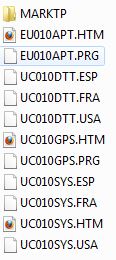
If you downloaded the CNDV-80MT, you might have gotten the same version that I got which is missing some files necessary. Just take them from your old working disc and use a program like MagicISO to add them to the new ISO before you burn it. The files/folders listed in the JPG are commonly missing on newer map discs including the CNDV-100MT which I got working on my AVIC-80DVD. (Also make sure you replace the new DVI.DAT file with your old one)

post-46561-044322300 1290142368_thumb.jpg

Attached Files (1)
Capture.JPG
Capture.JPG
Posted Jan 18, 2011 · 06:27 UTC#5

I'm having the same error on my screen. I don't have any old working disk. Where can I get those files?

This is what I have on the CNDV100 I downloaded...

CNDV100.jpg

Posted Jan 20, 2011 · 03:20 UTC#6

Hi,


I'm having the same issue - I can't locate my original disc =( I believe this is the disc that came with my unit CNDV-70MTP EAST (USA) - anybody know of any torrent links or file hosting/ftp where i can find this disc?


Thank you!!! - i have searched the forum and was unable to find any links guessing cause the disc is too old


Any help would be greatly appreciated!!!!!!

Edited Jan 20, 2011 by DjRiDe
Posted Mar 18, 2011 · 16:48 UTC#7

Okay I found my old original Pioneer 2007 map disc and checked out the files on the disc but not seeing the needed files that DV8er listed in his post above. (see attached images)


ac2d92a00d8b3d8c0417_1.jpg ac2d92a00d8b3d8c0417_2.jpg

Pioneer_2007_Map_Disc_ac2d92a00d8b3d8c0417.jpg

Pioneer_2007_Map_Disc_ac2d92a00d8b3d8c0417_2.jpg


Can anyone who has access to these files package them up in a zip file and post it somewhere? I've checked all my newer discs CNDV-90MT and CNDV-100MT and none of them have these files.


My AVIC N4 was working perfectly with the CNDV-90MT disc and started showing the 'Please insert appropriate disc' error after I attempted to upgrade to the CNDV-100MT disc. Has anyone managed to fix this problem themselves without having to send their head unit in to Pioneer or some eBay repair guys for $120.00?

Edited Mar 18, 2011 by coolsammy
Posted Mar 18, 2011 · 17:10 UTC#8

For those who have the N4 here's the thread discussing the service menu where you can reset the unit.

Avic N4 service menu


I think you have to reset the device and then use the DVD that worked correctly before. Anyone know how to reset our device?