Search Archive

Need Help with Quick Launch Buttons installation

By 1sicknickel · Dec 12, 2008in Hacks/Mods💬 5 posts👁️ 1,089 views
Posted Dec 12, 2008 · 03:28 UTC#1

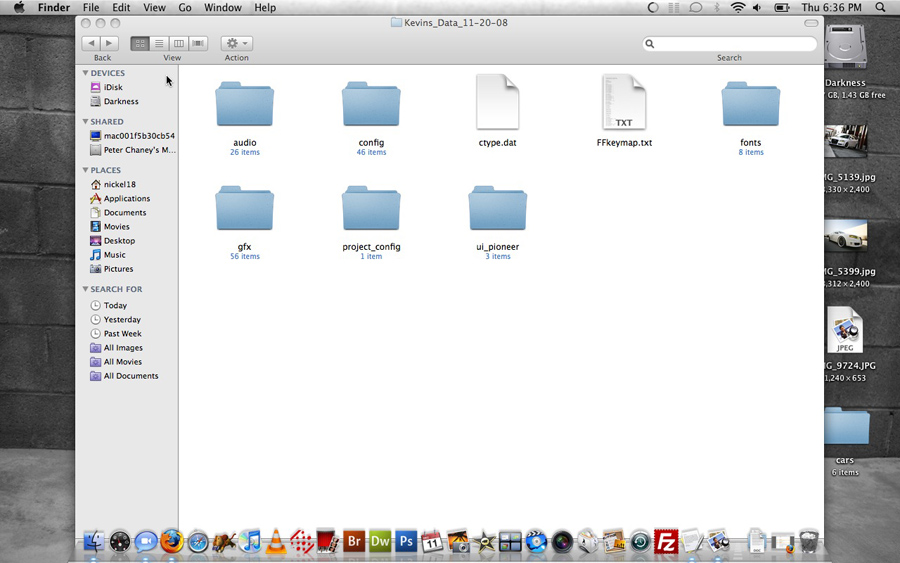
Okay I have attempted to put the ui_pioneer folder into My Flash Disk/APL2/iGo/ and I have nuthing but issues when I tried to reboot. So I deleted it and I want to start from scratch.. What am I doing wrong here? I haven't ever done this so Im just taking a wild guest. What am I suppose to put where?
3101031055_5a4d2c1c45_o.jpg

3101031135_e7089ced59_o.jpg

3101867794_8f9ccae85f_o.jpg

3101867896_5387000554_o.jpg

3101031449_186592d689_o.jpg

Posted Dec 12, 2008 · 04:16 UTC#2

No that is the contents of the Data Zip. Dont unzip it. I think someone said Safari automatically unzips downloaded files, use Firefox to download it. Then replace the data zip in MY FLASH DISK/APL2/iGO with the one you downloaded. But make sure you back up the whole MY FLASH DISK before you make any changes in case you need to put it back.

Posted Dec 12, 2008 · 18:05 UTC#3

So I tried what you said and deleted the Data.zip and I put the Keepers Kevins_11-20-08.zip file and nothing happened when I tried to reboot. Once I reboot it just said System Startup Please Wait and it did nothing for a few minutes so I turned the monitor off. Reloaded the original Data.zip and now back to square 1.

Posted Dec 12, 2008 · 18:09 UTC#4

you need to make sure you rename his data file to "data.zip" and make sure you copy over the other files it needs.... fonts, some system ini all the files in his zip you need to make it work

Posted Dec 13, 2008 · 18:55 UTC#5

I changed the name and still nothing. It looks like the stock map still.

you need to make sure you rename his data file to "data.zip" and make sure you copy over the other files it needs.... fonts, some system ini all the files in his zip you need to make it work