Here it goes.
There's a few things that need to be done in order to get this on your unit.
By installing this on your unit, you are agreeing to use it at your own risk and to hold me harmless from any issues it may cause with your unit. I will try to troubleshoot issues to the best of my ability (which is not much).
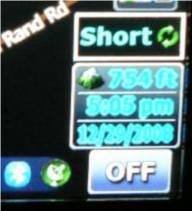
The functionality you're about to add is in the picture below.
Drop the two BMP's into your ui_pioneer/800_480 folder. Add the following code into the template800_480 file about 7/8 of the way down somewhere within the section that begins with: ;!!!zhuyi add new template
Next add these two sections into navigate800_480 ui file somewhere in the first layer:
onrelease='nextstate st_NavigateMap, ADVNAV_RECALC, map.CenterCursor' USE_SEPARATED_SAFETY_MODE=1 visiblemodel="navigation.distance_to_manuver.valid">
I adjusted the x value to put just above the standard cockpit on the left side. If you're using a different cockpit, you'll need to adjust both the slider values and recalc buttom values. You'll do the math to get it to fit where you want.
It'll function as if you went to the route settings screen and changed the method, except the change does not take effect until you activate the recalc button. In essence the recalc button performs the action that the back button on the route setting screen would.