I'm having trouble connecting my 250gb external hard drive to usb port. any time i connect the 900bt does not recognize its there but the light turns on, on the hard drive.. any ideas on how it would work, or why it doesnt work?
USB connection
I'm having trouble connecting my 250gb external hard drive to usb port. any time i connect the 900bt does not recognize its there but the light turns on, on the hard drive.. any ideas on how it would work, or why it doesnt work?
Is it a 1.8" drive or 2.5" (or bigger) drive? AVIC does not put out enough power to properly spin up larger drives. You need to use a secondary power source, if your drive takes one.
Also, make sure it is formatted as FAT32 and give AVIC some time to recognize it.
it is a toshiba 250gb external drive i bought it at circuit city doesnt tell me anything about the drive size i even looked it up online and still nothing but its 3'' wide x 5" long if that helps..
sometime the sys cannot recognize that big of a volume after all it is ce platform meaning compact edition for mobile devices with limited capabilities...if u would like to run something like that look at carputers...they are individually build using mb, chip, ram, HD, os etc and Io ports -- very neat...but time consuming and u have to have the niche for hacking and hardware installation but never less awesome results than you will be able to do it all even surf the net on the go with the help of clearwire a buddy of mine has it and it rocks
I would check the drive. Even if the unit can power the drive it wont see above a 32gb size drive. The drive must be formatted into FAT32 which has drive limitation size of 32gb. You will just need to create multiple partitions.
Huh? What? FAT32 can support 2TB volumes. I have a 320GB drive plugged in and it works just fine.
it is a toshiba 250gb external drive i bought it at circuit city doesnt tell me anything about the drive size i even looked it up online and still nothing but its 3'' wide x 5" long if that helps..
Probably a 2.5" then... Does it have a plug for secondary power source?
no it doesn't have a secondary source... i guess ill just have to go with a smaller hard drive or a flash drive..
Those should work. But it's not so much the capacity of the disk as the actual physical size. 1.8" disks are small enough that current AVIC puts out on USB calone an spin them up. 2.5" ones are too big....
maybe its a 2.5'' but the format says fat32 on my computer when i looked up the properties.. I'm an amateur at this haha. thanks for the help tho i appreciate it
FAT shouldn't be a problem.
i have a wd passport 320 and 250 gb and they're both formatted to fat. f900 wont recognize.
Are you using the power cable?
i just use the usb wire thats coming from the unit. i was told that's all i needed.
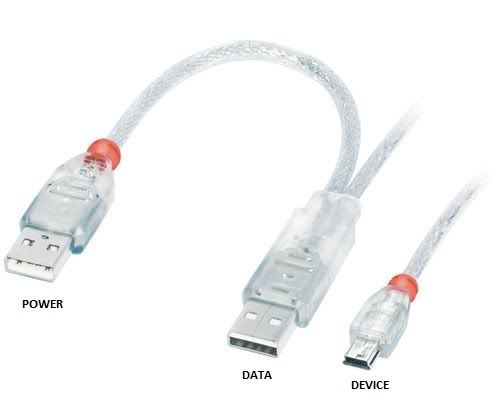
Not quite... It should be enough for a "real" computer that puts out more power on USB port. As WD notes on their product page, if you are using it with something that has low-power USB, there is an optional cable to bring more power to the drive.
I have a WD 320 Passport Essential, I was able to get my F700 recognize it at first but when I took it in the house to add a "little" music to it, and brought it back out to try it, the drive USB light just came on, so yeah, the optional cable is probably a good idea to use it with the navi. On a side note, the other external drive i have (regular 3.5in 160gb hd in a maddog enclosure.) plugged into an external power supply, the unit would not even acknowledge it was there, I am going to check into a 1.8in Toshiba drive tomorrow(I read somewhere on here someone had a ton of success with 1.8"), I'll let ya know the results. On a side note, the unit has no trouble seeing the 16gb SD card(think the limit is 4?), I just have way more music than that, I am just finding it hard to jump on the iPod boat, though it's beginning to look like that the only way I'm going to be able to have all my music from my pc in the car short of tons of mp3 disks and a couple sd cards.
~Sd
i was about to jump on the ipod bandwagon when I found out that the signal going into my f900 will be analogue instead of digital with an optional cable so I said f*& it.
i just use the usb wire thats coming from the unit. i was told that's all i needed.
Not quite... It should be enough for a "real" computer that puts out more power on USB port. As WD notes on their product page, if you are using it with something that has low-power USB, there is an optional cable to bring more power to the drive.
Yup, the cable should look similar to the pic below. One is data+power, and the other runs parallel with power only to bring more current to the drive to help it spin up. I'm going to fiddle around with my 100GB 2.5'' drive when I finally get done with my final exams. I'm pretty good with computers, almost done with my computer engineering degree at Univ of Mich. But, I have a feeling it won't work, because I don't think Windows CE can address that much physical space on an attached medium. I'm pretty sure the limit is 32GB. The only work-around I know if is to attach an iPod with a zif-->ide/sata adapter, then plugin whatever size hard drive the maximum an iPod can support.
EDIT: Here's a good read about Windows CE disk volume sizes.
http://www.hpcfactor.com/support/cesd/h/0044.asp
