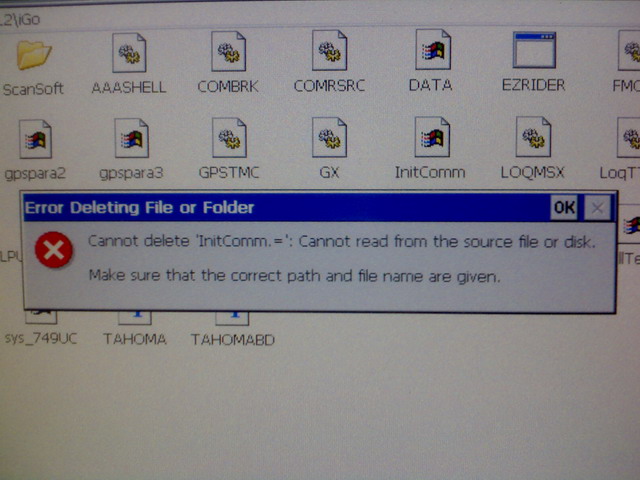
It all started since I installed the LeetLuncher to test it, on wednesday, something happened at that time (I think).
The next day I found maps of Argentina, my country (my friend GUGA really found them..thanx GUGA!!), so I decided to load them on my AVIC.
So I started in testmode, I went to \APL2\iGo and I noticed that it didn't have the same files and folders than other (like you). I have in another place: \My Flash Disk\User\SystemData\InitComm\ here're all files & folders, including EZRider.exe, licences, data.zip, bla bla bla (look at the pic below).
Anyway, I copied the hacked iGo folder (downloaded from some popular topic here) in its corresponding place (\APL2\iGo), took his time, and then I put all de map data in there.
Fine, here start the trouble.
Then I explore \My flash disk\ and I found that files were not where they should be, everything was unstructured, with the peculiarity that the folder \APL2\iGo containing infinite \iGo folders (take a look to the 3th pic). "\My Flash Disk\APL2\iGo\APL2\iGo\APL2\iGo\APL2\iGo\APL2\iGo\APL2\iGo\APL2\iGo............"
The worst thing is that will not let me delete, copy or move files or folders, nothing, not even format the memory.
What happened? How do I restore my flash disk? (I have the 2 gb memory and image of the F90bt US downloaded from de FTP site)
This happened to someone else?
Please help me!!
This is what I have: AVIC F900-BT with US & Canada maps. Firmware 2.0 (updated about 1 month). Crashed, yesterday...jejeje!!
Thanx a lot!! I hope some good news
PS: Sorry my english
UPDATE!! PROBLEM FIXED!! 16/mar/2009
Hi everyone!! I fixed my problem. So I'll go to explain, step by step, to help others having the same problem.
I'll begin by the end, I could fix it by formatting the memory normally (after dismounting). The problem was that I could not do that (read the original post)
As I wrote above, I had a loop in APL2/iGo folder, which used space in My Flash Disk and not allowed to me to copy new files (maps, data.zip, licenses, etc).
I've tried many ways to break the loop, but without success. So I decided to look for Win CE software that could do it for me, but, to my bad luck, none worked.
So, in the end, after trying a lot, I decided to try dismount the memory again (Part00* of the memory NAND with 1.8gb of space named "My Flash Disk") and then format it. First I tried with the USB pen driver connected to the unit, and it worked!!! So then I tried with the memory and it worked too!!! I don't know how, but it does.
Definitly, I don't know what could cause this problem?? I suppose that some active process of the system that not allowed to copy, move or delete files even format the memory. Apparently at some point the process stopped and I was able to do so. When? I don't know??
...well, thanx to everyone here in this forum!! I took a little of each post.
For more details, just ask me.