Search Archive

HOW TO: 5v USB power for 2.5'' hard drive

By wiretap · May 07, 2009in Hacks/Mods💬 23 posts👁️ 9,766 views
Posted May 07, 2009 · 01:36 UTC#1

I felt like making a tutorial for you guys to help alleviate the power issues some people are having with getting 2.5'' hard drives to work. The AVIC unit only puts out 500mA or less of current, which isn't enough to spin up the majority of 2.5'' drives. You need to have an additional power source. You'll want to use one of these cables do to that:
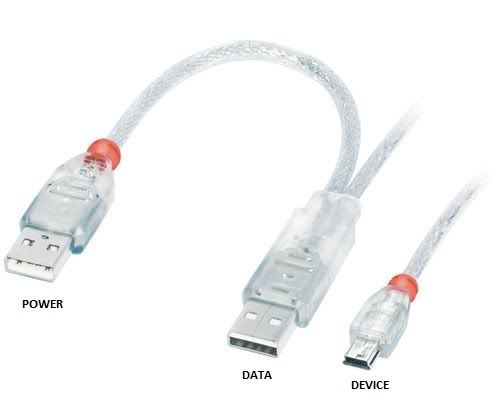
 

31780.jpg


Ok, here we go.. the fun part.


Tools needed:

- Screwdrivers, sockets, or whatever else you need to take apart your car interior

- Pliers

- Drill

- Drill bit to drill pilot holes for screws (I used 1/16'' bit)

- Hole saw (I used 1'' diameter so I can fit a lot of cables through it to run behind the dash)


Parts needed:

- Zip ties

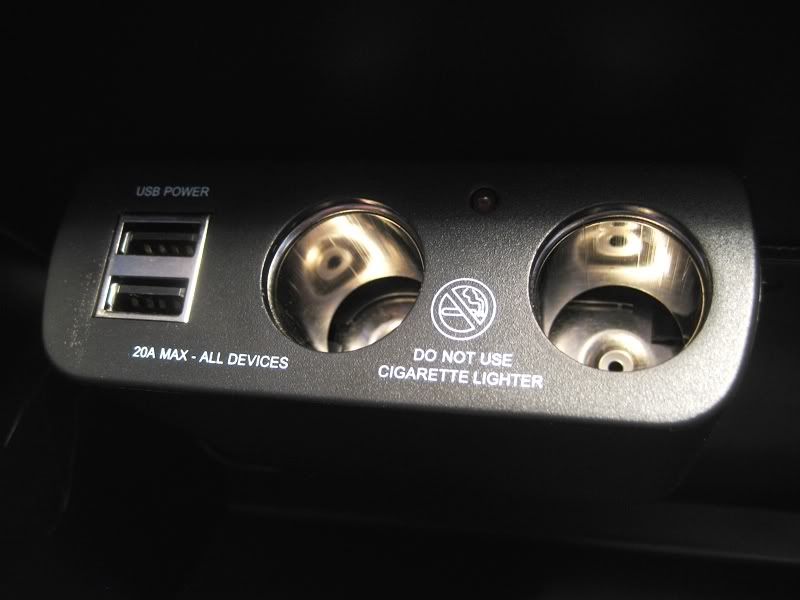
- Cigarette/USB multi-use car charger (http://www.amazon.com/Multi-Use-Car-Charger-Dual-Ports/dp/B000PB8CQI/ref=sr_1_3?ie=UTF8&s=wireless&qid=1241655923&sr=8-3)

- Cigarette lighter socket (http://www.amazon.com/Parts-Express-CIGARETTE-LIGHTER-SOCKET/dp/B0006TIRZA/ref=sr_1_1?ie=UTF8&s=automotive&qid=1241655997&sr=8-1)

- Quick spice vampire clips (http://www.amazon.com/Pico-1558PT-Electrical-Wiring-Package/dp/B00030CQGI/ref=sr_1_4?ie=UTF8&s=automotive&qid=1241656037&sr=1-4)


You may substitute any of those things for a product you may like better; that's just what I chose. I liked the multi-use charger because of it's nice mounting legs and dual USB ports. You can power a 2.5'' external hard drive for the AVIC, and have your phone charge at the same time. You can always run USB extension cables through the center console and to your cup holders, rear seats, or wherever you want to bring power to.


1st: Take the glove box out of your car.


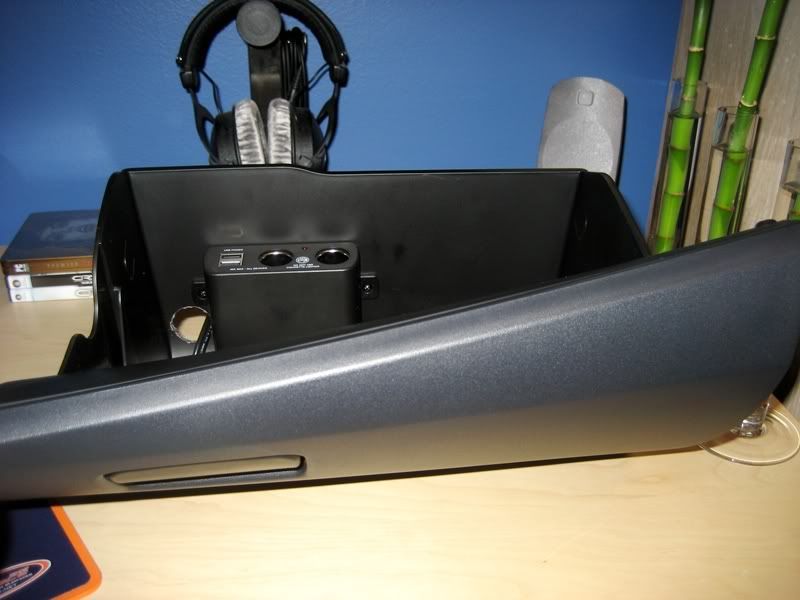
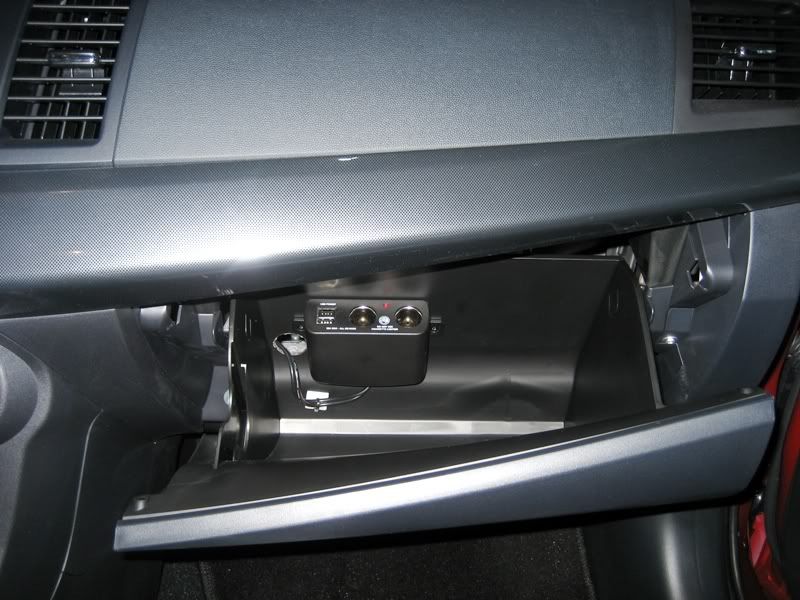
2nd: Mount the charger unit in the glove box. Be positive of where you're going to mount it so it doesn't interfere with anything when you actually put it in the car and open/close the glove box. Note that it can't be mounted too high because when you have things plugged in, you don't want them crunching in there when you close it. It also can't be mounted too low because of the hinges. You'll want to drill two small pilot holes where you want to mount it, then use the small screws it came with for mounting. Here's where I chose to mount mine.
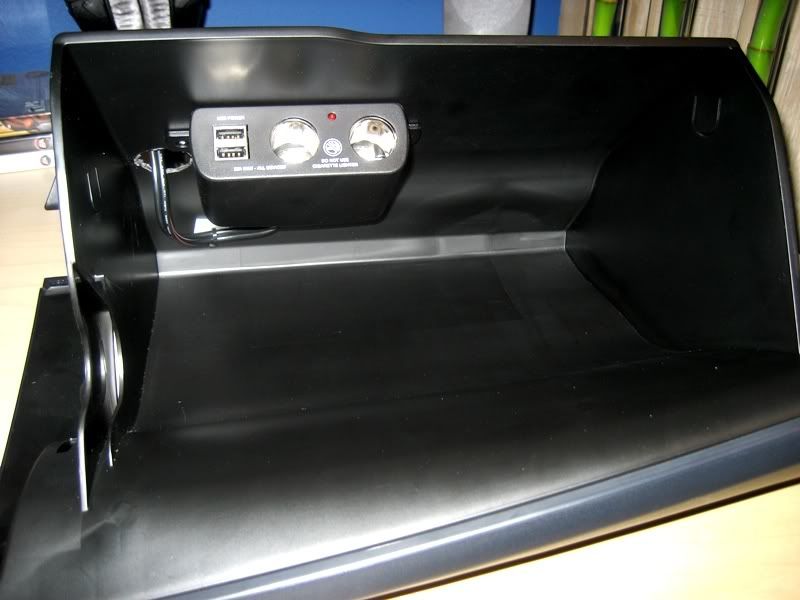
 

IMG_1186.jpg


3rd: Drill your hole to route cables through now that you know where your charger unit is mounted. I didn't find it necessary to use the drill with my hole saw because it's just soft plastic. Turning it slowly by hand will ensure a good cut through without screwing anything up cosmetically. Again, make sure the hole is up high enough from the bottom of the glove box so you don't slam cables in the hinge. I used a large 1'' hole so I can fit the cigarette lighter 12v adapters through it, as well as USB cables.
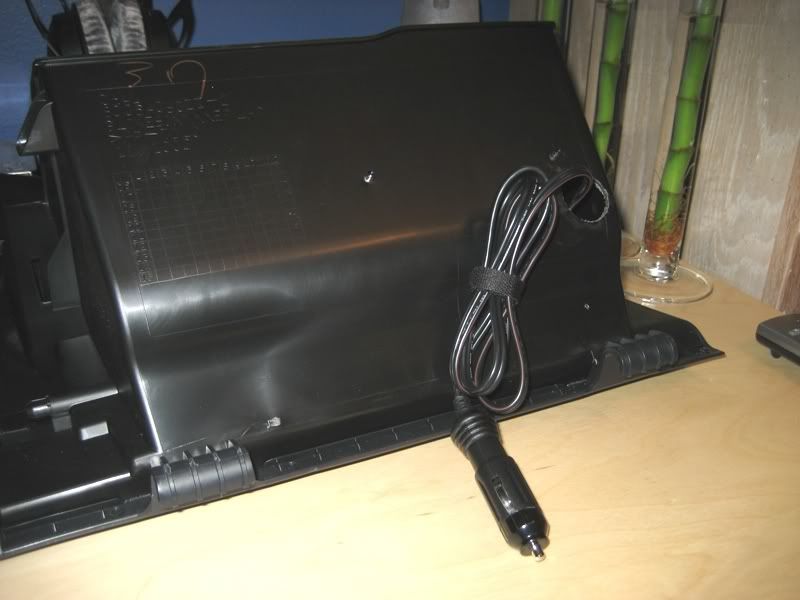
 

IMG_1187.jpg


IMG_1188.jpg


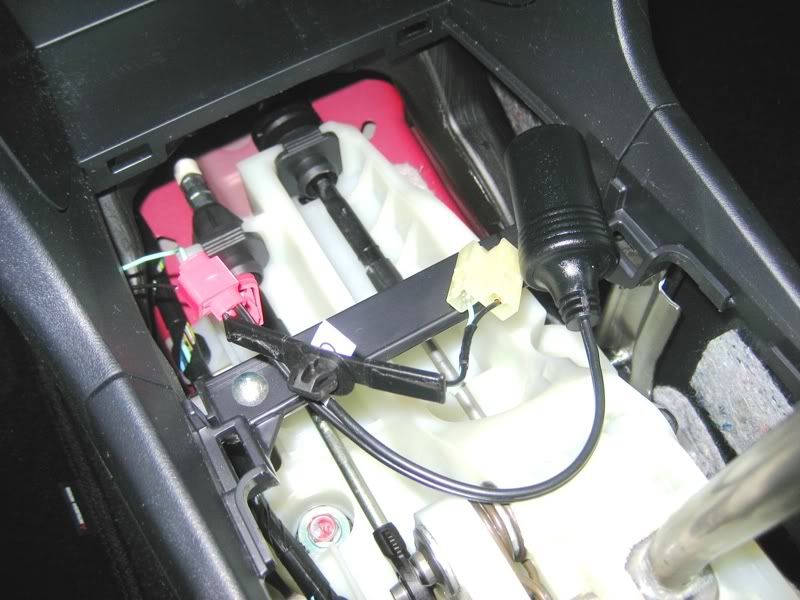
4th: Next, take it out to your car so we can wire it up. I chose just to splice into the existing cigarette lighter to make it super easy. That way it switches on when you turn on the car, and switches off when you turn off the car. Use the quick splice connectors to connect the factory cigarette lighter wires to your cigarette socket you bought. You'll probably have to use pliers close the quick splice things all the way so it makes contact thoroughly. It should look similar to this:
 

IMG_1193.jpg


5th Drop the 12v cable (the one for the usb/12v charger unit) from the glove box down behind and into the center console. I found it easier to sit in the passenger seat and put my left hand up inside the center console portion while feeding the 12v cable from the glove box down in with my right hand. You should now be able to connect them up. Bundle up your slack wire with a zip tie and stick it behind the glove box. You can use more zip ties in other places so you don't get anything rattling around.


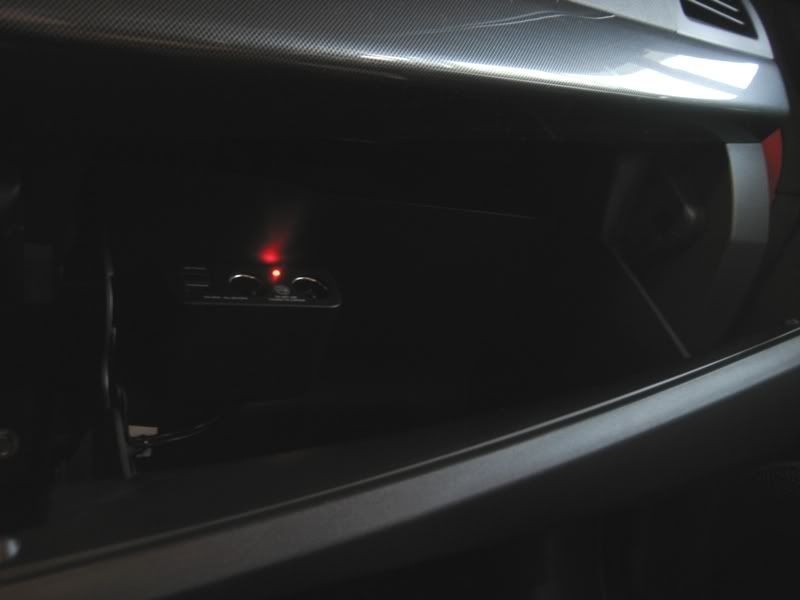
6th: Before putting everything back together, verify power is reaching the unit by turning the ignition key to accessory. Red light = good.
 

IMG_1196.jpg


7th: Reassemble your interior and you're done!


Finished product:
 

IMG_1194.jpg


IMG_1192.jpg

Posted May 07, 2009 · 02:12 UTC#2

lancer,

Posted May 07, 2009 · 02:32 UTC#3

???


Yes, this is the car it was installed in.


th_P3287919.jpg


th_P3287892-1.jpg

Posted May 07, 2009 · 03:02 UTC#4
???


Yes, this is the car it was installed in.


th_P3287919.jpg


th_P3287892-1.jpg

sweet, i need to put up some more money and trade in my lancer to be able to grab an evo while it's still at 0% or just wait forr the 2010 model, anyways, back to the topic,

Posted May 25, 2009 · 02:12 UTC#5

Where would one locate the dual end USB to mini USB? I can only find them with the large ends.

Posted Jun 03, 2009 · 14:55 UTC#7

this is an awesome step by step. unfortunately, i dont have the time to perform this install, so instead i brought my car to my local mom and pop shop where they hooked up my system and did my tints. good people, fast clean and fair prices.


i showed them your step-by step and they told me they'd install it for $65 if i brought them the parts.


thats fair for my time.


thanks a lot wiretap!

Posted Jun 03, 2009 · 22:23 UTC#8

Excellent tutorial !!!!!!!! When I get some spare time ill give this a shot. Thanx for all the great info.

Posted Jun 03, 2009 · 22:30 UTC#9

Thanks, and you're welcome. :)

Posted Jun 04, 2009 · 07:13 UTC#10

yo wiretap, i have a question about the functionality of the hdd with the f-series.


i own a 900, and im picking up a 250gb western digital passport to go with this setup. im just wondering if you have to use windows CE to format the drive into fat32, or if you can do it from your pc and have it still be recognized.


also, once you dump all your folders and albums on the hdd,

1. how are they displayed on the head unit?

2. does it show them as it would show an ipods library?

3. can you sort by letter? can you search?

4. is there voice recognition?

5. and most importantly, can you set it to random and have to play files from all over the drive?

6. and what if your album folders contain album art or playlist files or media formats other than mp3 like .flac or .wav. will those be recognized? what happens if while its in random, it jumps to a .jpg or some other format of album cover art, will it display it, will it not even recognize it?


sorry for all the questions, just want to know how functional this really is.

Posted Jun 05, 2009 · 18:55 UTC#11

so i just tried using my 250GB external western digital drive on my F900bt. it recognized the mp3's fine when there was only 1GB on there that i tested just to make sure it was in FAT32 and recognizable.


immediately after, i dropped another 100GB of music onto the drive and it didn't recognize it at all. The usb icon never lit up. i let it sit for 10 minutes and nothing.


ive seen some people have hit 40GB and havent been able to go passed it, someone else said they had about 17GB of music and 28GB of tv shows and it worked.


has anyone figured out if there is some hard cap on the F series that prevents you from using a full 250GB external hard drive to play music from?


i have all the files on the HDD sorted by artist/album/song.


any help here is definitely appreciated.

Posted Jun 05, 2009 · 19:02 UTC#12
so i just tried using my 250GB external western digital drive on my F900bt. it recognized the mp3's fine when there was only 1GB on there that i tested just to make sure it was in FAT32 and recognizable.


immediately after, i dropped another 100GB of music onto the drive and it didn't recognize it at all. The usb icon never lit up. i let it sit for 10 minutes and nothing.


ive seen some people have hit 40GB and havent been able to go passed it, someone else said they had about 17GB of music and 28GB of tv shows and it worked.


has anyone figured out if there is some hard cap on the F series that prevents you from using a full 250GB external hard drive to play music from?


i have all the files on the HDD sorted by artist/album/song.


any help here is definitely appreciated.


please stop double posting

Posted Jun 05, 2009 · 19:55 UTC#13
please stop double posting


He's at least triple-posting... :lol:

Posted Jun 05, 2009 · 19:58 UTC#14

boris, did you ever reach a limit on your hard drive? someone asked you earlier in a post and you never responded.


This format program worked well for me with vista to format HD to FAT32.


Boris - Let me know when you get over 40GB on your HD and If you start running into problems.

I had just under 40GB on mine and when I pushed it up started having my problems...

Thanks for the reply.


Will do... I probably have enough FLACs to bring the drive in and compress them...


and then you said you had 8GB in a later post... but did you ever fill it up passed 40GB?


*edit*

forgot to mention, i called pioneer support, they confirmed that they had used an "igo 80GB external hdd on the version previous to the F series and it worked fine when completely loaded with mp3's".


i am now in the process of shaving down my list to try and figure this out.


boris or anyone else have an answer before i waste my time unnecessarily?


**edit 2**

my policy for testing this is going to be shaving off 10GB until it is recognized within 5 minutes of plugging it in. then ill fiddle with maximum sizes until i get it close.

Posted Jun 05, 2009 · 21:31 UTC#15

update:


67.9GB recognized to the point where the hdd colds boots while plugged in (before turning car on).

however, only ~800 songs were recognized out of 10,000.


right now there are 130 individual folders on top, with multiple album folders under that with mutiple mp3 files below that.


i formatted the drive intially with fat32format. i would love to hear if anyone used the win ce format method on the unit itself, and if they had any success with making more files recognizable.


back to the testing...

Posted Jun 05, 2009 · 22:01 UTC#16

I have the windows ce format method on my 100GB drive.. I have around 50GB of music and 25GB of videos. It doesn't recognize from a cold boot, but it recognizes just fine and plays all my music/vids within 30-45 seconds of plugging it in.

Posted Jun 06, 2009 · 15:47 UTC#17

well its a new day, time for some more testing on my F900.


For reference:

F900BT

WD 250GB my passport essential external

all music in either .mp3 or mp4 format

formatted the hdd using fat32format via command prompt in vista64

usb y-cable for extra hdd power


my goal is to get 130GB of music recognized >5 minutes.


last night i went through the drive and deleted all the cover art .jpgs, .m3u playlist entries, and random .txt and video files. when the drive was filled with about 68GB, it seemed to lag out the F900BT so that i could not choose a source to play music from. i was in a rush, so i didn't give it more than 3 minutes once i saw that it was lagging. this may have been able to be recognized had i given it another minute or two.


my last test was just trying to get 40GB of only .mp3's and .mp4's recognized. this works, but will not reliably cold boot. sometimes its recognized within 30 seconds, sometimes 2 minutes, other times 4 or 5. so far it seems like its a waste of time to wait to see if it will cold boot, so for the sake of time saving, im going to be plugging the HDD in once the system has booted (30 seconds after key turn).


will update later today as i make more progress.

Posted Jun 15, 2009 · 11:27 UTC#18

i did ficks the plugin problem by installing a time-relais in the USB cable this will make the usb drive start 20 seconds after power, so no need to unplug it everytime i boot

Posted Jul 16, 2009 · 15:44 UTC#19

wiretap,


This is a great tutorial. I was wondering if we could go one step further...


The lead on the power module is 4' long, and the fuse is built into the casing. Shouldn't we just be able to cut off the plug on the end, and attach the vampire clip to the bare wire ends, thus negating the need for the additional socket? It's pretty tight under my center console/emer brake cover, and I don't know if I can squeeze the plug and socket. It would also allow me to drill a smaller hole in my glove box, since I wouldn't need to pass a 1" wide DC plug through it.


EDIT: Found a detailed PDF regarding this: http://www.magnadyne.com/MagPublic/Pictures/DVU-2-INS.pdf Says if you want to hardwire, you need to attach the power lead to a fused 20A source, and the black lead to the chassis ground. Would the vampire tap method you illustrated achieve this? The unit body does have a fuse in it, but maybe I'm missing something. BTW, is the ground wire of the "tappee" power line attached to the vehicle chassis, or to the battery (-) terminal (or is it the exact same thing)?


Thanks.

Posted Jul 18, 2009 · 03:28 UTC#20

Yes, you can hardware, and I mentioned you could do that.


The reason I made a big hole in my glove box was for USB cables and other cables to pass through easily.

Posted Jul 23, 2009 · 13:00 UTC#21
Yes, you can hardware, and I mentioned you could do that.


The reason I made a big hole in my glove box was for USB cables and other cables to pass through easily.

Thank you, but please stop calling me "hardware". :D

Posted Jul 27, 2009 · 21:52 UTC#22

I mean "hard wire", as in you could hard wire it. lol. I was probably typing from my phone. Sorry about that. :lol::cry: