Search Archive

bmp reflections

By Dino · May 17, 2009in Hacks/Mods💬 7 posts👁️ 1,851 views
Posted May 17, 2009 · 20:06 UTC#1

Hey guys,

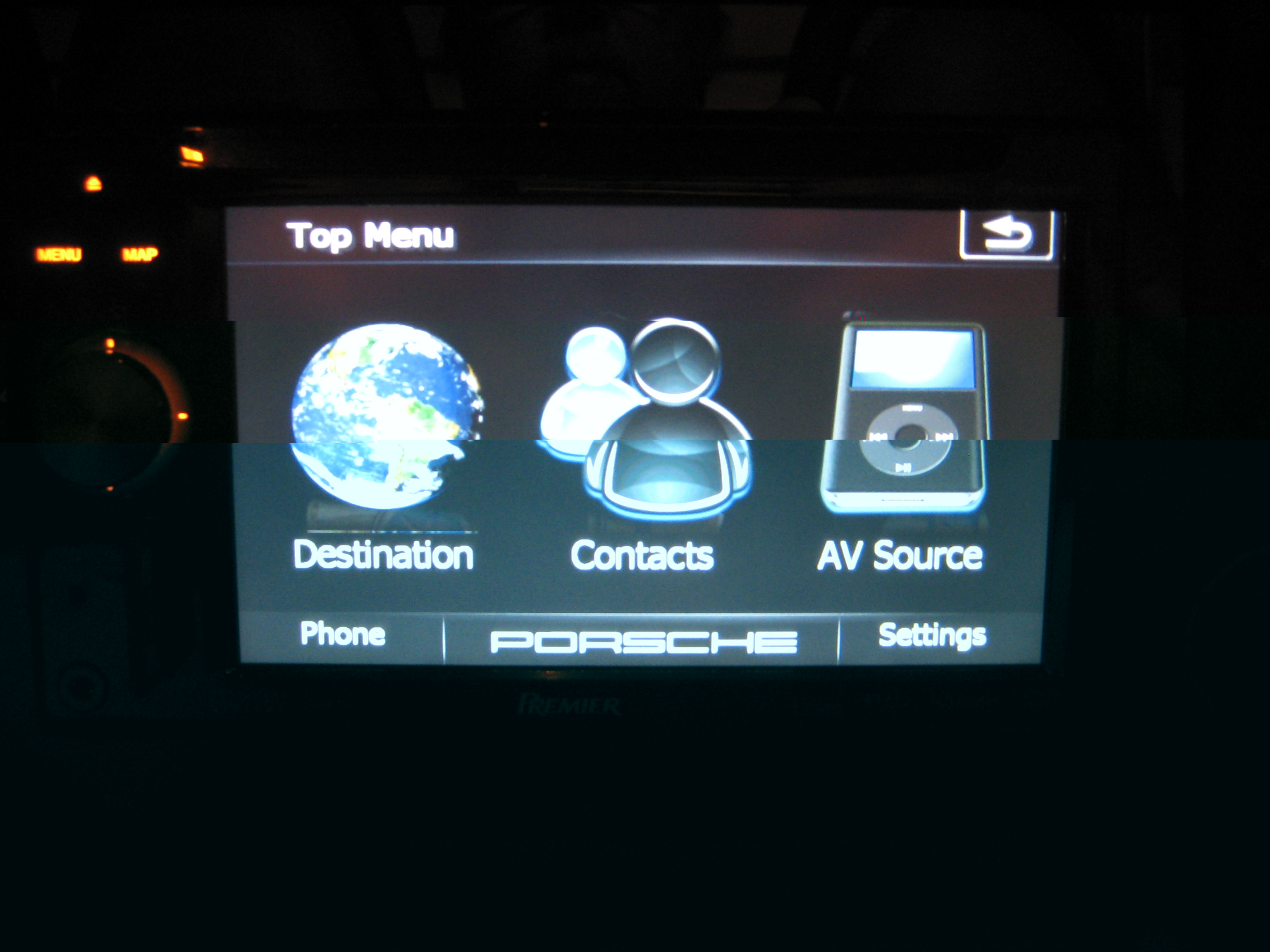
I've been reading this forum for the last couple of months and have found tons of great info here, thanks! I have installed the cmh all-in-one along with a few other hacks and mods I've found but here's my problem. I have edited my image.res a bit and made my own custom top menu bmps. When I load them, however, I still see the reflections that were underneath the images in the cmh mod. The reflections are not on my bmp files as I have created them from scratch. I have searched through all the images I can find and I see no image with the relection on it. Anyone know where I might find the files?


Thanks,

Dino
Posted May 18, 2009 · 22:58 UTC#2

could you post pics?

Posted Jun 05, 2009 · 23:31 UTC#3

Hey guys,

Sorry for the delay in response. I have attached a pic of my top menu screen. You can clearly see the reflection from the original Cmh mod beneath my new images, especially the first (earth) image. I have searched the entire res file and cannot figure out where these reflections are coming from. Any ideas?

post-34184-12872757644469_thumb.jpg

Posted Jun 05, 2009 · 23:46 UTC#4

You should post to Guga's thread. I'm sure if there are separate bmp's for the reflections, he can tell you what they are named.

Posted Jun 06, 2009 · 00:18 UTC#5
Hey guys,

Sorry for the delay in response. I have attached a pic of my top menu screen. You can clearly see the reflection from the original Cmh mod beneath my new images, especially the first (earth) image. I have searched the entire res file and cannot figure out where these reflections are coming from. Any ideas?IMG_0779.JPG


what program did you use to make those? the reason why the reflections are still there is because i'm assuming that you just painted over the existing BMP, if that was the case then you also need to modify the alpha layer of the BMP, the alpha layer is what's causing the reflection,

Posted Jun 06, 2009 · 05:16 UTC#6

I used Photoshop CS to make the images. Now that I think about it, I think I did paint over the old images. I made them over a month ago and forgot. Anyway, I'm not sure how the transparency of the original image would show through what I painted and pasted over top of it, but then again I'm no PS expert. So, how do I modify the alpha layer or can I just paste a solid image over the black background?

Posted Jun 06, 2009 · 05:42 UTC#7
I used Photoshop CS to make the images. Now that I think about it, I think I did paint over the old images. I made them over a month ago and forgot. Anyway, I'm not sure how the transparency of the original image would show through what I painted and pasted over top of it, but then again I'm no PS expert. So, how do I modify the alpha layer or can I just paste a solid image over the black background?


go to the channels tab and click on the alpha channel, check out the thread regarding car image as arrows and it pretty much explains what you need to do