Search Archive

Transparent AV Buttons

By Dino · Jun 21, 2009in Hacks/Mods💬 15 posts👁️ 2,130 views
Posted Jun 21, 2009 · 19:39 UTC#1

So, after reading this forum for the last couple of months and gathering some great information, I noticed something. Many of you guys have created some fantastic mods and schemes here and I thank you all for your hard work! But one thing bothered me. All of these beautiful, slick looking mods still had those goofy looking gray or red AV buttons and out of place looking blue or red bar at the bottom for the song title and radio info. I first started making a set of blueish AV buttons to match CHMs mod but then I switched to IDTs mod and they didn't look right at all. So, then it hit me. Why not make transparent buttons so they match with any scheme and clean up the screen.


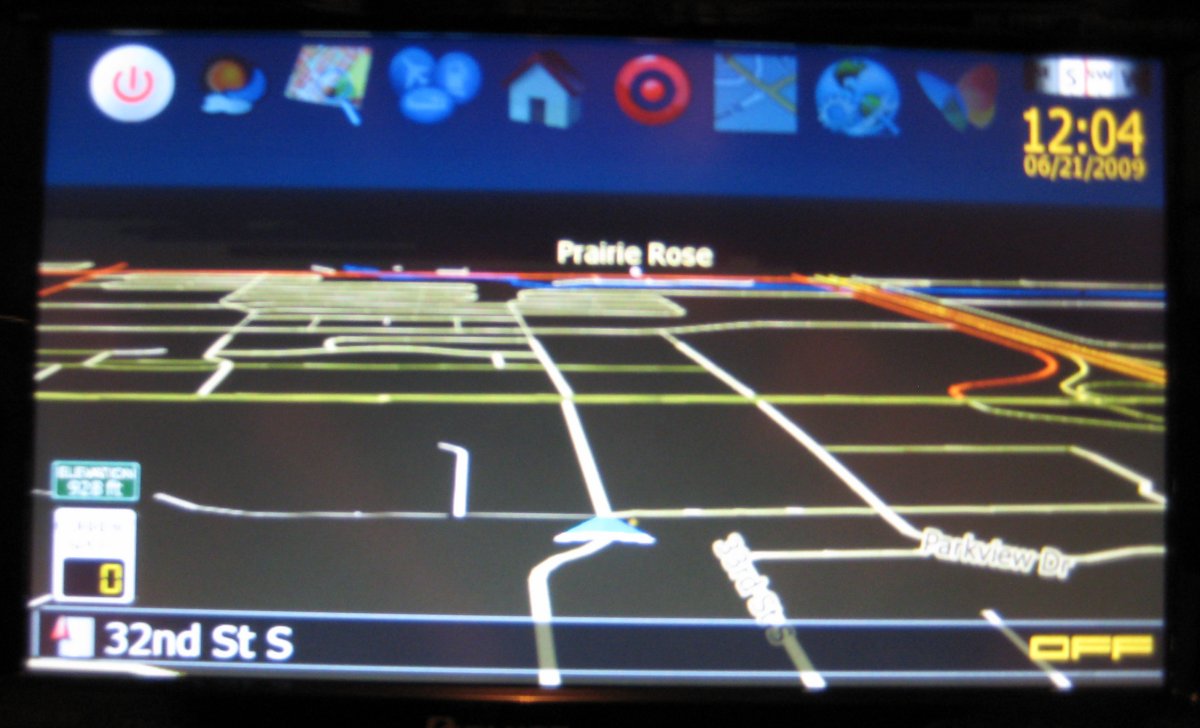
Here's what I came up with:


Ipod, Disc, XM, Cirrius, HD, have white icons with transparent backgrond. AM, FM, USB, AV, EXT, etc., are just yellow text with transparent background. I actually haven't tested the XM, Cirrius, or HD because I don't have a subscription to any of them. I extended the road info boxes to cover the rest of the screen left by removing the buttons. Next was the removal of the blue title bar which baffled me for a bit. Thanks to eurotuner for pointing me in the right direction.


Whatcha think?
post-34184-12872757812362_thumb.jpg

post-34184-12872757813874_thumb.jpg

post-34184-12872757815169_thumb.jpg

Posted Jun 21, 2009 · 20:00 UTC#2

Looks good, but what happens when the current street info is very long and runs into the av bar info? does it over lap each other because the av bar is now transparent?

Posted Jun 21, 2009 · 20:11 UTC#3

Good question. I haven't been on a road with a name that long. We'll have to see.

Posted Jun 21, 2009 · 20:46 UTC#4

Keep us updated on that. That is the only reason i made mine black instead of transparent.

Posted Jun 29, 2009 · 00:37 UTC#5

Hey eurotuner, so I had the opportunity to test out whether or not the street info text overlaps the AV info today and the answer is no. The long road name stops at the little triangle play icon. I did a little research and I think this is dictated by this line in the navigatemap_800_480.ui


I believe the w=580 statement limits the width of the road name info to 580 pixels.

Posted Jun 29, 2009 · 01:05 UTC#6
Hey eurotuner, so I had the opportunity to test out whether or not the street info text overlaps the AV info today and the answer is no. The long road name stops at the little triangle play icon. I did a little research and I think this is dictated by this line in the navigatemap_800_480.ui


I believe the w=580 statement limits the width of the road name info to 580 pixels.


yes it is controlled by the width parameter

Posted Jun 29, 2009 · 01:36 UTC#7
Hey eurotuner, so I had the opportunity to test out whether or not the street info text overlaps the AV info today and the answer is no. The long road name stops at the little triangle play icon. I did a little research and I think this is dictated by this line in the navigatemap_800_480.ui


I believe the w=580 statement limits the width of the road name info to 580 pixels.


yes it is controlled by the width parameter


I would think the title bar has a higher Z or layer value than the street bat that allows it to have the text above or on top of the street name bar.


The 580 w value in essence is about 3/4's of the width of the screen.


Explain what the text did. Did it shrink to fit in half the screen width or did the street name extend underneath the title bar but was not visible?

Posted Jun 29, 2009 · 03:58 UTC#8
Hey eurotuner, so I had the opportunity to test out whether or not the street info text overlaps the AV info today and the answer is no. The long road name stops at the little triangle play icon. I did a little research and I think this is dictated by this line in the navigatemap_800_480.ui


I believe the w=580 statement limits the width of the road name info to 580 pixels.


Thats great! Can u post the two files of the transparent bar for me in a zip? unfortunately i dont have a program to make things transparent, i only change colors using paint. Thanks

Posted Jun 29, 2009 · 06:44 UTC#9

The text didn't shrink. It appeared to disappear underneath the little play icon. Matter of fact one letter was partially hidden by the icon but did not show through the transparent BG. As for the transparency of the bmps, I merely filled them with magic pink. They are not alpha layer transparencies.

transparent AV title bar.zip

Posted Jun 29, 2009 · 12:48 UTC#10
The text didn't shrink. It appeared to disappear underneath the little play icon. Matter of fact one letter was partially hidden by the icon but did not show through the transparent BG. As for the transparency of the bmps, I merely filled them with magic pink. They are not an alpha layer transparencies.


Thank you!

Posted Jul 01, 2009 · 01:31 UTC#11

I actually finally just got around to installing the AV bars and unfortunately doing a test drive on a long named road the text did interfere with the AV bar information. It jumbled all up. Guess i will have to stick with a black AV bar.

Posted Jul 01, 2009 · 04:44 UTC#12

Too bad! Maybe the road I was on didn't have as long a name as yours. If I find the same issue, I'll revert to black as well. Until then, I'm really digging having everything semi-transparent on my map.

Posted Jul 15, 2009 · 05:35 UTC#13

could anyone possibly give the exact rgb numbers for the color 'magic pink' because ive tried to replicate this color to use for other buttons but i cant seem to get it to match correctly..thnks

Posted Jul 15, 2009 · 23:23 UTC#14

From Wiki:

Occasionally, a magenta background is used, as in some software applications where the magenta or fuchsia key value #FF00FF is sometimes referred to as "magic pink".[7]


BTW, Magic Pink only seems to work with the Pioneer software( AV system, Phone, etc.) and not with the Igo Nav software.

Posted Jul 16, 2009 · 03:26 UTC#15
From Wiki:

Occasionally, a magenta background is used, as in some software applications where the magenta or fuchsia key value #FF00FF is sometimes referred to as "magic pink".[7]


BTW, Magic Pink only seems to work with the Pioneer software( AV system, Phone, etc.) and not with the Igo Nav software.


thnks so much