I bought a 4 months old Smart car which comeswith a AVIC-F90BT installed from a used car dealer. I can not enter the destination, means when touch the destination icon, there is no response. Also can not delete the destination history, means the delete button has no response? Is this a software problem? Since I bought it with the used car, I do not have the receipt for the unit, will pioneer honor waranty?
problems with F90BT
Try it with the car parked with the parking brake on...
thanks (another gsxr 1k )a million, put the hand brake on, everything come to alive. so nothing wrong with the software, just my ignorance. i will be interested to know how to disable the parking brake switch so i can key the destination without hand brake's on(while driving)
Just curious to know if anyone has any images of what the color of the map is when you are free roaming (no destination selected) and when you have a route in progress?
The road colors are similuar but the "negative area" changes from light greens to dark/earth colored sections.
I tried looking up "color", "color of map", "map screen while in route" and I can't find anything.
I apologize for thread hijacking. But I have a F90BT so i figured this was a good place for it.
Issue: map color while in route changes to dark browns. map color is lighter, more greens and less browns.
Car: 2002 subaru wrx
Unit: F90BT
Software: 2.006
hacks: DVD by pass to switch in glove box (issue happens no matter if by pass is active or not)
Miranda, search the forums with the word "BYPASS". IMO the easiest one to do is the so called hardware method.
Esentially you will take the green wire that is attched to the parking brake circuit and run that straight to ground. and you would need to move a wire in the harness. Th wire is originally intended as a mute wire (but most folks don't use it. that would need to be moved from the top left position in the plug to the second row 4th spot from the left and then run to ground. Th search will show photos of it.
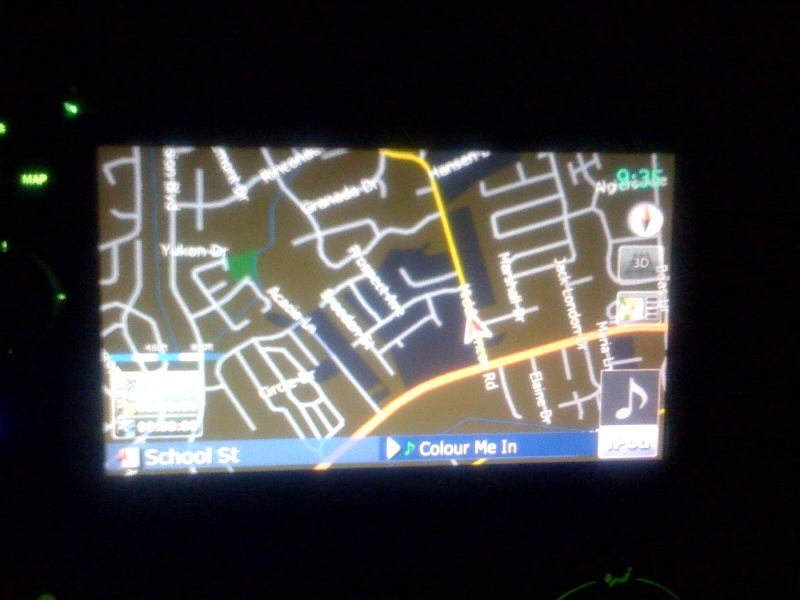
Is this normal color for a F90BT and is there a way to change it?
It started day one at a random spot and it went away but came back. I then did the 2.006 update and it is still there. I've tried to reset the system but it still shows in this color. Am I missing something? Is there a way to change the color of maps?
looks normal to me.
looks normal to me.
ok. I was just tripping because of the all the browns when all the videos online (IE: youtube, cnet) show the map in a lighter green. To be honest part of it is that it just looks ugly! ![]()
looks normal to me.
ok. I was just tripping because of the all the browns when all the videos online (IE: youtube, cnet) show the map in a lighter green. To be honest part of it is that it just looks ugly!
Colors can be changed (search the Hacks forum for "Color Schemes"). But depending on your location, colors will be different. Some terrain features might be coded in brown.
looks normal to me.
ok. I was just tripping because of the all the browns when all the videos online (IE: youtube, cnet) show the map in a lighter green. To be honest part of it is that it just looks ugly!
Colors can be changed (search the Hacks forum for "Color Schemes"). But depending on your location, colors will be different. Some terrain features might be coded in brown.
ah! that makes sesne. Cool. I thought that the map or the screen was just being weird. I'm heading to SF tomorrow so I'll see if the map changes.
I did see the hack for color changes but I don't mind the stock look at all. I'm waiting until 3.0 gets hacked to change anything. Hopefully we'll start seeing those SD cards showing up at our homes and some better performance. ![]()
Is this normal color for a F90BT and is there a way to change it?It started day one at a random spot and it went away but came back. I then did the 2.006 update and it is still there. I've tried to reset the system but it still shows in this color. Am I missing something? Is there a way to change the color of maps?
So I realized how to get into night mode and day mode. I didn't realize that this was a night mode and never notice the change of time as a reason that the screen would go dark colors like this.
It makes great sense to keep your eyes focused on dark colors for night vision. I still don't like it though, haha.