quick question , how do u open image.res to change a few icon than close it back 
Thanks Richard
quick question , how do u open image.res to change a few icon than close it back
Thanks Richard
winrar should work.
7zip is better 
Just rename it to image.7z and extract the content when you done, zip it up with 7zip and rename back to image .res
Job done
I seem to have intermittent luck. I'm using 7-Zip and use the 7z format when I rezip. Then change the extension from 7z to res. Some icons appear, others do not.
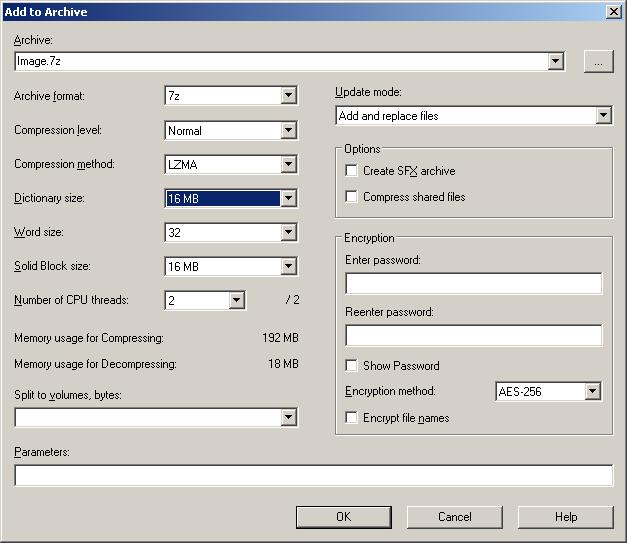
Can someone tell me What settings they have on their 7zip Archiver? Here's what's set on mine...
Archive format: 7z
Compression Level: Normal
Compression method: LZMA
Dictionary Size: 16 MB
Word size: 32
Solid Block Size: 16MB
Encryption Method: AES-256
I've also attached a screenshot.
cant seem to get image.res mod to work with new 3.01.. have to use one that came with it or it will not load
Any help
cant seem to get image.res mod to work with new 3.01.. have to use one that came with it or it will not load
Any help
I am using Guga's old theme and it works. His new one works too. Maybe you are putting it in the wrong place?
I seem to have intermittent luck. I'm using 7-Zip and use the 7z format when I rezip. Then change the extension from 7z to res. Some icons appear, others do not.
Can someone tell me What settings they have on their 7zip Archiver? Here's what's set on mine...
Archive format: 7z
Compression Level: Normal
Compression method: LZMA
Dictionary Size: 16 MB
Word size: 32
Solid Block Size: 16MB
Encryption Method: AES-256
I've also attached a screenshot.
try having the setting in zip rather than 7z
Doesnt work with "trial" versions. 
Doesnt work with "trial" versions.
Mine isn't a Trial.
Ok,
So I sat down for an hour last night trying different Settings and found the solution of what settings 7-zip needs to properly recompress (zip) the folder for Image.res.
Archive Format: 7z
Compression Level: Fastest
Compression Method: LZMA
Dictionary Size: 16 MB
Word size: 64
Solid Block Size: Solid
The setings I had to keep tweaking were the dictinary size and the solid block size. Im not sure if the word size makes a different, but the above settings is what worked for me. I'm also including a screen capture of the window.
I did notice that when you unzip the original Image.res with 7-zip, the output is a folder titled "Image" inside another folder titled "Image" with 4 folders inside of it. If you try to rezip the top folder (the first "Image" folder), it wont work properly. Instead, go to the next level (the "Image" folder inside the "Image" folder) and select that for archiving. When you finish archiving it, the result should be Image.7z. Just rename it to Image.res and copy it back to your device. PRESTO! Your custom icons should work!
Happy Moding!

Welp, anytime I try to delete and replace any image it comes up "Not Implemented"
Any thoughts?
Thanx,
Bud
Doesnt work with "trial" versions.
Mine isn't a Trial.
Mine is