Search Archive

questions for z110 with rear cam

By aleicgrant · Aug 08, 2009in General💬 20 posts👁️ 3,998 views
Posted Aug 08, 2009 · 23:08 UTC#1

is there a way to view you rear cam picture when driving and not just reverse?


also, was thining of getting the N2 pioneer back up camera but been reading about how far along the license plate cams have come. Does anyone own one to give me their thoughts?

Posted Aug 09, 2009 · 03:05 UTC#2

SETTINGS, MAP SETTINGS, VIEW MODE, REAR VIEW. It gives you about 3/4 of the screen to the left for rear view and 1/4 of the right for the map. The Boyo VTL420 is what I use and it is great. If you order your unit from Crutchfield you get that cam for free.

Posted Aug 09, 2009 · 03:09 UTC#3

would you mind terribly posting a picture of the screen when in reverse.


I have heard good things about Boyo but the negative always seems to be a very grainy picture both day and night.

Posted Sep 06, 2009 · 23:36 UTC#4

so is it not possible to have the camera pull up full screen like on kenwoods where u hold nav button for 3 seconds and the camera comes on, full view


i might be making this up, but for some reason i remember a rearview button on the top right of the source screen of the F series to pull up the camera

Posted Sep 07, 2009 · 01:36 UTC#5

The new Kenwood units show even a smaller rear view screen and do the split nav/rear view as well. The F series did allow full rear view but the Z does not, only nav/rear view.

Posted Sep 07, 2009 · 02:28 UTC#6
so is it not possible to have the camera pull up full screen


It's possible. You have to have the camera hooked up to an AV source (e.g. AV2). You have to change the camera polarity on to "GND" and then go to AV Source and choose whatever you have the camera hooked up to. You'll get a blank screen. You have to put it in reverse and then out of reverse and you'll get the full screen view. You won't be able to go to any other screen or mode until you put it in reverse, keep it in reverse, and go to "home" and change the camera polarity back to "battery."


See my vid here that shows this about half way thru or so:

Posted Sep 07, 2009 · 02:43 UTC#7

you can add a switch to the rev. wire to trigger it into thinking you are in reverse, you will need to add a diode to the wire so that when you flip the switch while your driving your reverse lights don't come on


it will still work when you put car in reverse like normal but if you are driving you can just flip the toggle switch

(wired to 12v) and the unit will switch to the camera input, but you must put diode in line with vehicle reverse wire,

Posted Mar 18, 2010 · 19:51 UTC#8
The new Kenwood units show even a smaller rear view screen and do the split nav/rear view as well. The F series did allow full rear view but the Z does not, only nav/rear view.


The Z actually does allow for a full rear view while driving, however there seems to be a glitch with this feature (in my opinion)


If you hold down the MODE button for about 3 seconds it will pop up the visual settings (brightness, contrast, etc...) and there will also be a button in the lower right that says CAMERA. if you hit this button it will switch the screen to show you the rear camera view. BUT FOR SOME STRANGE REASON you cant get the BRIGHTNES, CONTRAST etc... settings to go away. so in the end you can only see a small sliver of the camera view. it seems like this was obviously intended to allow people to quickly turn on their rear view camera while driving but my feeling is that they made a mistake with the programming and unfortunately make it so you cant actually see it.


i know about the split map screen that shows 75% camera and 25% map screen so that usually does the trick for our customers but it would be great if this intended feature actually works.


can anyone else confirm that their Z reacts the same way? Are you able to get the visual settings to go away so you can see the rear camera after holding the MODE button for 3 seconds?

Posted Mar 18, 2010 · 20:05 UTC#9

That's just about the dumbest thing I've ever heard.


There's a sliver of the view there so you can adjust the settings and see how they are affecting the picture.


It's not a programming error.

Posted Mar 18, 2010 · 21:06 UTC#10

how about:


"i think that screen is meant to allow you to adjust the camera's display settings, not to actually view the camera while driving"


but now that you say it, that makes perfect sense.

Posted Mar 18, 2010 · 21:30 UTC#11

I was about to respond in almost the same manner but Captain beat me to the punch. It is not a programing error. And you are out of line with your statement towards Captain. Do not let this get out of hand. It is best to just move on from here.

Posted Mar 19, 2010 · 03:03 UTC#12

You're right, I'm sorry about being rude.


I was in a mood this afternoon. It kinda came out on you. :oops:


But really, for as many bugs as their headunits seem to have, Pioneer DOES do extensive testing on their software before releasing it. Most programming errors (and if this were one, ones as blatant as this) would be found while testing.

Posted Mar 19, 2010 · 22:16 UTC#13

I installed an F series and I recall there IS a button at the top right of the screen where you can have the complete rear screen show the rear view as you drive. We hooked it all up as instructed in the manual, it was a small Panasonic camera we used with nice picture, got it on Ebay new for $100 shipped. Images were sharper then Boyo in my experience. Also good night images. I also think it was hooked to an AV port on the F series. But really to get to see the rear view while in motion forward it was not big deal or difficult to figure out.

Posted Mar 26, 2010 · 07:11 UTC#14

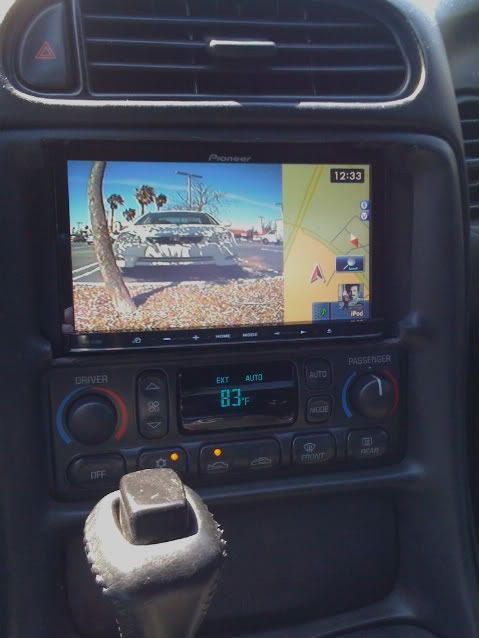
Here's a straight shot of the rear view cam in map mode.


IMG_91371.jpg


I'm using a Boyo frame cam. I forget which model number. But I'm very happy with it in day or night time use.

Posted Apr 05, 2010 · 09:19 UTC#15

Currently I am installing camera with Z110.


To utilize rear view in map mode. How do I connect power to camera?


My camera has RCA video out and power input.


Should I connect power to ACC or rear light lead?


If I connect power to rear light lead, How can camera turn on during rear view in map mode?


If I connect power to ACC, which means camera is alway on during drive.


I cannot see power connect from Z110 to camera.


Thank you

Posted Apr 05, 2010 · 14:29 UTC#16

Follow the instructions that came with the camera.

Posted Apr 05, 2010 · 20:01 UTC#17

Instruction manual says connect it to read light lead. But in this case, how rear view in map mode works? Unless rear view light on, camera will not receive any power.

Posted Apr 05, 2010 · 20:17 UTC#18

If you read the install instructions for both the unit and the camera, it makes perfect sense.

Posted Apr 05, 2010 · 21:11 UTC#19

Can you please explain to me? Thank you.

Posted Apr 06, 2010 · 00:22 UTC#20

Look over page 13 of the install manual for the 110. Then apply that to the install instructions for the camera.