Search Archive

N3 & CD-VC1 troubles

By rowat · May 14, 2006in Problems/Troubleshooting💬 15 posts👁️ 3,646 views
Posted May 14, 2006 · 03:25 UTC#1
Just wondering if anyone is using the AVIC-N3 and the CD-VC1 successfully? The remote seems to work flawlessly, but pressing the 'voice' button has no effect whatsoever, I do have the mic connected. The unit is bypassed, though I don't know why that would have any effect on it.
Posted May 14, 2006 · 23:41 UTC#2
Does it work when you press the voice button on the screen?

rowat said:
Just wondering if anyone is using the AVIC-N3 and the CD-VC1 successfully? The remote seems to work flawlessly, but pressing the 'voice' button has no effect whatsoever, I do have the mic connected. The unit is bypassed, though I don't know why that would have any effect on it.
Posted May 15, 2006 · 06:07 UTC#3
I'll have to check when I get another unit, I decided to return the one I had (it was an open box buy at Fry's) and they didn't have any others. Couldn't find any other units at any more Fry's, or CC... and Pioneer's website hasn't been responding for me this weekend.
Posted May 23, 2006 · 03:53 UTC#4
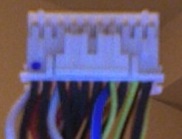
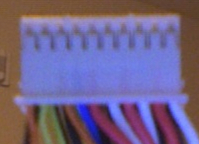
Finally got the new unit in, ordered from Crutchfield, took forever to get here. Anyway, there is no voice icon that appears on the screen to press, looking at the book I see where it would be, but it doesn't appear on my screen. Since the button still doesn't work, I'm guessing it doesn't see the mic. I pulled the secondard harness (the one with the mic input on it) and rang the wires out to make sure they rang all the way through, and they do. I can test the mic and watch the resistance change while making noises into the mic, so its working. I'm now down to either a) my n3 is busted, or b) the harness is pinned wrong. I think all those plugs are assembled by hand so I'm curious to see what someone elses harness looks like.
Attached Files (2)
Photo 2.jpg
Photo 2.jpg
Photo 1.jpg
Photo 1.jpg
Posted Jun 07, 2006 · 14:54 UTC#5
It sounds like it doesn't recongnize that the mic is installed. Is there a Menu setting that needs to be changed? Check the Navi menu and go to Volume and turn Voice Recognition On.

-Scott
Posted Sep 25, 2006 · 23:00 UTC#6
I was curious if you found a solution to your problem. I am currently having the same problem. All of my wiring in correct. The mic is plugged in and nothing. There is no voice icon on the screen either. Any suggestions?
Posted Sep 26, 2006 · 00:05 UTC#7
citytrooper said:
I was curious if you found a solution to your problem. I am currently having the same problem. All of my wiring in correct. The mic is plugged in and nothing. There is no voice icon on the screen either. Any suggestions?


Did ypu turn on the voice recognition?
Posted Sep 26, 2006 · 00:54 UTC#8
Are you sure you plugged it into the wire marked "Mic Input" on the extra pigtail harness? Common mistake to plug it into the wired remote input by accident

citytrooper said:
I was curious if you found a solution to your problem. I am currently having the same problem. All of my wiring in correct. The mic is plugged in and nothing. There is no voice icon on the screen either. Any suggestions?
Posted Mar 06, 2007 · 08:42 UTC#9
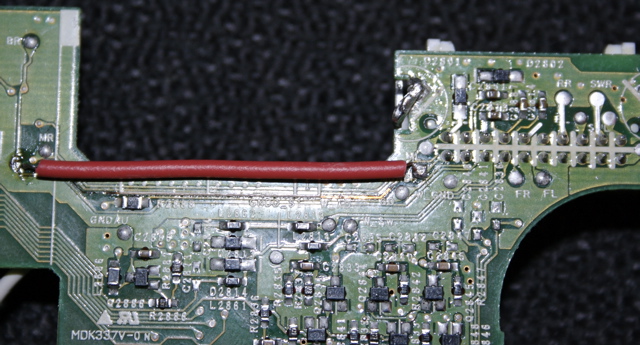
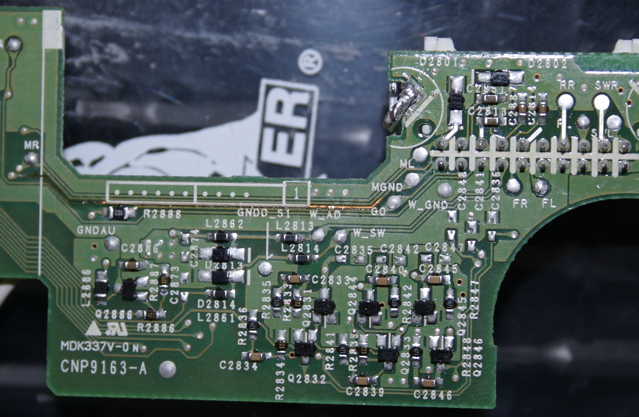
I finally had some time to spend to get to the root of the problem. Service manual in hand, I disassembled the N3 until I found that the Mic Ground trace on the board that had the input connector for the mic cable had been burned through. I bought the unit off ebay supposedly new, but its possible it came to me that way, or its possible that maybe the first mic I got was bad in a bad enough way that it shorted it out (the manual does say not to remove or connect the mic with the unit powered on). I jumpered past it with some wire, and now I've got voice recognition goodness! Before and after attached.
Attached Files (2)
IMG_0357.jpg
IMG_0357.jpg
IMG_0352.jpg
IMG_0352.jpg
Posted Mar 06, 2007 · 11:07 UTC#10
So i guess you didnt get it from crutchfield like you said u did?
Posted Mar 06, 2007 · 12:55 UTC#11
I never had any problems with the VC1, other then the fact that its completely useless.

Actually it was worth it for the remote, which I use a lot. The voice commands though; theres really nothing I can say thats any easier then simply pressing the button on the screen.
Posted Mar 06, 2007 · 18:24 UTC#12
PaisanNYC said:
So i guess you didnt get it from crutchfield like you said u did?

I bought the 2nd VC1 from crutchfield, not the N3, I had bought the first VC1 at frys, it didn't work, so I returned it and got another.
Posted Mar 06, 2007 · 21:56 UTC#13
madmanfrommars said:
I never had any problems with the VC1, other then the fact that its completely useless.

Actually it was worth it for the remote, which I use a lot. The voice commands though; theres really nothing I can say thats any easier then simply pressing the button on the screen.


ditto
Posted Mar 08, 2007 · 11:52 UTC#14
madmanfrommars said:
I never had any problems with the VC1, other then the fact that its completely useless.

Actually it was worth it for the remote, which I use a lot. The voice commands though; theres really nothing I can say thats any easier then simply pressing the button on the screen.


But if you didn't hack the unit, you wouldn't be able to press many of the buttons on the screen to adjust your route, or creating a new route without first parking the car and applying the parking break. So it's not very useful if you have bypassed your unit... I agree that the remote is great, and I do use voice quite often to get to my address book entries and to quickly cancel a route, or to find the closest gas station to where I am driving.

But if you had a un-bypassed unit, then the voice module becomes much more useful.
Posted Mar 08, 2007 · 12:58 UTC#15
I've yet to bypass my unit, and I still don't use the voice commands. :lol: