Search Archive

'03 Nafigator with DVD Video and Dual Source Question

By 03Naviguzzler · May 14, 2006in General💬 5 posts👁️ 1,712 views
Posted May 14, 2006 · 19:13 UTC#1
ducatiboy said:
I posted pics of my install in the "post pics of your install" thread, but here they are again:
http://www.sminnick.com/AviatorRadio/
.


Ducati...since the Aviator is the cousin of my Navigator...


I am strongly considering the Z1 for these reasons.

My current Nav system is good (one of the best) but...

The sound quality is crappy

I've already put in new Amps, a separate Bass Box etc etc...however

I have XM, modulated (which blows)
I have a Blue Tooth Phone with no functionality
I have an IPod Video (2 actually) and the interface is FM modulated (again crappy sound)

A few questions have come up in my mind when talking with the Tweeter guy I've been dealing with.

1. How do I keep the Dual Source muting feature with the DVD Video Screen in the back for the kiddies? This is my main question, since I can't afford to put in a whole new flip down screen DVD in the back as well, will I be able to listen to any source (other than DVD) and listen while the DVD is playing through headphones from the back?

Here are a few more questions...if they were answered elswhere let me know...

2. The "XM Traffic" feature is this a realtime thing and how good does it work...I am in the DC area and I'd really love to hear from someone (like you) with this feature and some feedback

2. Steering Wheel Controls ... Are they as good?
3. The "ripping" feature, can it pull mp3's off your iPod.
4. What bitrate does it put the songs on the HDD at?

The Navigation Interface and Controls... I've had NAV in my Lincoln for 3 years now and it's very intuitive with large icons and zoom button etc. When I saw the Z1 at Tweeter, the controls seem small and placed in weird places.. (assuming your Aviator have OEM Nav) what's been your experience so far with the Z1 Nav...

Thanks to everyone who put this forum together.

I got the site link from the main Tweeter Installer so obviously the word is spreading and everyone involved should be proud of their efforts.

Capstone
Posted May 14, 2006 · 19:16 UTC#2
I really need to spell check better...Especially since I can't edit posts as a Guest... :)
Posted May 15, 2006 · 06:02 UTC#3
I've done similar installs in Excursions and Expeditions and for this reply I'll assume your Navigator is similar. The factory deck and the overhead video system are connected together with a data control wire. That means that the overhead gets a digital turn on signal from the deck in the dash (will probably be a green/? wire that will read between 8 and 10v DC on a multi-meter). If that's the case, you'll have to relocate your factory headunit when you put in the AVIC. Otherwise, your overhead won't get it's turn on signal. Once you do this, you'll be able to hear the sound from the overhead through the IR emitters (headphones) or you can find the correct wires to interface with the AV in on the avic and play through the speakers. I didn't do this, but there are about 20 very small gauge wires up there. I think the ones for video were yellow.

For steering wheel controls, you'll want to use something like the Peripheral Electronics PESWIPS and it'll work great.

The Pioneer nav interface is one of the best, in my opinion, but it does a lot of stuff so like anything else that's complicated it'll take a bit of a learning period to get used to.
Posted May 15, 2006 · 17:10 UTC#4
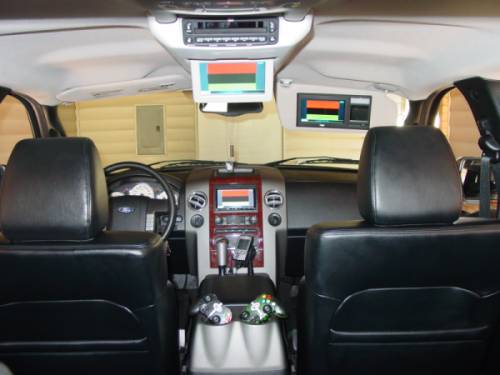
I have a 2005 F150 with the overhead entertainment system and we had to relocate my factory headunit in the dash behind the Z1. I can play a DVD on the Z1 and have it played on all monitors, but if my kids do not want to watch that they can put in a DVD in the overhead and listen to it on their headphones. My wife can watch the DVD on her visor monitor or we can listen to whatever music we want. I hope this message and the picture helps you out.

Navyguy
Attached Files (1)
DSC00251small.jpg
DSC00251small.jpg
Posted May 17, 2006 · 19:56 UTC#5
From my understanding from the manual, you can have two sources playing at once. You can "send" one source to the AV outputs while keeping a seperate source up front. Thats why they offer the "back seat" remote. It will control the second source without having to change the screen on the main z1 display. I have a monitor in my sequoia and will be wiring it as a second zone this weekend (right now it has it's own dedicated DVD player.) I'll report back on how it goes.