Can anyone tell me if the colour schemes which were developed for V2.000 will work ok on V3.00?Thanks guys.
Posted Sep 09, 2009 · 21:41 UTC#1
Can anyone tell me if the colour schemes which were developed for V2.000 will work ok on V3.00?Thanks guys.
Can anyone tell me if the colour schemes which were developed for V2.000 will work ok on V3.00?Thanks guys.
Generally, yes. Format is the same.
Some schemes (i.e. Xerces, Real View...) that have sky/sun/moon etc. graphics in them require that said graphics actually be present in GFX folder. iGO 8.0 ignored them, but iGO 8.3 in new firmware will actually try to use them if the scheme calls for it.
Thanks for your reply Boris.The trouble i am having is that whatever scheme i choose,they all turn blue when zoomed in.When i zoom out the colours appear ok!!!Any ideas?Thanks again for your interest.
Thanks for your reply Boris.The trouble i am having is that whatever scheme i choose,they all turn blue when zoomed in.When i zoom out the colours appear ok!!!Any ideas?Thanks again for your interest.
What exactly does turn blue? Is it in 2D or 3D mode?
It is the background in both 2D and 3D.When you zoom out the blue is actually an oblong shape ie a blue section within the map.As you zoom out the Blue section disappears only to reappear as the auto zoom cuts in or if you manually zoom back in.It reminds me of a Garmin type colour scheme(like from a cartoon)Hope you can understand but it isn't easy to explain.
It is the background in both 2D and 3D.When you zoom out the blue is actually an oblong shape ie a blue section within the map.As you zoom out the Blue section disappears only to reappear as the auto zoom cuts in or if you manually zoom back in.It reminds me of a Garmin type colour scheme(like from a cartoon)Hope you can understand but it isn't easy to explain.
Strange... Really have no idea what it could be... Can you snap a picture of it?
OK Boris thank you.I am away for the weekend but will send photos when i get back home.Do you think this could be a map problem.I installed V3.00 from this site along with updated maps.When I reinstalled my original FD with 2.006 everything worked fine(map colour wise)I have put 3.00 back on with nrw maps and the colour ptoblem has returned.Thanks again for all your help.
OK Boris thank you.I am away for the weekend but will send photos when i get back home.Do you think this could be a map problem.I installed V3.00 from this site along with updated maps.When I reinstalled my original FD with 2.006 everything worked fine(map colour wise)I have put 3.00 back on with nrw maps and the colour ptoblem has returned.Thanks again for all your help.
Well, it could be... although I do not see how. I'll wait for the pictures.
Hi Boris,
Have attached a few pictures which will I hope show my problem.Your thoughts are very much appreciated.
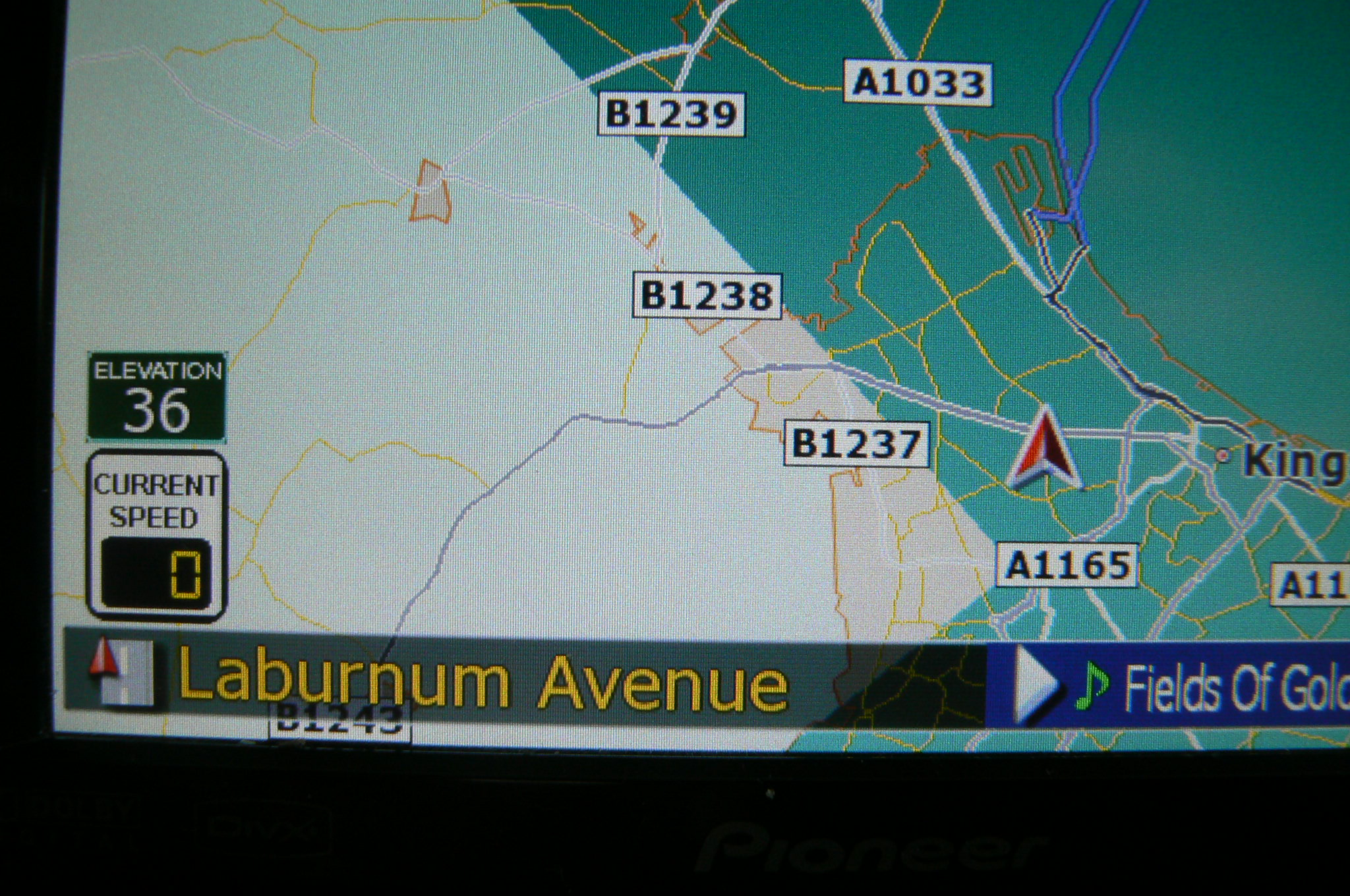
Boris.Latest update.Managed to DL and get working the latest UK maps and hey presto!All colours now OK.Must have been something to do with the previous map?Thanks again for all your help and advice.What do you think?
Boris.Latest update.Managed to DL and get working the latest UK maps and hey presto!All colours now OK.Must have been something to do with the previous map?Thanks again for all your help and advice.What do you think?
Hmmm... It sorta looks like the old maps did not have urban/non-urban areas mapped properly. From what I see on the pic, the part on the left looks like the urban area (landscape not displayed, city colors) and blue-green part is "wilderness", sorta... If new maps make it work, must be the mapping problem...
I got the same large blue areas when i used Tomolas ver3 and maps, when I used his flash upload and the latest teleatlas uk 2009 map all was ok so i put ver 3 in my pc emulator and got the same blue areas using Pioneers UK map but ok with teleatlas map, I figured it may be to do with Pioneer trying to stop pirate copying of ver 3 ?
I have since persuaded Pioneer UK to free issue me the SD's for version 3 and have now installed it and using the same map have no blue areas.
Pioneer UK were very undersatanding of my situation when i told them that i did not expect 2007 maps and dodgy firmware in a newly purchased unit they resisted to start with but after a few phone calls explaning my dissatisfaction with the slow keypad response, poor display contrast and the fact that the Pioneer distributor store i bought my F900Bt was not even on the map they aggreed to and did send me the new firmware and maps FOC, it works much better now but i am missing the GTIMATT mods, please Matt if you are reading this, do a new version.
Hi Brian.That is interesting,thank you.How on earth did you manage to get a free update?On the few occasions I have contacted them they didn't seem to be aware that V3.000 even existed....or so they told me. 
It took about four phone calls and me insisting it be escalated until someone would take my gripes seriously but I finaly got a sympathetic ear in the customer support dep't (or they got fed up with me calling) and explained my list of things that I thought made my purchase unfit for purpose and warranted either money back or an update and they agreed to let me have the upgrade pack.
I have to say it has in the main fixed most of my problems, it has added a new one, when using POI's to show petrol stations some that were fine in ver 2 are now in the wrong place, an example is my local BP garage is now on a major railway line instead of being on the A5, its about 2 miles out, I am not sure if I can re locate it, if someone knows how to please let me know. (I do mean relocate it on my map  )
)
If you think you have a case prepare it well before calling and put it to them politely and stick with it, they know version 2 was buggy and slow and they are quite understanding, they will try to get out of letting you have a FOC update of course but if you get the right person on the right day and are polite and state a good case they may look after you.