Search Archive

Compass complexity in Gurjon Skin

By diaftia · Sep 09, 2009in Hacks/Mods💬 10 posts👁️ 1,323 views
Posted Sep 09, 2009 · 23:08 UTC#1

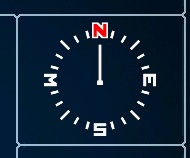
I am having a problem getting the compass working correctly in a mod I am working on. The problem is its pulling the OEM image but I cant find a place where the image name is specified. In the Gurjon skin he uses a rotating compass and in most of our mods there is a sliding compass. The compass I want to get working is this one:


The way this compass works is the needle stays static and the NSEW dial rotates.


This is what I am getting:


In the above compass the compass needle rotates as if its expecting the NSEW image in the top image. Yet the code that I am using is the same in both of these cases:


	;-- Compass


Does anyone know why I am getting the original needle or how to change that image? Where is the compass defined? My navitagemap uses the IDT compass and works fine.


Thanks,


Alex
post-26802-12872758924078_thumb.jpg

post-26802-12872758924276_thumb.jpg

Posted Sep 10, 2009 · 21:44 UTC#2

Anyone know where that diamond needle comes from? Sorry, getting impatient and want to get this thing released! ;)

Posted Sep 10, 2009 · 22:22 UTC#3

.VPR files.

Posted Sep 10, 2009 · 22:31 UTC#4
.VPR files.


Newbie question - where are the VPR files? I've tried searching both the base gurjon files, the backup flash I have, and the internal data.zip.


Thanks,

Ben

Posted Sep 11, 2009 · 02:50 UTC#5

Boris: thanks for the info. I thought I checked those and they were just coordinates for the compass rotation. Maybe I missed one though.


Ben: I am mobile right now but I could swear they are in the common directory. I will check tonight once I get my vmware running on my new mac.

Posted Sep 11, 2009 · 03:52 UTC#6

for the first compass image use this code, assuming you already have the vpr's


Posted Sep 11, 2009 · 06:32 UTC#7
for the first compass image use this code, assuming you already have the vpr's


Thank you! I am going to have to go try this tomorrow!


Where did you find it?

Posted Sep 11, 2009 · 09:05 UTC#8

the code is already there, i just did

for the first compass image use this code, assuming you already have the vpr's


Thank you! I am going to have to go try this tomorrow!


Where did you find it?


the code was there, i just played with all the compass scripts

Posted Sep 11, 2009 · 16:48 UTC#9
Boris: thanks for the info. I thought I checked those and they were just coordinates for the compass rotation. Maybe I missed one though.


Ben: I am mobile right now but I could swear they are in the common directory. I will check tonight once I get my vmware running on my new mac.


They are actually vector graphics describing how the compass looks. Color (normal RGB) is there as well.

Posted Sep 12, 2009 · 04:12 UTC#10
Boris: thanks for the info. I thought I checked those and they were just coordinates for the compass rotation. Maybe I missed one though.


Ben: I am mobile right now but I could swear they are in the common directory. I will check tonight once I get my vmware running on my new mac.


They are actually vector graphics describing how the compass looks. Color (normal RGB) is there as well.


Ah ok... something I need to look into in more depth and learn on. Some beta testers have mentioned that this compass is more jerky than the speed dial compass that moves more smoothly. These are the video's I was given. The first video is of the round compass, and the second of the Cruise screen compass.


http://www.mediafire.com/file/yi2imtzwkin/Compass.mov


http://www.mediafire.com/file/2wymmmeyl4n/IMG_0187.MOV


Is that the same config files doing this or is that just the nature of the beast?