Pioneer has just released an AVIC Feeds application for your iPhone!
You can now find a location using google maps on your iPhone and send the destination via Bluetooth to your AVIC-Z110BT or U310BT.
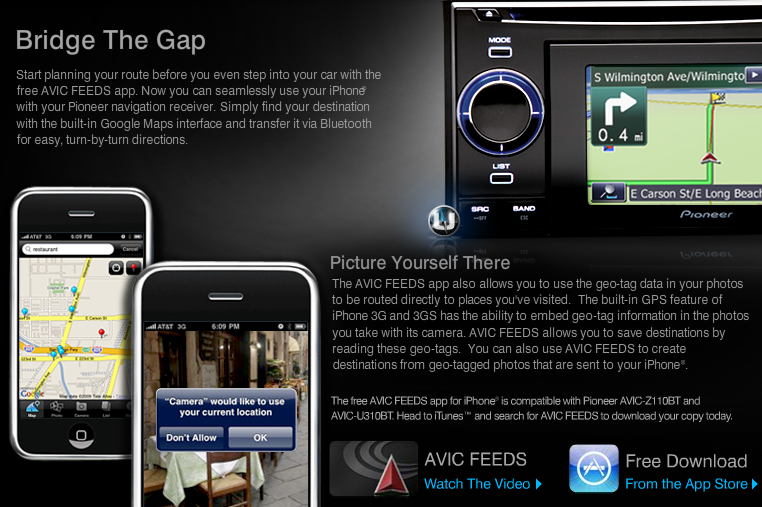
Pioneer has just released an AVIC Feeds application for your iPhone!
You can now find a location using google maps on your iPhone and send the destination via Bluetooth to your AVIC-Z110BT or U310BT.
tits
I just received an e-mail from Pioneer about it too. I don't own an iphone or ipod, but getting this navi unit might force me to get at least one of them.
Well this came out of nowhere.  I will be testing this and possibly doing a video demo of this soon.
Ok first problem found. The ability to use geo tagged photos to plot your route only works if the photo is in your camera role. If it is in your photo album the app wont see it to allow you to save it as a photo to route from.
Just did an overall test of the app and it does seem to work pretty well. The photos section of the app at this point is useless though sense it doesn't allow you to use previous photos stored in your photo album.
I tested this today, and was able to use a photo taken earlier (a week ago) and it did work.
Yes, you must select it from the Camera Roll (not an album), and for some reason it took a long while to appear on the head unit, but it (eventually) showed up.
If they wanted to really make it useful, they would implement
(a) being able to click on the ADDRESS of a contact to send the search results to the maps app, to then return the address location
( use the full google maps functionality (rather than the cut-down embedded version in their app)
Rob
How come no x910 or x710 love?
why is it the lowest and highest end units work with this but not the mid range? this would be great for the mid range x and f series
yeah im bummed, I have an iphone but the F900 
apple should just shut down these posers and make car stereos 
Probably has to do with the bluetooth chip they buy from Parrot. The U and new Z are truly "new" models, the 710 and 910 are just F series with different software, so maybe the old bluetooth chip and/or software didn't have the bluetooth profile that the iphone needs to send the info
Pardon the noob question here, but would an update to the BlueTooth software make it compatible? 
Apparently not, or they would've added it to the X models
This may also be intentional. This is how they separate the value of the more expensive unit from the budget unit.
It's a Bluetooth chip compatibility issue.
At least you can use Avic Feeds with the F-series and X-series by transferring via USB or SD card, according to Pioneer...
I just ordered the Z110 so I guess I will get full functionality  . I was going to get X710 or 910, but they were out of those...
This app is certainly a powerful addition to the nav unit. I used it last night actually to find a restaurant that was not included in the POI database of the unit. I was able to find the restaurant with the iphone app, re sync my BT contacts, and choose the POI from contacts all on the fly in real time while driving down the road. Awesome!!!
I wish this app could draw address information directly from my iPhone Calendar. That would let me send all of my scheduled trips for the day directly to the AVIC. The current method is nothing but a duplication of work that's already been done.
I tested this today, and was able to use a photo taken earlier (a week ago) and it did work.Yes, you must select it from the Camera Roll (not an album), and for some reason it took a long while to appear on the head unit, but it (eventually) showed up.
If they wanted to really make it useful, they would implement
(a) being able to click on the ADDRESS of a contact to send the search results to the maps app, to then return the address location
(
Rob
I found a possible solution to this, though I agree they should have included this in the app:
1. In Itunes I selected sync with Google Contacts and then all my contacts were synced into my gmail account (once I logged in).
2. Went to my gmail account and opened a contact with an address and it had a google map link, click on that and then you can send the result it to Pioneer just like you looked it up manually (dunno why Google maps doesn't save "send to Pioneer" as my default). Of course if this could all be scripted for all your contacts it would be nice... At least it's less typing...
3. It seems like you have to save the results to a .KML file (you will be prompted if you try to leave the Google Maps page of Avic Feeds) and then go to the previous window and then you can open the .KML file and send it to the SD card.
Haven't gone through and tried importing it on the Z (where the Avic Feeds button is greyed out normally), but seems like this would be the process...
Can you say CLUNKY??
Has anyone figured out if this iPhone app can also be installed on an iPod Touch?
I've got a 2nd Gen iPod Touch that has bluetooth, it seems logical that it should work, right?
Seems like a very cool app to have. Unfortunately iTunes won't let it install for me. If anyone has any suggestions as to how to get this installed on an iPod Touch, please feel free to throw it out there.
Is there a Windows Ce\Pocket PC version or type program of this program that does the same thing
Has anyone figured out if this iPhone app can also be installed on an iPod Touch?
The app is only developed to be supported on the Phone so there is no official support intended for the Touch. There may be a way to get it installed if you hack the Touch but I would bet on it.
Is there a Windows Ce\Pocket PC version or type program of this program that does the same thing
To run on what device?