Search Archive

Z2 Screen Color Problem & Sirius Song/Artist Listing

By PhilR · Oct 18, 2009in Problems/Troubleshooting💬 5 posts👁️ 670 views
Posted Oct 18, 2009 · 18:11 UTC#1

Hey All,


Thanks for looking. I just spend some time searching the forums and instruction manual but can't seem to find out what is happening with my recently installed Z2 (upgraded to Z3).


My screen will randomly change from the blue themed display to yellow. I'll start up and the screen will be the correct blue background, and five to thirty minutes later the blue disappears and the ugly yellow takes over. Then blue takes over a while later. Weird. All screens are effected, it's like on old school television with the blue ray tube burnt out. I thought it might be the light sensor pushing the unit into a night mode, but the ambient light can be unchanging and super bright when the screen switches. Headlights on or off makes no difference.I have the unit set on "Daylight" mode instead of auto, but that setting doesn't make any difference either. Am I missing something super simple?


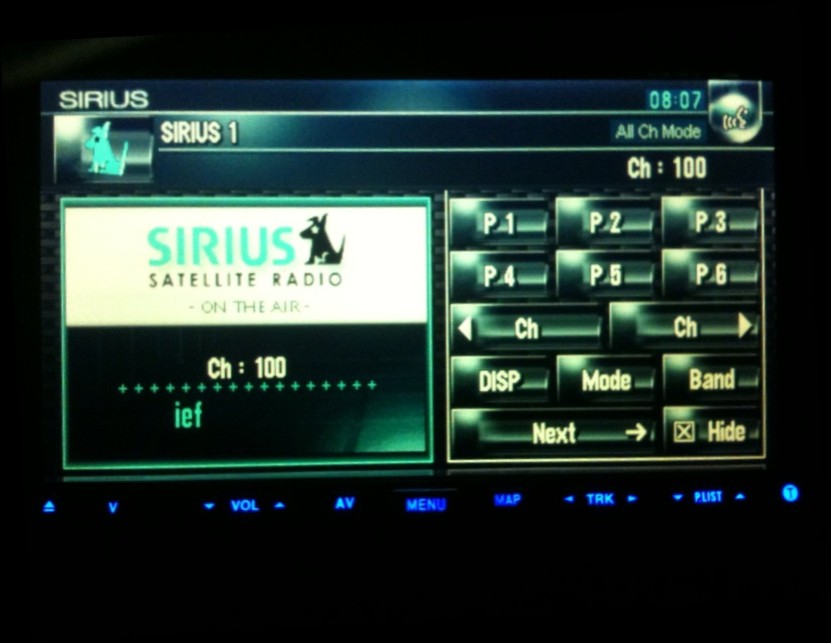
I also have the Sirius unit set up on the Z2. It's pretty annoying to press the "Display" button on the screen to toggle between the artist and song listing. Is there any way to get both to display at the same time like most other Sirius receivers do? There is so much room for display info, it seems really counter intuitive not to display it all at once instead of making the user cycle through four choices each time.
Posted Oct 18, 2009 · 19:00 UTC#2

For your screen question, it sounds like the ribbon cable is going bad. A new screen is pretty cheap (I think like, 50 bucks). Search around for some threads on replacing the screen, a few members have done it and it is a breeze.

Posted Oct 31, 2009 · 05:11 UTC#3

What's really strange is that the rear view camera screen is normal, but when the truck is out of reverse, the screen goes back to the yellow tint. Screen shot below.


With the Sirius issue, doing some searching on other parts of this board it becomes obvious that the interface simply sucks.


Another issue, my 2-D navigation screens will show the vehicle tracking left to right with the arrow at a weird angle. Isnt' is supposed to track up and down unless the "North" feature is selected? The driver's view angle also seems to be showing what would be seen out of the left side of my truck instead of straight ahead. Any ideas?


Thanks!

post-38305-12872759877916_thumb.jpg

Posted Oct 31, 2009 · 05:13 UTC#4

Check your installation angle setting. I think it's under Hardware, can't remember off the top of my head. You'll know it when you see it though.

Posted Oct 31, 2009 · 23:50 UTC#5

Figured out the navigation issue. Resetting the 3D learning option fixed the problem. Now on to the yellow screen..