Search Archive

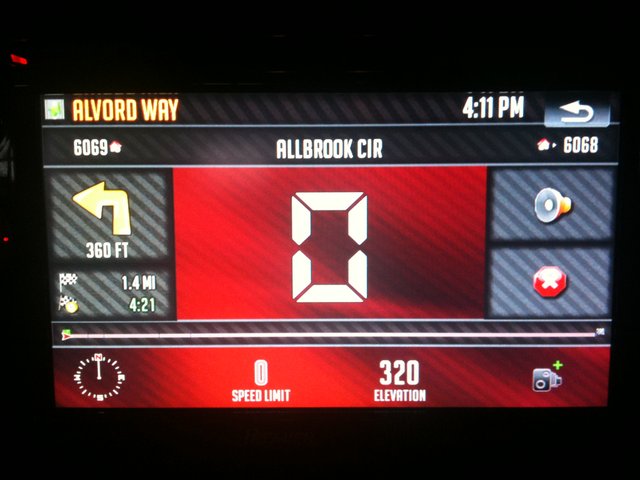
HOW TO: Add Daftia's Digi-Speedometer screen

By gnasr74 · Jan 05, 2010in Hacks/Mods💬 18 posts👁️ 4,885 views
Posted Jan 05, 2010 · 14:50 UTC#1

I have been trying to add Daftia's speedometer screen to my data file, but have been unsuccessful. Daftia has been helping me, but still can't get past startup screen. What I have done is add the 2 different fonts, spr files, the 2 ui files and edited the main.ui. I also looked through the nav.ui file and there is also no mention of the digispeedometer in the nav.ui file.

I added these to the 800 480 folder:

AJG_Carbon.bmp, AJG_ico_speedcam_add.bmp, AJG_infobutton.bmp, blackstripe_hnum.bmp, k_header_2.bmp, k_house_left.bmp, k_house_right.bmp, k_info_bg_2.bmp, k_mute_off_2.bmp, k_mute_on_2.bmp, k_on_road_next.bmp, k_stop_nav_2.bmp.

AND these to the common folder:

clock.bmp, destpoint.bmp, Mute.bmp, speed_cams_small.bmp, viapoint.bmp, compass_sp_ro.vpr, compass_n.vpr, speed_cams_small.spr.

I cant figure out what i am doing wrong. Has anyone successfully added this to their file and would be able to help, I would really appreciate it. I believe I am missing something from the nav.ui file or the template file, but I am not a coder, just a copier.

thanks
post-29366-12872760692599_thumb.jpg

Posted Jan 05, 2010 · 17:53 UTC#2

You really need to launch it in testmode since you dont have an emulator and see what error it is throwing you. You have nothing to go on until you do that.

Posted Jan 05, 2010 · 23:05 UTC#3

What nav mod do you want to add this to? This speedometer screen is available in most nav mods, it just looks different and that is easy to change

Posted Jan 06, 2010 · 04:20 UTC#4
What nav mod do you want to add this to? This speedometer screen is available in most nav mods, it just looks different and that is easy to change


I think he is the one running cmh's mods still.

Posted Jan 06, 2010 · 14:13 UTC#5
What nav mod do you want to add this to? This speedometer screen is available in most nav mods, it just looks different and that is easy to change


What are the steps to use this speedometer screen?


I copied over the bmp files but did not get the screen.

I am using Andr200/Stan 3.0 data file.


Thanks

Jimbo

Posted Jan 06, 2010 · 15:49 UTC#6

Yes I am still using cmh's mod. It seems to be unpopular but I like the original clean configuration of the screen and the blue boxes. As you know abb1, I also created a customized blue image file to match and changed the bmps in the data file to match as well. it would take too much time to start over with a mod and change it back to the screen and shortcuts, etc....that I like. I have already spent too much time getting it to where it is now, you all know how much time it takes. I used cmh's original mod but added so much to it like trip computer, cruise dials, custom settings, elevation and speed limit images, speedcams and so much more. Anyway i am basically finished with my mod and really haven't done much to it in a while. I added a 3D car and am looking for a 3D pickup truck and was hoping to just add this speedometer screen. If i can't get it to work, then it is okay because I like the way my mod is right now. If i can get the speedometer to work than its a bonus. So thanks for your help guys.

Posted Jan 06, 2010 · 19:46 UTC#7
Yes I am still using cmh's mod. It seems to be unpopular but I like the original clean configuration of the screen and the blue boxes. As you know abb1, I also created a customized blue image file to match and changed the bmps in the data file to match as well. it would take too much time to start over with a mod and change it back to the screen and shortcuts, etc....that I like. I have already spent too much time getting it to where it is now, you all know how much time it takes. I used cmh's original mod but added so much to it like trip computer, cruise dials, custom settings, elevation and speed limit images, speedcams and so much more. Anyway i am basically finished with my mod and really haven't done much to it in a while. I added a 3D car and am looking for a 3D pickup truck and was hoping to just add this speedometer screen. If i can't get it to work, then it is okay because I like the way my mod is right now. If i can get the speedometer to work than its a bonus. So thanks for your help guys.


Did you ever launch ezrider in testmode? Any error?

Posted Jan 06, 2010 · 21:45 UTC#8

I haven't tried the ezrider or emulator yet but I have come to the realization that i need to upgrade to Daftia's mod or IDT's mod.

I guess I am going to start with either one as a base and change it to match my screen. I wanted to avoid basically starting over if I used those DATA files, but it is inevitable. Anyway thanks a lot for everyone's help.

Posted May 20, 2010 · 19:18 UTC#9

Did you ever launch ezrider in testmode? Any error?


Hi Daftia,

I have successfully added your splitscreen and now I see how great this emulator is now that I have learned to use it.

The error I am getting is the following:

FFUIERROR: Parse error [ expected]

Posted May 21, 2010 · 01:17 UTC#10

I don't really even know what a parse error is or else I would try to troubleshoot it.

Posted May 21, 2010 · 16:10 UTC#11
I don't really even know what a parse error is or else I would try to troubleshoot it.


It means that the source file is so incorrect that iGO does not even try to execute it, because it does not meet certain requirements. In this case, as from the error message, there is a layer that has an opening tag but not the closing one, so it pretty much never ends.

Posted May 21, 2010 · 22:37 UTC#12
I don't really even know what a parse error is or else I would try to troubleshoot it.


It means that the source file is so incorrect that iGO does not even try to execute it, because it does not meet certain requirements. In this case, as from the error message, there is a layer that has an opening tag but not the closing one, so it pretty much never ends.


I just do not see how that is possible since all I did was add the 2 ui files and edited the main.ui. Other than that, all I did was add the bmps and sprites. I am assuming there is something that needs to be added to the variable_def.ui file or the navigate.ui file that I am missing for this mod.

Posted May 22, 2010 · 17:15 UTC#13
I don't really even know what a parse error is or else I would try to troubleshoot it.


It means that the source file is so incorrect that iGO does not even try to execute it, because it does not meet certain requirements. In this case, as from the error message, there is a layer that has an opening tag but not the closing one, so it pretty much never ends.


I just do not see how that is possible since all I did was add the 2 ui files and edited the main.ui. Other than that, all I did was add the bmps and sprites. I am assuming there is something that needs to be added to the variable_def.ui file or the navigate.ui file that I am missing for this mod.

Either one of the new UI files has an error, or may be when you edited main.ui, you did not close comment or something like that...

Posted May 22, 2010 · 18:48 UTC#14

It means that the source file is so incorrect that iGO does not even try to execute it, because it does not meet certain requirements. In this case, as from the error message, there is a layer that has an opening tag but not the closing one, so it pretty much never ends.


I just do not see how that is possible since all I did was add the 2 ui files and edited the main.ui. Other than that, all I did was add the bmps and sprites. I am assuming there is something that needs to be added to the variable_def.ui file or the navigate.ui file that I am missing for this mod.

Either one of the new UI files has an error, or may be when you edited main.ui, you did not close comment or something like that...


Now I understand what you are saying and I kind of figured that was the problem after searching to find out what a parse error is. You are probably right, but since this mod is working in Daftia's and Abb1's mods, then the ui files should be fine. i am going to go through them again and see if i missed the code error. Thanks Boris, I appreciate your responses and help.

Posted May 23, 2010 · 14:23 UTC#15

I went through all the code to see if I am missing the layer that has an opening tag but not the closing one. And can't find it. This should be an easy mod, but I can't get it to work.

Posted May 23, 2010 · 18:46 UTC#16

This is crazy. I figured maybe i would try Abb's code for the digispeedometer since i was getting a parse error for the code, but i am getting the parse error even with Abb's code. This leads me to believe that I am missing a code form another file. Any ideas?

Posted May 24, 2010 · 19:08 UTC#17

That error is totally vague in what its telling you. Basically what I have found is that error means "there is a problem that is most likely syntax related". Gee, thanks for the info. ;)


I have had that error come up when commenting something out that I accidentally used a : for rather than a ;.


Where I would start is by making sure that you have all of the template= referenced correctly. So if there is a template= command do a search for whatever it equals to be sure it exists. If you are sure that all of your templates exist as well as all of the images and SPR/vpr files are copied over then you should start commenting out the code.


So comment out sections leaving the layer tags in place. Uncomment out a section at a time until you find your error. Once you find the section that is the offender then start with several lines at a time.


Also make sure that all of the layers that the speedo.ini is loading exist. Let me know how it goes.

Posted Jun 09, 2010 · 03:58 UTC#18

finally got it to work. What a bitch it was to find this error. You were right Daftia, I forgot to add these 3 template lines in the navigate800_480.ui file.

.


If anyone is looking to add this mod, also do not forget to add a button for this ...... onrelease='nextstate ST_DigiSpeedometer'.

Enjoy :D