Search Archive

Signpost issues

By diaftia · Mar 22, 2010in Hacks/Mods💬 21 posts👁️ 3,900 views
Posted Mar 22, 2010 · 20:22 UTC#1

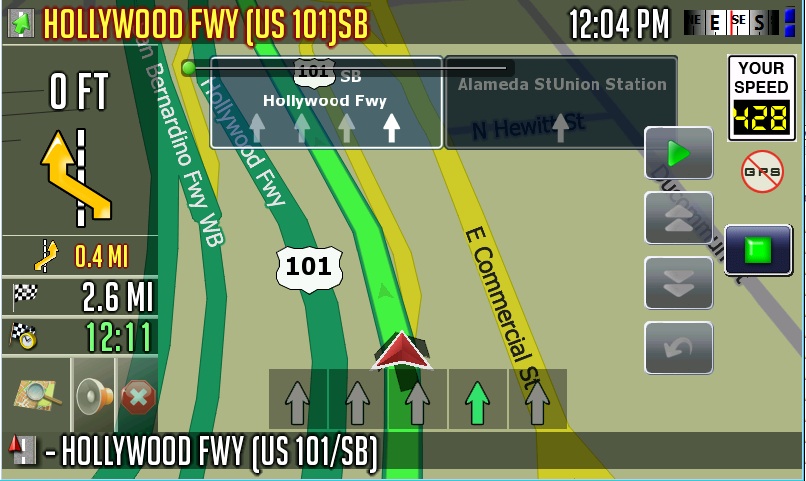
I am wondering if anyone has some expertise in the area of signposts? I have a problem where my signposts are no longer changing colors. I have restored all of the original files (laneinfo_signpost.ini and signpost_template_bg.bmp). When I open the ini file and comment out the line:


signpost_background_color=RGB(0,48,32)


...it is supposed to turn blue since that is the original color of the signpost_template_bg.bmp file. Odd thing is it doesn't and still stays green. I could make the color purple and it wouldn't change. I have even replaced the signpost_template_bg file with a different one and it still stays the same.


What other items can affect the color of the signs? Mine seem to be locked or at least ignoring the signpost_background_color variable.


Thanks for the help.
Posted Mar 22, 2010 · 21:46 UTC#2
I am wondering if anyone has some expertise in the area of signposts? I have a problem where my signposts are no longer changing colors. I have restored all of the original files (laneinfo_signpost.ini and signpost_template_bg.bmp). When I open the ini file and comment out the line:


signpost_background_color=RGB(0,48,32)


...it is supposed to turn blue since that is the original color of the signpost_template_bg.bmp file. Odd thing is it doesn't and still stays green. I could make the color purple and it wouldn't change. I have even replaced the signpost_template_bg file with a different one and it still stays the same.


What other items can affect the color of the signs? Mine seem to be locked or at least ignoring the signpost_background_color variable.


Thanks for the help.


I think I know where the problem is. Check in the apl2 folder for the branding folder. Open it up and you should see a ui_pioneer folder, and in common folder there is a laneinfo_signpost.ini file. Delete it and see what happens.


I was drawing blanks the other day when you PMed me and forgot all that one.

Posted Mar 22, 2010 · 23:26 UTC#3
I am wondering if anyone has some expertise in the area of signposts? I have a problem where my signposts are no longer changing colors. I have restored all of the original files (laneinfo_signpost.ini and signpost_template_bg.bmp). When I open the ini file and comment out the line:


signpost_background_color=RGB(0,48,32)


...it is supposed to turn blue since that is the original color of the signpost_template_bg.bmp file. Odd thing is it doesn't and still stays green. I could make the color purple and it wouldn't change. I have even replaced the signpost_template_bg file with a different one and it still stays the same.


What other items can affect the color of the signs? Mine seem to be locked or at least ignoring the signpost_background_color variable.


Thanks for the help.


I think I know where the problem is. Check in the apl2 folder for the branding folder. Open it up and you should see a ui_pioneer folder, and in common folder there is a laneinfo_signpost.ini file. Delete it and see what happens.


I was drawing blanks the other day when you PMed me and forgot all that one.


Hmmm... I did a text search for signpost_background_color but maybe I didnt go out to that level. Let me go check it out. Thanks for the reply N-S-E-W.

Posted Mar 22, 2010 · 23:34 UTC#4


I think I know where the problem is. Check in the apl2 folder for the branding folder. Open it up and you should see a ui_pioneer folder, and in common folder there is a laneinfo_signpost.ini file. Delete it and see what happens.


I was drawing blanks the other day when you PMed me and forgot all that one.


Hmmm... I did a text search for signpost_background_color but maybe I didnt go out to that level. Let me go check it out. Thanks for the reply N-S-E-W.


This would be outside the data.zip I assume since you reference the apl2 folder. I dont have a folder called branding inside APL2. :-/


Even found the branding.zip file and in there a ui_pioneer/common folder with no laneinfo_signpost.ini file in it.

Posted Mar 23, 2010 · 00:03 UTC#5

Damn it. I'll keep looking.

Posted Mar 23, 2010 · 00:39 UTC#6

Alex - Read pages 4 & 5 of your 2.3 thread. ovalball was able to change the color by changing the RGB values and merton changed his as well. I think he used the files on page 4 for his. Try it with a fresh download of your v2.3.

Posted Mar 23, 2010 · 02:14 UTC#7
Alex - Read pages 4 & 5 of your 2.3 thread. ovalball was able to change the color by changing the RGB values and merton changed his as well. I think he used the files on page 4 for his. Try it with a fresh download of your v2.3.

Yeah I did try those files but not on a fresh copy.


I'll give that a shot.


Thanks,


Alex

Posted Mar 24, 2010 · 16:44 UTC#8

Strangest thing... I tried running Merten3000's EU version of my mods and the signs are green. Both in an emulator and on my AVIC.


Can someone tell me if when they run a emulator if their signposts show as a different color? There has to be some external factor affecting this I just need to know if I can trouble shoot it in an emulator or not.


Thanks,


Alex

Posted Mar 24, 2010 · 17:07 UTC#9

Answered my own question. I think my code might have actually been good all this time! UGH! Got a new emulator environment going and this is what I got with the merten data.zip. Now I just have to figure out what is causing it or restore my AVIC from backup.

post-26802-12872762142836_thumb.jpg

Posted Mar 24, 2010 · 19:12 UTC#10

Found it buried at the end of my sys.txt. Somehow this line got in there:


signpost_coloring=1


That locks the coloring to be whatever the system wants it to be. Even irrelevant of the image color. I think that the igo app itself actually generates the color at that point.


Alex

Posted Mar 26, 2010 · 05:50 UTC#11
Got a new emulator environment going


Diaftia, can you please tell me (and the rest of the forum) what emulator you've got working & how you've done it?


I can get the one from the wiki page working, but only for the 2.0 upgrade... it crashes with 3.0 & 3.01...


I'm tired of running out to the truck to see what my mods look like...


Thanks Bud!

Posted Mar 28, 2010 · 03:35 UTC#12

This download works for me: http://rapidshare.com/files/271970819/Avic_Emulator.zip


Please follow provided instructions. Works only by double-clicking on EZRIDER.EXE. Not working for MainMenu.exe, AV.exe or TEL.exe.


Good lucks.

Posted Mar 28, 2010 · 20:22 UTC#13
Found it buried at the end of my sys.txt. Somehow this line got in there:


signpost_coloring=1


That locks the coloring to be whatever the system wants it to be. Even irrelevant of the image color. I think that the igo app itself actually generates the color at that point.


Alex


Good to hear that you were able find the issue. You must of unknowingly added it to your sys.txt not knowing what it did. It wasn't in your sys txt from the download.

Posted Mar 29, 2010 · 03:33 UTC#14
This download works for me: http://rapidshare.com/files/271970819/Avic_Emulator.zip


Please follow provided instructions. Works only by double-clicking on EZRIDER.EXE. Not working for MainMenu.exe, AV.exe or TEL.exe.


Good lucks.


yes, I had tried that emulator as well... but just to give you doubt I downloaded it from your link.


It works fine with V2...(as I had stated) but crashes with anything to do with V3 or higher!


so, can anyone tell me if i mod a +V2 data.zip file it will run in +V3???

Posted Mar 29, 2010 · 15:41 UTC#15
This download works for me: http://rapidshare.com/files/271970819/Avic_Emulator.zip


Please follow provided instructions. Works only by double-clicking on EZRIDER.EXE. Not working for MainMenu.exe, AV.exe or TEL.exe.


Good lucks.


yes, I had tried that emulator as well... but just to give you doubt I downloaded it from your link.


It works fine with V2...(as I had stated) but crashes with anything to do with V3 or higher!


so, can anyone tell me if i mod a +V2 data.zip file it will run in +V3???


Sorry to hear that but mine is working fine, here is my batch file contents. This batch file should be ran from the folder containing the nk.bin file.


"C:\Program Files\Microsoft Device Emulator\1.0\deviceemulator.exe" /video 800x480x16 /memsize 256 /c nk.bin /sharedfolder "D:\!Personal Folders\My Temp\My Flash Disk"


And below is the emulator capture from the latest Nav Mod of Abb's Chrome mod.


Good lucks.

post-42373-12872762178336_thumb.jpg

Posted Mar 29, 2010 · 23:22 UTC#16

Thank you for your further information...


I have tried every folder structure combination possible to get +V3 working, but it will not work!


However, no matter how I setup the file structure for V2 it work every time... even using my V2 files...


Raymond

Posted Mar 30, 2010 · 01:11 UTC#17

Look Raymond, let's make it works!!!


The original zip file Avic_Emulator contains a workable version of the iGo software, can you make it work in the first place before trying any other configuration with DATA.zip?


Or the original that came with the zip file is of V2.0?


Since you has success with V2.0 iGo configuration, I assume that you already installed emulator_v1.exe.

Posted Mar 30, 2010 · 02:27 UTC#18

Chuck88,


Thank you for helping me...


1. Yes, the original "IGO" software works fine...


2. I don't know what version of software came with the zip file, I assume it's V2 because I can get my V2 files working with no problems.


3. YES, I uninstalled all programs from the "Wiki" page I installed for the emulator... then I installed the emulator_v1.exe from the zip file...


When I launch the ezrider file, the Pioneer logo comes up then disappears... then I'm back at the test mode screen.


I'm sure I'm just missin' something???


This is what I changed my .bat file to... "C:\Program Files\Microsoft Device Emulator\1.0\deviceemulator.exe" /video 800x480x16 /memsize 256 /c nk.bin /sharedfolder "C:\Documents and Settings\Raymond\My Documents\Downloads\Emulator\iGo" (this is my V3.01 igo folder)


I also tried coping "My Flash Disk" files to that location as well as running it from it's original location.


However, when I copy my V2.0 igo folder to this location it runs fine!


Thanks again,


Raymond

Posted Mar 30, 2010 · 12:10 UTC#19

Alright, there are couple of things here:


1) For V3.0, you need the hacked ezrider.exe.

2) Put generic license files in the LICENSES folder, possibly others if you have them (just to make sure).

3) Delete the basemap.fbl from the MAP folder.

4) Delete all POI, terrain or 3D building files from their respective folders (POI, DEM and BUILDING), just let them empty.

5) Put only one map file for your state or Canada in the map folder.


Let me know.


Just for you info, the AVIC_Emulator provided iGo is of V3.0 ... so you should be theoretical able to run any V3.0 DATA.zip.

Posted Mar 31, 2010 · 00:17 UTC#20

Thank you,


I deleted those files & it works perfectly!!!!


THANK YOU again...


Raymond


P.S. are you sure that the "igo" folder that comes with the emulator is V3??? it doesn't have 2D heading up... only 3D & 2D North...

Posted Mar 31, 2010 · 00:25 UTC#21

Hey Raymond,


Glad that it works for you. As for the original iGo folder, I never play with, that just a guess from me, you might be just right.