On my update, my XM presets do not scroll like "The Price Is Right" Wheel. The fact is there is nothing to scroll, just the image of the channel. Anyone else have this problem?
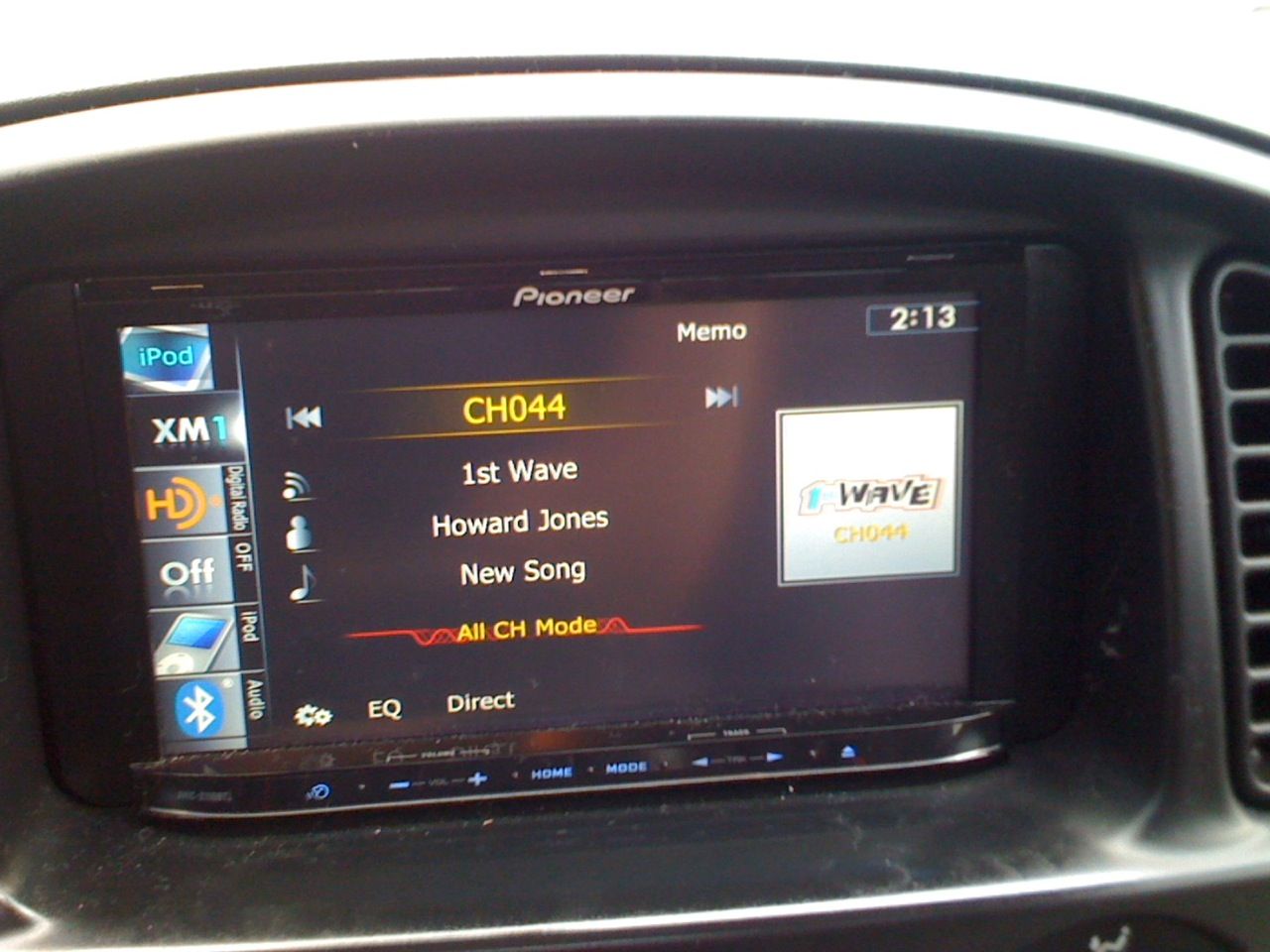

On my update, my XM presets do not scroll like "The Price Is Right" Wheel. The fact is there is nothing to scroll, just the image of the channel. Anyone else have this problem?
Have you tried flicking it yet?
Just from what I have been reading on the forums and being involved in other posts, your issue seems to be tied to the lack of scrolling (PiR Wheel) in the iPod, AM/FM, and MusicSphere interfaces as well. The 120BT has that feature in all of those modes. Someone needs to go to Pioneer and clarify why the PiR Wheel is not a functional feature in the upgrade. I have the Z120BT so I cannot comment on what the reason is, but would like to know why.
Maybe a Pioneer Rep reads the forums and can comment...
Peace ~ HFoM
Yeah, everything in that area is unresponsive to any touchscreen reactions. 
That is a lame deal, man. Definitely contact Pioneer and complain.
I sent Pioneer a long email about it and even sent the pictures. They did reply but with a generic "We have received your email and someone will be in contact with you shortly" response. Hope they can help me out, its not like I can re-install this update very easily.
Makes me wonder if there is indeed a hardware difference that wasn't documented...
Hell...maybe try to do the upgrade again<--if possible
Odds are that they just left something out in the upgrade script...
how many presets do you have stored? have u tried other banks like XM1, XM2.
They were all full, it doesn't matter if I am on XM1, XM2, or XM3. Hopefully Pioneer will contact me tomorrow with something.
Have you tried hitting the "Options" feature in XM Mode to see if there is a function to turn it on or off? When you're in XM Mode, try touching the "Dual Gears" on the bottom left side of the screen and see if there is some specific function choice...It's worth a try just to see...Just thinking outloud here..
Peace ~ HFoM
I'm able to get the scrolling wheel to work in SIRIUS (don't have XM), in HD AM/FM and in iPod (with shuffle turned off only) in my 110->120 updated unit. It does not work very well, though, as you have to become accustomed to hitiing it "just right" in order for the unit to differentiate between a selection and a "grab and drag/spin/scroll."
One thing that stinks is that station art and station ID are supported on XM and built-in analog AM/FM respectively, but not for SIRIUS and HD AM/FM, which means I only have "preset x" displayed for each preset.
Well I got an email back from the engineers asking me to call in to the support line to discuss this problem. It appears that (wait for it...) that I am the only one with this issue. They have no clue why. They suggested I pull out the XM receiver and reset it since all presets are stored in there. If I still have issues, then I will need to pull the unit and the XM receiver out of my vehicle and send it to them.
Hopefully its just a reset button issue.
If I still have issues, then I will need to pull the unit and the XM receiver out of my vehicle and send it to them.
That is their way of trying to discourage you from pursuing the issue. they know most people wont want to go to the trouble. Call them back and tell them you would like a case number on the issue. Then continue to contact them every couple of weeks until they look into the issue. Tell them its an easy issue to reproduce and give them the steps to do so.
If I still have issues, then I will need to pull the unit and the XM receiver out of my vehicle and send it to them.
That is their way of trying to discourage you from pursuing the issue. they know most people wont want to go to the trouble. Call them back and tell them you would like a case number on the issue. Then continue to contact them every couple of weeks until they look into the issue. Tell them its an easy issue to reproduce and give them the steps to do so.
They gave me a number to reference, which is #1311182. I will do what they suggest this weekend, if its still acting up, I will be calling them before I rip it all out and send it to them.
Now I suggest everyone with this problem copy that reference number and call them. When they tell you they have not heard of the problem tell them it has been reported by others and give them the reference number. Then insist you get a reference number as well. Tell them you want it looked into as a potential software problem.
Heck, even if you don't have a problem, call and say that you do and reference the case number.
It will probably get Pioneer off their lazy cracks for once.
Well what do you know, I guess the Pioneer techs hit this one on the head. I removed my XM receiver and reset it and re-installed it and now it works. I am gonna keep that case number handy in case the issue comes back.