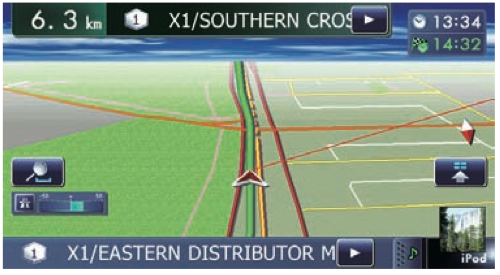
On the F20BT (Z120BT in the States) it shows X.X Km (or miles I assume) until the next turn, it's similar using the 2D or 3D displays
So in normal driving it looks like this showing x.x km till the next action:
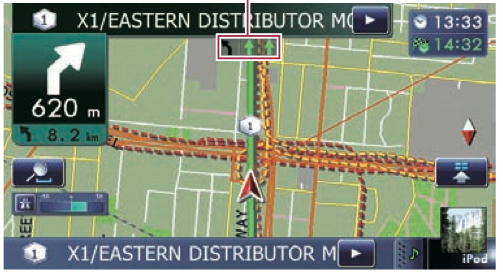
Then as you approach the corner it changes to this showing next corner is left/right in xxx m then in little picture/text it shows underneath that the following corner is left/right xxx m after that.
Then as you get even closer to the corner it shows this display, with no further information:
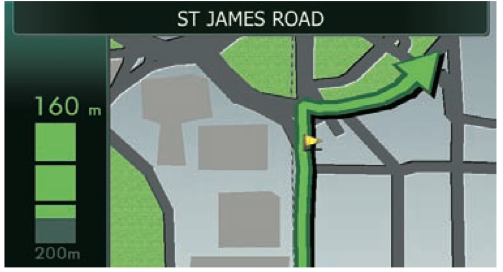
It then drops straight back to that first screen with no left/right information.
The problem is I would like to know the following turn is left/right so I can set up in the correct lane for the next turn, especially when driving in a strange city in heave traffic.
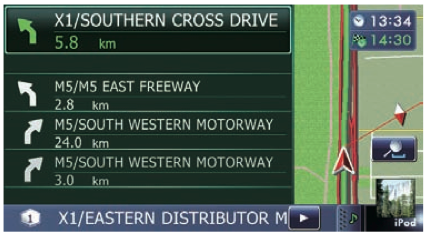
I do note there is a mode than shows the next four turns and looks like this, but it just seems like a terrible waste of map space:
But really I would just like that this screen to permanently stay in the corner:
So is this something that I am just missing, or something that Pioneer need to implement?
(What can I say, I'm new to the unit and am slowly finding all the little things that are lacking).