Search Archive

How to turn off the Pioneer Z120BT

By guimb · Oct 13, 2010in General💬 22 posts👁️ 16,344 views
Posted Oct 13, 2010 · 22:34 UTC#1

I do not think any button that turns off the device, so it was that installed in the ignition of the car to turn the car off the apparatus can also shut down.

Can anyone tell me if there is any other way to turn off the machine without it off with the car ?

Posted Oct 13, 2010 · 22:57 UTC#2

there is an off button on the screen. have a look around you should come across it

Posted Oct 13, 2010 · 23:42 UTC#3

There is no way to shut the system off without shutting down the vehicle, the off button just shuts the screen off. I do not know why Pioneer designed it this way?

Posted Oct 14, 2010 · 02:23 UTC#4

Really has no button to turn on or off.

Pioneer simply forgotten this button, even pressing the icon off the screen, the device is still connected and consuming energy, and there is the option to turn off the device or connect it only when I want.

Posted Oct 14, 2010 · 02:42 UTC#5

There have never been any Pioneer units with an ON/OFF switch. They simply don't see a need to put one on the unit. Honestly I don't really see a need for one either. A workaround would be to wire a switch to the 12 volt switched wire and toggle it when you want to turn the unit off.

Posted Oct 14, 2010 · 03:44 UTC#6

There is both a screen off and AV off soft buttons.

Posted Oct 14, 2010 · 17:29 UTC#7
There have never been any Pioneer units with an ON/OFF switch. They simply don't see a need to put one on the unit. Honestly I don't really see a need for one either. A workaround would be to wire a switch to the 12 volt switched wire and toggle it when you want to turn the unit off.


Old VWs always had the ability to run the radio without the key in the ignition, which I liked. I generally have connected my radios this way whenever I could. Your solution would work, but it's not all that elegant to have an external switch controlling it.

Posted Oct 25, 2010 · 10:50 UTC#8

Your solution would work, but it's not all that elegant to have an external switch controlling it.


You're right, its not. But if you require an on/off switch this is your solution.

Posted Oct 25, 2010 · 13:47 UTC#9

You're right, its not. But if you require an on/off switch this is your solution.


The reason there is not an on/off switch is that it takes the GPS several minutes to locate the satelites if you were to turn the unit off. If you don't believe me, press the reset button while driving. This will cause the unit to reboot, and it will take it awhile to find you again. The farther you have traveled from it's "known" location, the longer it takes.


When it turns on, it assumes that is is in the same place as when it was shut off. While it is aquiring sat signals, it uses VSS, internal gyro, etc to track your location.

Posted Oct 27, 2010 · 15:34 UTC#10

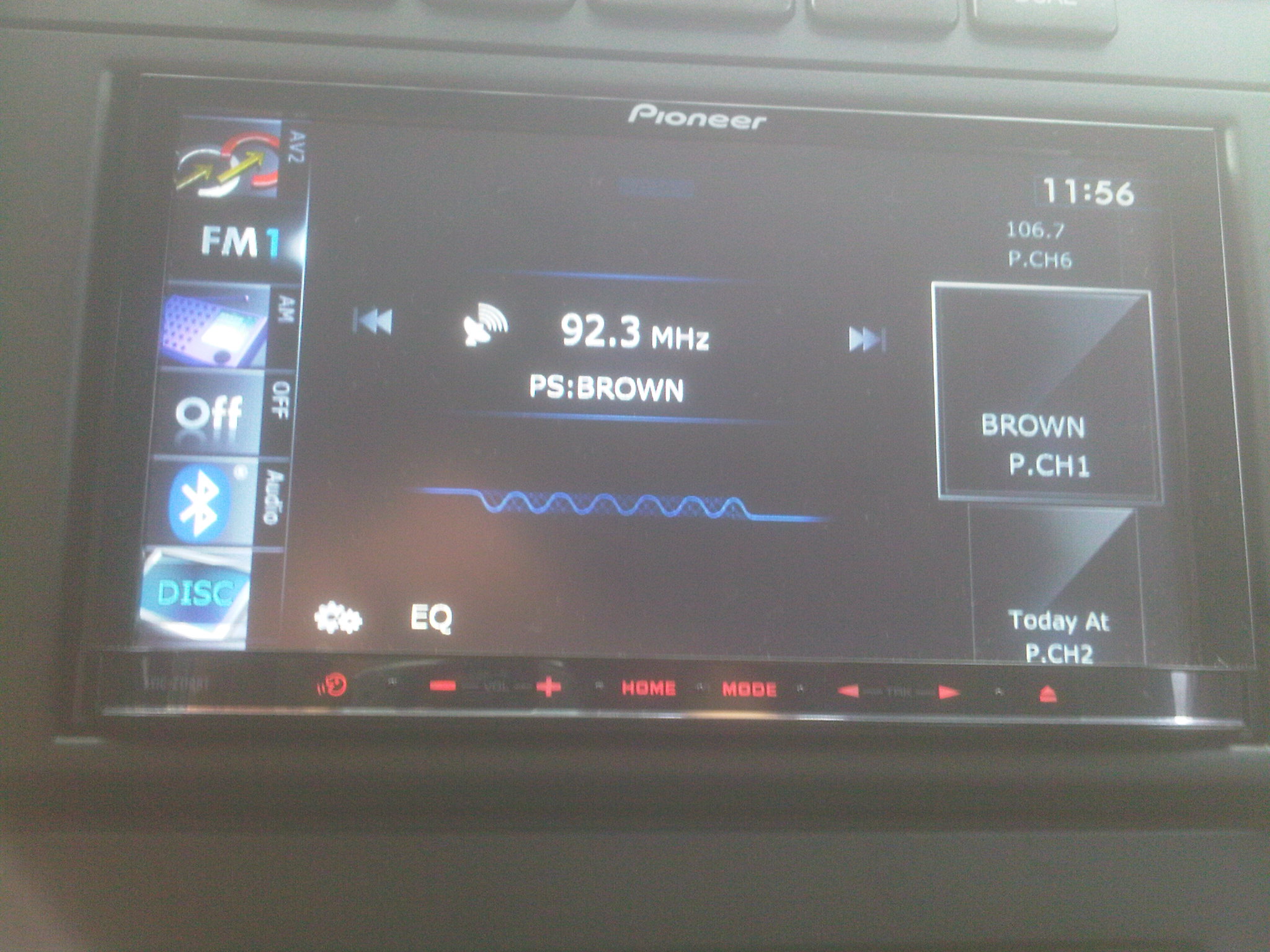
Fellas, I have the 110 upgraded to the 120 and I have an "OFF" button visible all of the time on my left hand side toggle menu. It shuts everything off not just the the screen.

Posted Oct 27, 2010 · 15:49 UTC#11

Fellas, I have the 110 upgraded to the 120 and I have an "OFF" button visible all of the time on my left hand side toggle menu. It shuts everything off not just the the screen.


In that case, how do you turn it on while driving? I think it just turns off the backlight of the LCD screen.

Posted Oct 27, 2010 · 16:03 UTC#12

For those requiring proof : )


post-23612-033975200 1288195365_thumb.jpg

Attached Files (1)
IMG00180-20101027-1153.jpg
Posted Oct 27, 2010 · 16:15 UTC#13

In that case, how do you turn it on while driving? I think it just turns off the backlight of the LCD screen.


It actually turns of the radio or video but the side menu bar remains on for the options to turn on the desired media. If you want the screen to turn off as well, you go to the settings tab on the main menu and then tap the "screen off" tab on the bottom right side. This gives you a complete black screen and all media is off as well. To turn it back on, just hit any of the front buttons or tap the screen. Not sure if this is what you are looking for, but it works for me.

Posted Oct 27, 2010 · 18:35 UTC#14

It actually turns off the radio or video but the side menu bar remains on for the options to turn on the desired media. If you want the screen to turn off as well, you go to the settings tab on the main menu and then tap the "screen off" tab on the bottom right side. This gives you a complete black screen and all media is off as well. To turn it back on, just hit any of the front buttons or tap the screen. Not sure if this is what you are looking for, but it works for me.


Exactly, it doesn't shut off. It just stops/causes and goes it a partial sleep. It is really a matter of semantics, and, like vblue42 said, there really is no need for an off button (one that actually turns the power off). For reasons that should be obvious, it would have to be a hard button.

Edited Oct 27, 2010 by RonS
Posted Feb 04, 2011 · 07:34 UTC#15

So there is a way to turn the AV off?

Posted Feb 04, 2011 · 08:26 UTC#16

NM I figured it out.


The "Off" touch button on the left toggle bar turns the AV off. The "screen off" in the settings will turn off the screen entirely as already posted. Any time you want the AVIC back on, simply touch the screen and the screen is lit back up instantly.

Posted Feb 04, 2011 · 22:43 UTC#17

Is there any way to make the antenna go down? Even with the AVIC AV off and the screen off, the antenna is still up. Any way to make it go back down?

Posted Feb 05, 2011 · 00:31 UTC#18

Is there any way to make the antenna go down? Even with the AVIC AV off and the screen off, the antenna is still up. Any way to make it go back down?


See pg 160 in the Z120 user manual. You can set it so the antenna is up only when the audio source is AM or FM. Not sure it that applies when you use the OFF button, but it might. Or just change the source 1st.

Posted Feb 08, 2011 · 18:34 UTC#19

See pg 160 in the Z120 user manual. You can set it so the antenna is up only when the audio source is AM or FM. Not sure it that applies when you use the OFF button, but it might. Or just change the source 1st.


I've attached a print screen pic of my AVIC Manual page 160. I don't see anything about adjusting the antenna settings? I also tried to use the find word function in Adobe Reader, and all of the antenna refernces were with respect to the GPS antenna. Any help? Thanks.

post-49465-0-96418500-1297190057_thumb.jpg

Posted Feb 08, 2011 · 19:46 UTC#20

I've attached a print screen pic of my AVIC Manual page 160. I don't see anything about adjusting the antenna settings? I also tried to use the find word function in Adobe Reader, and all of the antenna refernces were with respect to the GPS antenna. Any help? Thanks.

Sorry, my mistake. That was in the Z110 manual - pg 160. I see that the Z120 manual does not mention this feature. In fact, the AV System Settings screen on the Z120 appears to be missing two soft-buttons. I'm not sure if the problem is with the manual, or that they dropped that feature in the Z120. When I get back to my car I'll verify.


Here is what it said in the Z110 manual:


Switching the auto antenna setting

If the blue lead of the navigation system is connected to the antenna control terminal of the vehicle, select either of the following settings.

Power - The antenna extends or turns on when the ignition switch is turned on. The antenna is stored or turned off

when the ignition switch is turned off.

Radio - The antenna extends or turns on only when the audio source is FM or AM. The antenna is stored or turned

off when the AV source is switched to another source.


*****************************************************************

update: I checked my HU (a Z110 updated to Z120). The Z110 manual is correct for the Z120 also:

Touch [ANT CTRL] on the “AV System Settings†menu. You can then toggle between Power and Radio.

Since I don't have a powered/retractable antenna, I still don't know whether this fixes the OP issue. That is, if this setting is "Radio", and the audio source is AM or FM, does the antenna retract when OFF is selected? It should work if the source is not AM or FM.

Edited Feb 09, 2011 by RonS
Posted Feb 10, 2011 · 03:09 UTC#21

Sorry, my mistake. That was in the Z110 manual - pg 160. I see that the Z120 manual does not mention this feature. In fact, the AV System Settings screen on the Z120 appears to be missing two soft-buttons. I'm not sure if the problem is with the manual, or that they dropped that feature in the Z120. When I get back to my car I'll verify.


Here is what it said in the Z110 manual:


Switching the auto antenna setting

If the blue lead of the navigation system is connected to the antenna control terminal of the vehicle, select either of the following settings.

Power - The antenna extends or turns on when the ignition switch is turned on. The antenna is stored or turned off

when the ignition switch is turned off.

Radio - The antenna extends or turns on only when the audio source is FM or AM. The antenna is stored or turned

off when the AV source is switched to another source.


*****************************************************************

update: I checked my HU (a Z110 updated to Z120). The Z110 manual is correct for the Z120 also:

Touch [ANT CTRL] on the “AV System Settings†menu. You can then toggle between Power and Radio.

Since I don't have a powered/retractable antenna, I still don't know whether this fixes the OP issue. That is, if this setting is "Radio", and the audio source is AM or FM, does the antenna retract when OFF is selected? It should work if the source is not AM or FM.


I'm sitting in front of my AVIC right now. In the AV System Settings I don't see a [ANT CTRL] option. The only options Im seeing are AV1 Input, AV2 Input, Wide Mode, Mute, Mute Level, Rear SP, DivX VOD, and VR Catalog Menu.


I've included a pic of what I am describing. Any help?

post-49465-0-88536100-1297307384_thumb.jpg

Edited Feb 10, 2011 by LLCoolJ94
Posted Feb 10, 2011 · 04:59 UTC#22

I'm sitting in front of my AVIC right now. In the AV System Settings I don't see a [ANT CTRL] option. The only options Im seeing are AV1 Input, AV2 Input, Wide Mode, Mute, Mute Level, Rear SP, DivX VOD, and VR Catalog Menu.


I've included a pic of what I am describing. Any help?


That's odd, here is mine. I wonder if the difference is because mine was a Z110 upgraded to Z120 software? Maybe the update doesn't overwrite all of the system software. And maybe the Z120 doesn't support this feature. Or maybe it never worked in the first place, so they removed it.

Sorry, I guess that's it then.

post-43400-0-57626800-1297313971_thumb.jpg