Search Archive

PM III SplitNavi

By dragon24 · Oct 15, 2010in Hacks/Mods💬 17 posts👁️ 3,529 views
Posted Oct 15, 2010 · 06:43 UTC#1

PM III SplitNavi


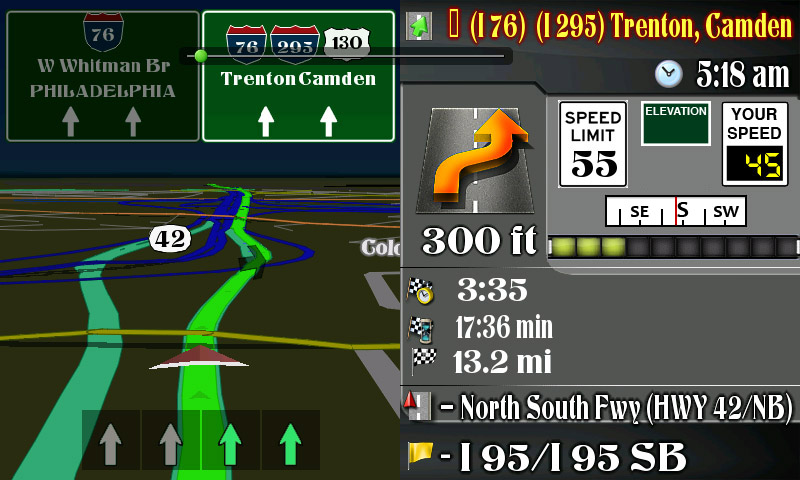
I have been playing with the splitnavi part of the mod for the avic. i bee using ABB1 mod as a basic & worked from it. i only been playing around for 24hrs & i can't remember all the lines of code of what goes to what. here is a sample of what i have so far. it is still far from done.


the Elevation icon will sit between the speed limit & your speed sign.
post-32943-12872763383816_thumb.jpg

Posted Oct 15, 2010 · 13:22 UTC#2

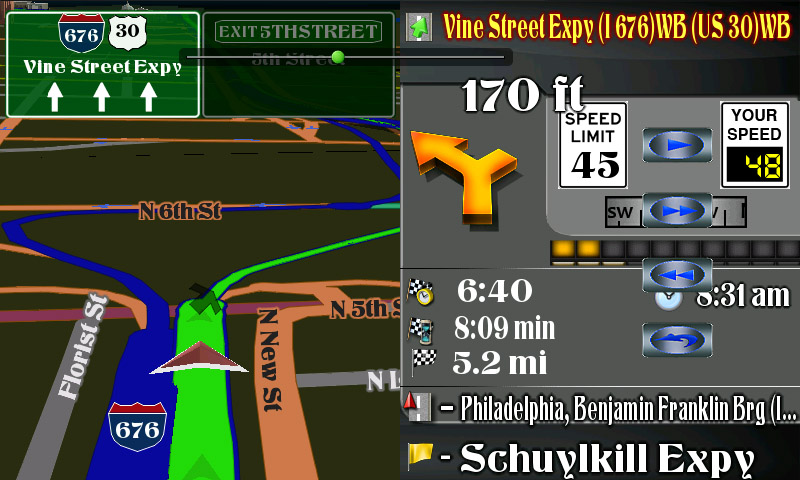
Looking good! I really like it! The only thing that I would change that is visible now is to move the 'next turn' text/units over, and now that you have space below the time, I would add a script to display the time for next turn which I wanted to do, but did not have the space.

People, ignore the simulation buttons as they are not present under normal driving conditions.

Posted Oct 16, 2010 · 03:22 UTC#3

its still going slow on my end. i really have no clue what you would move abb. im so far in left field now. here is a new pic so you can see the changes. i want to move some more things. the 1st pic is a clearer version of the edit with out the buttons.

post-32943-12872763387432_thumb.jpg

post-32943-12872763388823_thumb.jpg

Posted Oct 16, 2010 · 19:38 UTC#4

Hey I noticed that your interstate signs are translucent, can you give me the code and location just for that?

Posted Oct 17, 2010 · 02:05 UTC#5

Hey I noticed that your interstate signs are translucent, can you give me the code and location just for that?


i didn't do anything to the code. i used abb1 chrome theme as a base for the mod. you best best would be to ask abb1 or someone that works with the code.

Posted Oct 17, 2010 · 12:39 UTC#6

its still going slow on my end. i really have no clue what you would move abb. im so far in left field now. here is a new pic so you can see the changes. i want to move some more things. the 1st pic is a clearer version of the edit with out the buttons.

I am a little confused, did you already make the changes or is this a template? I just dont want to tell you where to move things when it looks like it was already done

Posted Oct 17, 2010 · 16:52 UTC#7

I am a little confused, did you already make the changes or is this a template? I just dont want to tell you where to move things when it looks like it was already done


i already moved things. i feel like a noob.

Posted Oct 18, 2010 · 01:42 UTC#8

i already moved things. i feel like a noob.

Well, it's looking pretty good!

Posted Oct 18, 2010 · 06:11 UTC#9

abb what did you have in mind to change.

Posted Oct 18, 2010 · 07:50 UTC#10

abb what did you have in mind to change.

The only thing that I would do with the extra space that you have is add the 'time to next turn' underneath the next turn icon, and below that have the 'time to destination, and then move the 'remaining time' and the 'Distance to Destiunation beside the two. Then I would move that divider (below the next turn icon) that is set a little too high and move it down some to look neater. That is it! All you need to do is add the script for 'Time to next turn', along with the icon, and then move the other three times and distances. If you need the script, let me know, or you can find it in the 'speedometer 800_480.ui'

Edited Oct 18, 2010 by abb1
Posted Oct 20, 2010 · 12:23 UTC#11


1 already moved things. i feel like a noob.


Can you give me some idea what changes you made on the sign post and lanes. I would love to tinker around and help a little.

Jimbo

Posted Oct 21, 2010 · 20:48 UTC#12

Can you give me some idea what changes you made on the sign post and lanes. I would love to tinker around and help a little.

Jimbo


i can post the file up in a pack if you would like them. all the things that i moved in the are in the screenshots posted above.

Posted Oct 21, 2010 · 23:02 UTC#13

Can you give me some idea what changes you made on the sign post and lanes. I would love to tinker around and help a little.

Jimbo

The signposts and lanes were there before. You need the new 2010.06 maps to show signs and lanes, otherwise, they were only

available in Navteq maps

Edited Oct 21, 2010 by abb1
Posted Oct 22, 2010 · 00:39 UTC#14

i can post the file up in a pack if you would like them. all the things that i moved in the are in the screenshots posted above.


That would be great! I don't have Teleatlas 6.2110. But I do have TelNav.

Jimbo

Posted Oct 22, 2010 · 00:40 UTC#15

The signposts and lanes were there before. You need the new 2010.06 maps to show signs and lanes, otherwise, they were only

available in Navteq maps


Thanks Abb1. I don't have the 6.2110 maps but I have 2 qtr Telteg maps.

Posted Oct 22, 2010 · 16:28 UTC#16

i will post up the data.zip file for you later. just check back for a link. good luck