Search Archive

Issue with XM receiver on Pioneer Z120 - Audio cuts out sometimes

By WeatherB · Nov 09, 2010in Problems/Troubleshooting💬 25 posts👁️ 5,818 views
Posted Nov 09, 2010 · 02:19 UTC#1

I'm having a problem with the XM receiver on my Pioneer Z120 with the audio cutting out sometimes and I hope you guys can help. I've already sent an email to Pioneer's tech support but it has gone unanswered so far.


I suspect that this problem only started after I upgraded to the Z120 software but I can't be entirely sure anymore as I know someone else who has this very problem but on a X920.


This also happens rarely, but seems to be happening more frequently recently with it happening as frequently as once per day and it's very annoying.


What ends up happening is that out of no where when you change XM stations, the audio starts to cut in and out. I've tried changing stations when this happens and even cycling through the sources and coming back to XM, but nothing fixes it. Then after a little while, probably 20 - 30 seconds, the audio completely cuts out. Everything looks fine with the song title refreshing, etc... But there is no audio. At this point I can change to any other source and there IS audio but no audio from the XM source.


The only way to fix this is to cycle the power of the head unit, which involves turning the car off and on. This is the annoying part especially when you are on the highway.


Anyone else have this issue or suggestions on what I can do to resolve this?

Posted Nov 09, 2010 · 03:03 UTC#2

Are your headlights on when this happens?

Posted Nov 09, 2010 · 05:52 UTC#3

This is a common problem or bug with the XM tuner. I have experienced this various times, happens when you are jumping around channels. Never has it done it when you are tuned at a certain channels for a long period of time. It is annoying since you have to cycle off/on to listen to XM again.

Edited Nov 09, 2010 by rgarjr
Posted Nov 09, 2010 · 13:13 UTC#4

Are your headlights on when this happens?


Good question, I think so, not entirely sure.


This is a common problem or bug with the XM tuner. I have experienced this various times, happens when you are jumping around channels. Never has it done it when you are tuned at a certain channels for a long period of time. It is annoying since you have to cycle off/on to listen to XM again.


Exactly, it happens when you are jumping between stations. What is the resolution for this? Is there another XM receiver I can use instead?

Posted Nov 09, 2010 · 16:39 UTC#5

Hmm....I'm not prepared to agree with everyone that this is an XM tuner issue just yet. Likely, but not sure yet...


More specific questions for you...


- Did you do any splicing (not recommended)?


- Do you have the antenna where it has a relatively unobstructed view of the sky?


- Does the XM antenna have its own metallic ground plane beneath it?


- Is it in the "RF shadow" of the GPS antenna or its metallic ground plane? Remember that both are L-band...keep them out of each others' shadow...side-by-side is usually OK for most people.


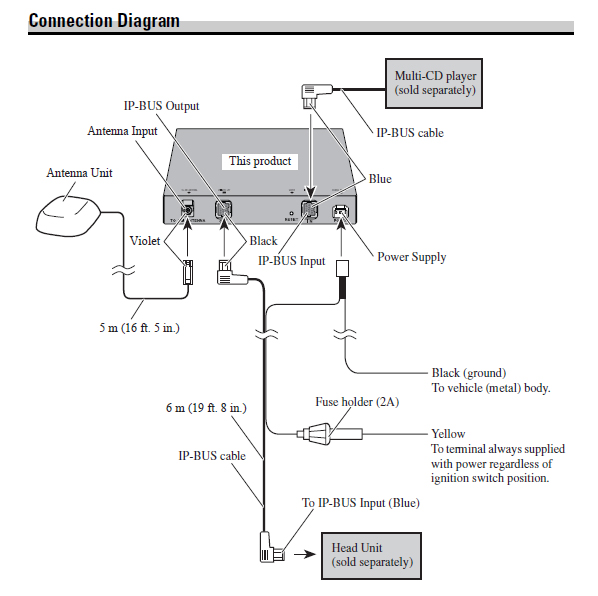
- What is the entire series of wires and connections between your XM antenna and the tuner?


- What is the entire series of wires and connections between your XM tuner and the head unit?


- Is it the OEM antenna?


- Which XM tuner are you using?


- Have you checked the XM signal strength? In the old D3, one used to be able to check XM signal strength in one of the info screens. Not sure if you can do that on the newer units.


- What part of the country are you in? Remember that the XM spacecraft's beam footprint is optimized for certain parts of North America more than others. My old D3 worked find the Mid-Atlantic, but often lost signal in other parts of the country.

Edited Nov 09, 2010 by JohnnyDepp
Posted Nov 09, 2010 · 21:13 UTC#6

Good question, I think so, not entirely sure.


Exactly, it happens when you are jumping between stations. What is the resolution for this? Is there another XM receiver I can use instead?


Well there's an older tuner that has the NAV traffic. Don't know anyone who is running that one with these new units (X920/Z110/Z120) and if they are having this same problem.


When I first saw that problem I thought I'd might be my tuner but come to find out a lot of users are having the same thing.

Edited Nov 09, 2010 by rgarjr
Posted Nov 09, 2010 · 23:38 UTC#7

The older traffic tuners can be used without problem and there are people that are using them on this forum.

Posted Nov 10, 2010 · 03:25 UTC#8

My buddy is using his old GEX-P10 XM tuner (or whatever the model number was) with the new X920BT...no problems at all. Doesn't get the NavTraffic obviously, but he doesn't mind losing that since he has MSN now...at least through Jan 2011, that is.


Wouldn't mind answers to my questions to the guy above...wondering if it's really the tuner at all.

Posted Nov 10, 2010 · 03:26 UTC#9

I appreciate everyone`s help on this. Hopefully we can get it figured out once and for all.


Hmm....I'm not prepared to agree with everyone that this is an XM tuner issue just yet. Likely, but not sure yet...


More specific questions for you...


- Did you do any splicing (not recommended)?

No splicing on the XM tuner end, I did have to do some soldering and splicing to connect the Z120 harness to my car's harness.


- Do you have the antenna where it has a relatively unobstructed view of the sky?
Yes, the antenna is mounted on the roof of my car by the FM antenna.


- Does the XM antenna have its own metallic ground plane beneath it?
I am using the OEM antenna that came pre-installed in my car, I assume that it has this metallic plate already installed.


- Is it in the "RF shadow" of the GPS antenna or its metallic ground plane? Remember that both are L-band...keep them out of each others' shadow...side-by-side is usually OK for most people.
Yes, the GPS and XM antennas are well away from each other.


- What is the entire series of wires and connections between your XM antenna and the tuner?
Not entirely sure because the car came with the antenna pre-installed.


- What is the entire series of wires and connections between your XM tuner and the head unit?
Just the IP-Bus cable.


- Is it the OEM antenna?
No, my car came with Sirius radio so I am using the Sirius antenna instead. I just swapped the plastic connectors, pink for XM and green for Sirius.


- Which XM tuner are you using?
Using the GEX-920XM, bought brand new about 5 months ago.


- Have you checked the XM signal strength? In the old D3, one used to be able to check XM signal strength in one of the info screens. Not sure if you can do that on the newer units.
I haven`t been able to find any way of checking this on the Z120.


- What part of the country are you in? Remember that the XM spacecraft's beam footprint is optimized for certain parts of North America more than others. My old D3 worked find the Mid-Atlantic, but often lost signal in other parts of the country.
I`m in Ontario, Canada. I have no problem with the sound quality or reception except for when this issue happens.
Posted Nov 10, 2010 · 03:27 UTC#10

My buddy is using his old GEX-P10 XM tuner (or whatever the model number was) with the new X920BT...no problems at all. Doesn't get the NavTraffic obviously, but he doesn't mind losing that since he has MSN now...at least through Jan 2011, that is.


Wouldn't mind answers to my questions to the guy above...wondering if it's really the tuner at all.


Does your buddy do a lot of channel surfing?

Posted Nov 10, 2010 · 13:57 UTC#11

Does your buddy do a lot of channel surfing?


Yes. No problems at all. We tested it quite a bit jumping around all over the place quickly...and also after half-hour drives listening to one station. No problems.

Edited Nov 10, 2010 by JohnnyDepp
Posted Nov 10, 2010 · 14:12 UTC#12


Yes, the GPS and XM antennas are well away from each other.


No, my car came with Sirius radio so I am using the Sirius antenna instead. I just swapped the plastic connectors, pink for XM and green for Sirius.


(Unlikely Issue) Is the GPS antenna anywhere near the center of the field-of-view of the XM antenna in the direction of the sky? If so, the GPS antenna could possibly be interfering with your XM reception depending on what direction your vehicle is heading with respect to the direction to the XM/Sirius spacecraft. However, I'm guessing your OEM XM antenna is on the roof of your car, so this is unlikely. Also, these aren't exactly line-of-sight (LOS) systems...S-Band and L-Band frequencies bounce around your car, diffract, etc. quite a bit.


So, moving on to the other answer you gave....


(Likely Issues) What **EXACTLY** do you mean when you say you "swapped" the connectors? Did you have to cut or splice the actual XM antenna wire to replace the connector? Or did you use a adapter of some kind?


If you actually CUT the OEM antenna wire, you've introduced noise in the line, which will affect your XM signal strength is reduce reception. Splicing antenna or microphone wires is ALWAYS a bad idea. Too many "professional installers" (I always laugh at that term...LOL) do this all the time because they don't want to bother re-routing wires up and down car pillars, dashboards, etc. To make matters worse, a lot of these guys never took a soldering class and don't know how to properly solder (e.g., "tinning" the leads first, using the right flux/solder combo, etc.).


Moving on to even LIKELIER problems here...


The XM and Sirius broadcast frequencies are NOT exactly the same. Using an antenna from one service for the other is a BAD idea. As a reference, here are the broadcast bands used by each service:


XM: 2332.5 to 2345.0 MHz (12.5 MHz bandwidth)

Sirius: 2320.0 to 2332.5 MHz (12.5 MHz bandwidth)


...besides which, the strength of the signals from both spacecraft that reach the Earth is not the same. The two services probably expect antennas with different gains.


ALSO....is your factory antenna powered??? If so, it might be an active antenna...is it getting power since you did whatever you did to "swap" connectors? Maybe the antenna's not even being properly powered anymore.


Summary Opinion:


You've revealed that you're using a Sirius antenna with XM (really bad idea). Moreover, it sounds like you cut the antenna wire(s), which really messes with antenna signals (another bad idea). Finally, your factory antenna may be a powered, active antenna and we don't know if you cut the power connections to it (yet another bad idea, if you did that...we don't know).


So, I strongly recommend you temporarily try using a virgin, uncut, unspliced, never-modified XM (NOT Sirius) antenna mounted in a GOOD location for antennas, avoiding all the potential "gotchas" I list in my first post. Don't cut anything, don't splice anything...don't even LOOK at the antenna the wrong way. Say supportive things to it, and buy it a latte before installing it.


Let us know what happens. If it works, then you may have to go through the pain of replacing your factory antenna with a proper XM antenna and routing the wires. Or simply use/hide it in a place you like.


By the way, my buddy and I both have Audis...I had an AVIC D3 before I dumped it and I just installed an X920BT in his car. In both cases, the antennas were hidden under the top, front dashboard in a stereo speaker well (we removed the small, center front speakers in both installations. There's a metal brace under each one, which provides a suitable ground plane for the antenna. Or you could just mount it on your dash, behind the center of the windshield. These are pretty small antennas, and are pretty unobtrusive. These are the things that your typical "professional installers" don't get. Sort of like trying to mount microphones covered in sticky stuff without any air behind them...which makes the mic useless. STAY IN SCHOOL, KIDS! Learn physics! lol

Edited Nov 10, 2010 by JohnnyDepp
Posted Nov 10, 2010 · 18:47 UTC#13

To clarify, I did not have to actually cut or splice the OEM antenna wire. Both Sirius and XM use the same coax connector, except that the hard-plastic connector is different. The hard-plastic part I am referring to is the pink section of the XM antenna's connector.


I still have the XM antenna that came with the GEX-920XM, I'll give it a try on the weekend. At the very least we can eliminate the antenna as the issue.


Thanks for the suggestion.

Edited Nov 10, 2010 by WeatherB
Posted Nov 11, 2010 · 03:22 UTC#14

Ah...well, that's better than splicing, but still tricky.


I suspect that your XM signal SNR is too low due to the non-optimal antenna choice. A poor SNR means the data rate is too low...and the continuous digital audio data requires a higher data rate.


The song title, artist, and station name only require a few bytes of data, which is why those are showing up just fine.


Tell me...is your friend with the X920BT who's having this problem also using a non-XM antenna? If his is an XM one, did he splice it in any way?


With the old D3 (god, I hated that thing), one could check the XM signal strength in the service screen. Not sure why Pioneer removed that capability in the later units. Would really help answer this question.

Edited Nov 11, 2010 by JohnnyDepp
Posted Nov 12, 2010 · 03:02 UTC#15

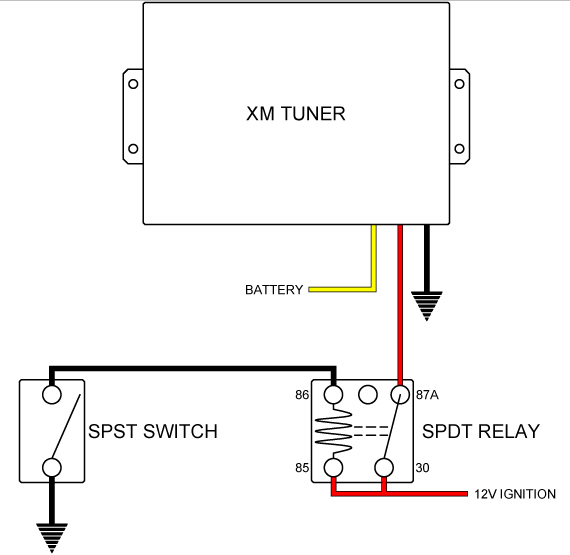
I'm toying with an idea to wire my tuner like this circuit (which I have drawn, btw). So whenever it dumps out, just rock the switch back and forth. Cuz to be honest, it is pain in the ass when you're driving and no more XM until you restart.

post-41711-049440100 1289531645_thumb.jpg

Attached Files (1)
xm.jpg
xm.jpg
Edited Nov 12, 2010 by rgarjr
Posted Nov 13, 2010 · 00:12 UTC#16

I'm toying with an idea to wire my tuner like this circuit (which I have drawn, btw). So whenever it dumps out, just rock the switch back and forth. Cuz to be honest, it is pain in the ass when you're driving and no more XM until you restart.


Are you using a proper XM antenna in a proper location???? Did you splice it in any way? Read the entire thread...


I don't think this is a bug...I think anyone having this problem is either using the wrong antenna, or messed up the antenna installation or location in some way, or both.

Edited Nov 13, 2010 by JohnnyDepp
Posted Nov 13, 2010 · 03:37 UTC#17

Yea I am not seeing any of this issue with my setup.

Posted Nov 14, 2010 · 03:58 UTC#18

I'm toying with an idea to wire my tuner like this circuit (which I have drawn, btw). So whenever it dumps out, just rock the switch back and forth. Cuz to be honest, it is pain in the ass when you're driving and no more XM until you restart.


Won't this cause you to lose the presets as well?


I haven't had this problem the entire week so I haven't bothered trying the OEM XM antenna yet. Want to see how long this problem free streak will last. :)

Posted Nov 14, 2010 · 06:54 UTC#19

Yeah I'm using the supplied antenna situated on the rear roof.


Won't this cause you to lose the presets as well?


Nope, that's what the battery wire is for.

Posted Nov 16, 2010 · 04:00 UTC#20

Yeah I'm using the supplied antenna situated on the rear roof.


Nope, that's what the battery wire is for.


Interesting... Which model tuner do you have?


I`ve got the GEX-920XM and it only has two power cables, a constant 12Volt and a ground. There is no third connection like you showed in your diagram.

Posted Nov 17, 2010 · 03:51 UTC#21

Yeah my bad, the GEX-P920XM does only have battery and ground for its power inputs. In that case I'm not sure if you will lose your presets if you momentarily disconnect the yellow wire.

post-41711-074740700 1289965890_thumb.jpg

Attached Files (1)
Untitled-1.jpg
Untitled-1.jpg
Edited Nov 17, 2010 by rgarjr
Posted Nov 29, 2010 · 15:49 UTC#22

Whatever happened to the original problem in this thread??? Solved?

Posted Dec 04, 2010 · 00:01 UTC#23

Whatever happened to the original problem in this thread??? Solved?


It seems to have resolved itself for the timing being without me changing anything. This hasn't happened at all since beginning of November so I'm not monitoring it for now.

Posted Dec 04, 2010 · 17:31 UTC#24

It seems to have resolved itself for the timing being without me changing anything. This hasn't happened at all since beginning of November so I'm not monitoring it for now.


I find that difficult to believe.

Posted Dec 04, 2010 · 23:05 UTC#25

I find that difficult to believe.


Ya, I doubt that it's completely resolved since I didn't change anything but I haven't seen the symptoms of this for a while now. Not that I'm complaining.