Search Archive

Z2 with broken screen. Options?

By jonyb · Nov 12, 2010in General💬 18 posts👁️ 5,228 views
Posted Nov 12, 2010 · 18:54 UTC#1

I was installing a Z2 for a customer (that luckily was my cousin) and broke the screen. This was going in a new Explorer with very little room behind the radio. As I was holding the head unit up to the mounting holes, I removed 1 hand to get the screws and when I did, my thumb pressed too hard on the screen and it cracked. Not only did it crack the glass, but the LCD is busted too.


I found a couple places that repair these, but they're saying $500. United Radio said "send $175, we'll give you a quote, then if you don't fix it, we'll refund $110", or something like that. Basically, I need to weigh the options whether or not to repair this one or buy him something different.


I can buy the LCD module for $286 from Pioneer, and I may be able to repair it myself. I've got most of it apart except for the screen. The harness is still in the Explorer so I cant get the unit powered up at the moment.


The other option is to buy them a u310BT. We've discussed that option and it's okay with him because it's for his daughter and he isn't concerned with not having DVD capabilities.


DSC_9105.jpg

DSC_9106.jpg

Posted Nov 12, 2010 · 20:08 UTC#2

I have good news for you. It looks like only the touchscreen was broken and not the LCD. The Touchscreen part number is CSX1093 (Touch Panel) and costs $52.50 plus shipping, handling, tax.


The replacement is fairly simple, but requires removal of the LCD panel.

Posted Nov 12, 2010 · 20:13 UTC#3

How can you tell that the LCD isn't broken?


Notice the eject button?

Posted Nov 12, 2010 · 20:15 UTC#4

Can you power it up? If so, see if the LCD looks normal behind the broken glass. If the LCD is broken, send it to Pioneer for their $200 flat rate repair.

Posted Nov 12, 2010 · 20:25 UTC#5

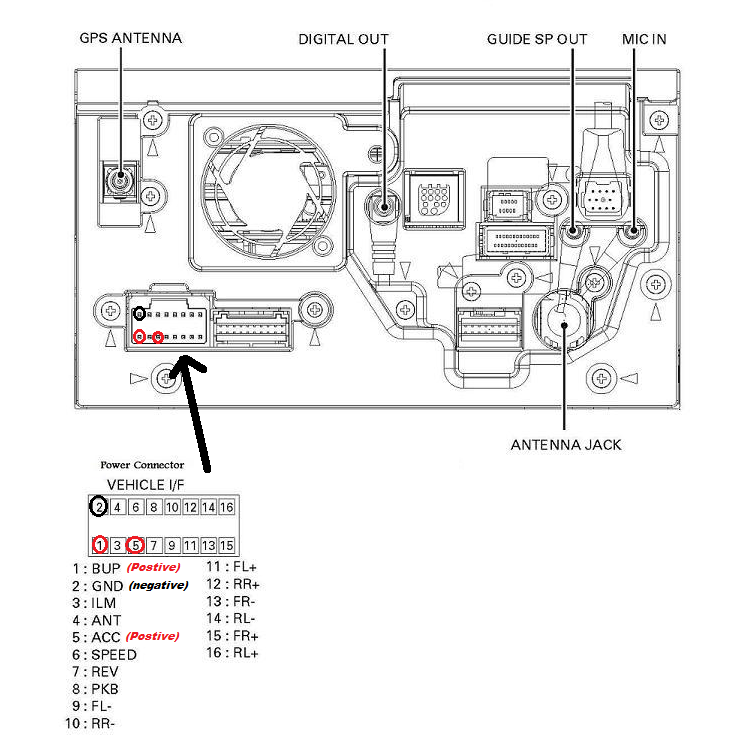
Don't have the harness, it's still in the vehicle that's not here. I did try to power it up on the workbench, but not sure if I had the right pins. Couldn't find a very good picture anywhere. I used the black plug, top and bottom pins on the inside (top for 12V and bottom for ground), also used the 3rd pin from the inside for ignition. Tried that with power on top, then power on bottom, neither seemed to work. I may call them to get the harness tomorrow.

Posted Nov 12, 2010 · 20:38 UTC#6

Don't have the harness, it's still in the vehicle that's not here. I did try to power it up on the workbench, but not sure if I had the right pins. Couldn't find a very good picture anywhere. I used the black plug, top and bottom pins on the inside (top for 12V and bottom for ground), also used the 3rd pin from the inside for ignition. Tried that with power on top, then power on bottom, neither seemed to work. I may call them to get the harness tomorrow.


See attached power pinout. If you sent 12V+ to the wrong pins, you may have fried something internally. All the pins you tried are speaker connections...

post-8105-073955200 1289594349_thumb.png

Attached Files (1)
Pinout for Power.png
Edited Nov 12, 2010 by garrettoomey
Posted Nov 12, 2010 · 20:49 UTC#7

vblue at first glance I didn't think he'd broken the LCD either but after looking closer, I think he did. See that discoloration in the center of the screen?


jonyb, definitely try to get it powered up to confirm whether the LCD is broken or not, you could save some serious cash if it isn't.

Posted Nov 12, 2010 · 21:18 UTC#8

vblue at first glance I didn't think he'd broken the LCD either but after looking closer, I think he did. See that discoloration in the center of the screen?


jonyb, definitely try to get it powered up to confirm whether the LCD is broken or not, you could save some serious cash if it isn't.


vblue? I think it's time the Captain gets new goggles!

Posted Nov 12, 2010 · 21:33 UTC#9

It's done.....


DSC_9117.jpg

Posted Nov 12, 2010 · 21:44 UTC#10

Agreed. Contact Pioneer for repair, as it would be your least expensive route.

Posted Nov 13, 2010 · 09:43 UTC#11

vblue? I think it's time the Captain gets new goggles!


For serious.


To be honest though, I'm generally very busy these days and only glanced at your avatar before replying :P

Posted Nov 14, 2010 · 14:20 UTC#12

Pioneer quoted me around $500 for repair. I'd rather buy something else then spend that much money on this head unit.


I tried to open the screen yesterday and the eject button is messed up and it wouldn't open. I'm gonna try to dig it out and see if I can get to the board to get it open.


Do you guys know if the LCD module that they sell for $286 comes with the complete faceplate? Any other recommendations?

Posted Jan 12, 2011 · 00:02 UTC#13

does anyone have instruction on changing the glass touch panel on the avic z2 if so please send me a link or just the instruction i have order the glass already i am just trying to replace the glass and my radio should be as good as new

Posted Jan 12, 2011 · 14:14 UTC#14

does anyone have instruction on changing the glass touch panel on the avic z2 if so please send me a link or just the instruction i have order the glass already i am just trying to replace the glass and my radio should be as good as new


Download the service manual and you will find the instructions in in:

http://kightlinger.net/files/personal/car/documents/AVIC%20Z2%20Unit/Manuals/AVIC%20Z2%20-%20Service%20Manual.pdf

Posted Jan 20, 2011 · 05:15 UTC#15

Chino did you replace the touch panel yet? How hard is it to do, I downloaded the manual and its a little hard to see whats going on. I imagine I am supposed to be looking at page 23? Let me know if you have any experience.

Posted Jan 24, 2011 · 15:28 UTC#16

Chino did you replace the touch panel yet? How hard is it to do, I downloaded the manual and its a little hard to see whats going on. I imagine I am supposed to be looking at page 23? Let me know if you have any experience.


I have a Z1 - with a CD that does not Read.

Seems like it should be good for parts.


Gary

Posted Jan 25, 2011 · 02:59 UTC#17

Anyone know if this would be compatible with a z2? What would you want for it, and do you have any pictures?

Posted Jan 26, 2011 · 07:28 UTC#18

Z1, Z2, and Z3 are all the exact same hardware, only thing different is the software.