I just updated the AVIC D3 with the 2010 disc for the West Coast and everything works fine until I tried my music CD. The screen changed to this:
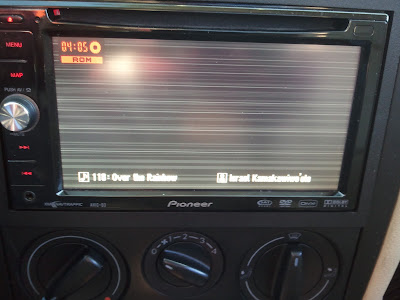
Is this normal? or Did the update mess up something
I just updated the AVIC D3 with the 2010 disc for the West Coast and everything works fine until I tried my music CD. The screen changed to this:
Is this normal? or Did the update mess up something
If I remember correctly (haven't had a D3 in a while), that's just the background it sets. You can change it in the settings.
I just updated the AVIC D3 with the 2010 disc for the West Coast and everything works fine until I tried my music CD. The screen changed to this:
Is this normal? or Did the update mess up something
I've had the same problem updating with the western europe disc. Previously i could display folders and tracks of mp3s recorded on a DVD; now i get the same screen as you which is useless with multiple albums. A normal CD shows the same screen as before the update (track, album, artist etc) but now all the fields are blank - i'm sure they weren't before but then i don't play cd's often.
have you been able to change this display? I haven't found anything in the set up menus or manual.
I believe that is the "Hide" option. Nothing comes up when you press on the screen?
I believe that is the "Hide" option. Nothing comes up when you press on the screen?
i've not seen the hide option on the rom screen; it is on the other screens (radio, cd). i've touched the screen and all the icons on the photo above without any effect. it's odd that no one else has noticed any changes with their mp3 discs after the update..
Found fix. I searched online and found out that there is a reset button just to the right of the CD eject button. Using a toothpick you can press the reset and set it back to factory settings. It kept the new update, which was nice.
Found fix. I searched online and found out that there is a reset button just to the right of the CD eject button. Using a toothpick you can press the reset and set it back to factory settings. It kept the new update, which was nice.
good man, worked a treat.
Uh yeah...the D3 came with a plastic stylus in the box to do resets....