Does anyone know what the wiring harness is for that's to the right of the "output cable" harness?
On a side note, I want to add some kind of remote. Wireless or wired as I don't have steering wheel controls to tap into. Any suggestions?
Does anyone know what the wiring harness is for that's to the right of the "output cable" harness?
On a side note, I want to add some kind of remote. Wireless or wired as I don't have steering wheel controls to tap into. Any suggestions?
The mysterious missing wiring harness that you are talking about will be used for usb devices, android, and windows devices, etc. Pioneer will be releaseing this USB cable and firmware 3.0 near the end of january this month. I think you will be extremely excited about the 3.0 firmware, it will bring a host of new features, and bug fixes which users have been asking for since it came out.
The mysterious missing wiring harness that you are talking about will be used for usb devices, android, and windows devices, etc. Pioneer will be releaseing this USB cable and firmware 3.0 near the end of january this month. I think you will be extremely excited about the 3.0 firmware, it will bring a host of new features, and bug fixes which users have been asking for since it came out.
Source?
I'm assuming that the new harness will have a usb input on it. Do you know if you will be able to plug a normal iPhone cord into it instead of the OEM garden hose it comes with??
The AppRadio already has a USB interface on the back. The reason you need to have the "garden hose" cable is that it also carries the video out signal over an S-video interface. If you look at any of the unboxing galleries, you can see that the "garden hose" has a dock connector on one end and splits to a USB and S-Video connector on the other end where it plugs into the harness out of the back of the AppRadio.
LOL Garden hose!
Your not wrong, its huge...
I get that it splits off for video but is there no way to have video thru the USB cable? I just assumed that Pioneer made the cable system overly complicated for some reason. I ordered a cablejive dockXtender so I can wrap up the OEM cable with zip ties and stuff it under the dash.
USB cable can't handle video, doesn't matter what brand or kind of device..
The AppRadio already has a USB interface on the back. The reason you need to have the "garden hose" cable is that it also carries the video out signal over an S-video interface. If you look at any of the unboxing galleries, you can see that the "garden hose" has a dock connector on one end and splits to a USB and S-Video connector on the other end where it plugs into the harness out of the back of the AppRadio.
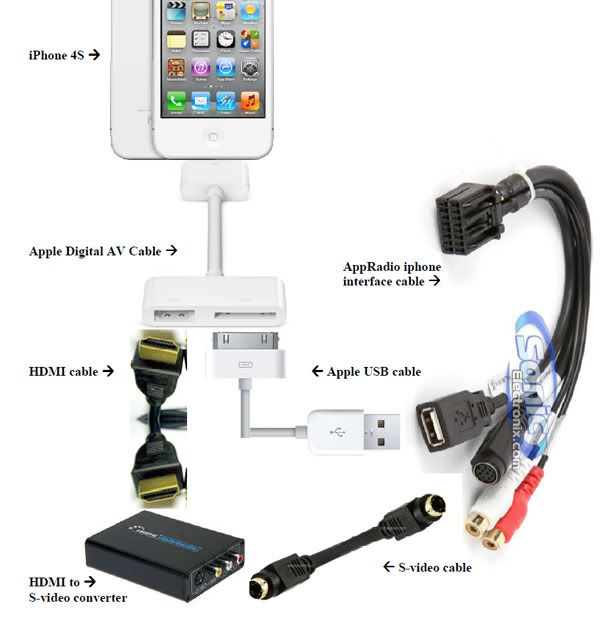
Thanks for explaining this. I made a separate thread about the ability to mirror the iphone 4S screen to an external monitor via HDMI using an Apple digital AV adapter cable. So if I were to use an HDMI to s-video converter, do you think I would be able to mirror the iphone on my AppRadio? Here's a photo of the setup which might make it easier to explain the setup I'm hoping will work:
Pioneer will be releaseing this USB cable and firmware 3.0 near the end of january this month.
hi johnnyq,
can you tell us more about this? How official is this? I have installed appradio and I am somewhat disappointed. Obviously the core solution is Pioneer working on updates and standing behind Appradio, solving problems and gathering app developers. Please tell us if you know that Pioneer is indeed adressing problems.
Rsquared, sorry does it work?
I am very interested in this type of connection
Thanks a lot
Rsquared, sorry does it work?
I am very interested in this type of connection
Thanks a lot
Just received all the parts I needed but haven't had a chance to test it out yet. Will report back soon.
Thanks, it could be' a good way to output video to a rear monitor.. For example if you add an hdmi switch between apple AV cable and Hdmi/Svideo converter you can both send video to appradio and to other monitors.. I am not an expert but it would be cool if it works
Just received all the parts I needed but haven't had a chance to test it out yet. Will report back soon.
Any food news? 
Thanks for explaining this. I made a separate thread about the ability to mirror the iphone 4S screen to an external monitor via HDMI using an Apple digital AV adapter cable. So if I were to use an HDMI to s-video converter, do you think I would be able to mirror the iphone on my AppRadio? Here's a photo of the setup which might make it easier to explain the setup I'm hoping will work:
any update if this works. i have two rear monitors that i would like to get video from the appradio