Search Archive

Wiring, bypass, reverse camera on switch .. Help a lost soldier out!

By shawnmarsh21 · May 16, 2012in Problems/Troubleshooting💬 10 posts👁️ 14,188 views
Posted May 16, 2012 · 19:59 UTC#1

Ok first off im still in Afghanistan for about 4 more days but i have an AVIC Z140BH waiting on me. Heres my questions and concerns so when I get home i can do this in a jiffy and move on to other taskings lo.


1) When wiring the harness where do i wire the reverse signal wire and is it pink? This question falls into my next question. Im trying to wire reverse camera up in a 2004 ford f150 and i want to have a switch where i can flip the switch down and back up camera comes on in reverse. And flipp the switch up and it comes on when driving. Can you explain to me what needs to be done to do the switch concept. and the concept of just wiring it to reverse lights please.


2) Next i have seen the youtube videos and read teh forums but i want some confirmation. To enable video in motion bypass ( Yes i know illegal) alls i have to do is move mute pin up no grounding the parking brake wire or anything?


If anyone would like to email me these answer please do. [email protected]
Posted May 16, 2012 · 20:53 UTC#2

1. Reverse wire goes to reverse lights and you don't need a switch to get rear view while in forward motion.


2. No, review the bypass threads for Z1XX units on this forum.


And lastly, as a veteran myself thank you for your service and God speed. HOOHA!!!

Posted May 22, 2012 · 19:09 UTC#3

What do you mean you dont need a switch to get it while in motion? Is there an option on the radio?

Posted May 22, 2012 · 23:00 UTC#4

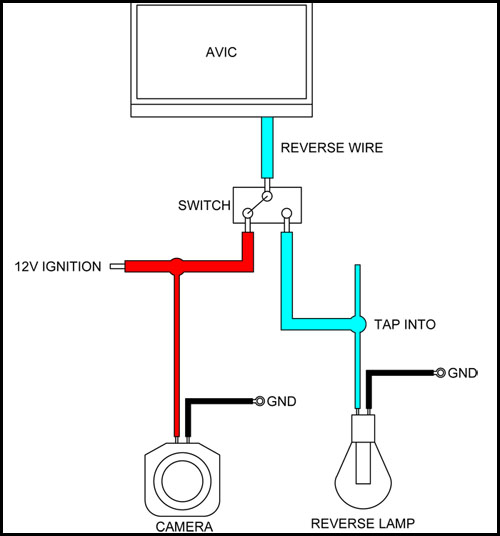
What u need is a SPDT switch. In one state the rear camera will come on automatically when you put the gear in reverse. Flip the switch and it will switch to rear camera mode regardless if your driving.

Edited May 23, 2012 by rgarjr
Posted May 23, 2012 · 10:07 UTC#5

Ok so just to clarify as im sitting in some ghetto country with nothing to do till I go home but get this down so i can knock it out.


So pink reverse camera wire from headunit to center pole on spdt.

The wire from the reverse camera Positive and Negative up to the trigger on one side?

And a 12v input to the other side that is all i have to do?


Im confused because. where do i run the cable from the actual camera the pos and negatve. And then the actual wire coming off the reverse lights when i put in reverse where does that go?


In my mind i would put the cables off cam to center pole with the pink wire from HU. And then reverse wire off fuse box to one side of switch and 12v to one side of switch.

Posted May 23, 2012 · 16:28 UTC#6

The camera's power u will get seperate from this. You need to find a good ground on the chassis and feed it 12V ignition.

post-41711-0-72166400-1337791973_thumb.jpg

Edited May 23, 2012 by rgarjr
Posted May 24, 2012 · 02:42 UTC#7

You don't need a switch as yes, the unit has a REAR VEIW option.

Posted May 24, 2012 · 12:56 UTC#8

You don't need a switch as yes, the unit has a REAR VEIW option.

Unfortunately, it isn't just a 1-button change. It's buried a couple levels down in the settings menu. So, if the user wants a way to quickly see out the rear, or toggle back and forth, a simple switch will work. Just be aware it will f-up the dead-reckoning logic (you're telling the HU you are going 60mph in reverse). It might have a slight impact on your plotted position since the calulated position won't match the GPS one.

Too bad you can't add this setting to the Quick Access menu on the NAV screen.

Posted May 24, 2012 · 20:47 UTC#9

Too bad you can't add this setting to the Quick Access menu on the NAV screen.


Actually didn't the 920\120 bring that into the software? I have seen a pic of the REAR VEIW map view icon in the shortcuts screen.

Posted May 25, 2012 · 17:32 UTC#10

Actually didn't the 920\120 bring that into the software? I have seen a pic of the REAR VEIW map view icon in the shortcuts screen.

You're right - I just checked. You can set an icon in the Shortcuts menu to select Rear View. It uses a split screen.