I was checkin out my 3d calibration to day and noticed somehitng intresting. In the attached picture I was parked and on flat ground. as you can see it is showing me on an incline and accelerating. Why is this happening?
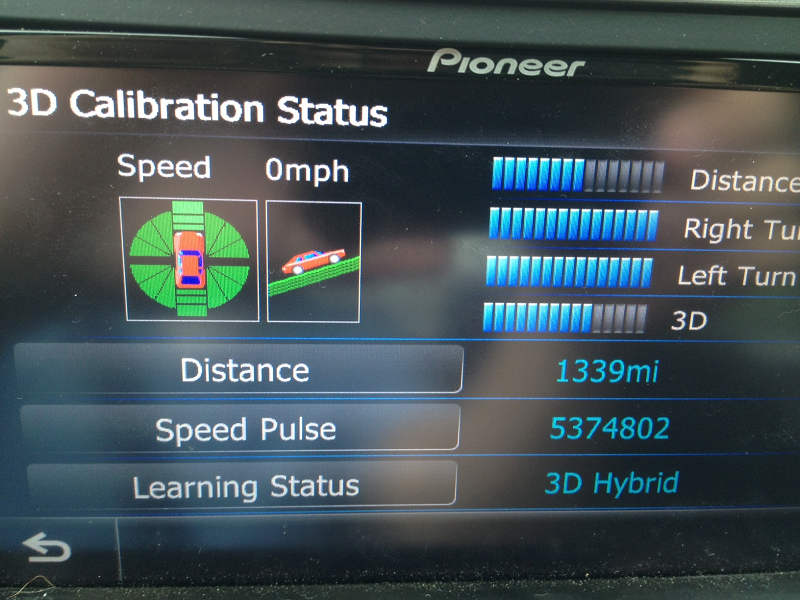
I was checkin out my 3d calibration to day and noticed somehitng intresting. In the attached picture I was parked and on flat ground. as you can see it is showing me on an incline and accelerating. Why is this happening?
I'd try recalibrating it. What is the angle/orientation of your head-unit in the dash. In the Installation manual, it mentions maximum angle, I believe, for precisely this reason. If you're dash slopes a lot and your HU is facing upward too much, it will mess-up the sensor.
However, I don't think the angle will affect the NAV calculations much (for dead reckoning) unless you are climbing Pikes Peak. So I wouldn't worry about it.
My uniit is monuted flat. I have to tilt the screen to get the angle i need. I am not sure how to reset the unit. I have done the factory reset but it does not do anything for the 3d connection data.
Mike
By flat, I assume you mean perpendicular to the ground. I would be suprised if the modified screen angle affects this, but I can't say for sure.
To recalibrate all the sensors, press "Learning Status". I am not at my car, so I can't say what options if has. I think you can safely reset all. The HU will re-learn everything pretty quickly (a couple miles IIRC). I'd do it someplace where you have lots of flat land if possible, although I'm not sure that matters.