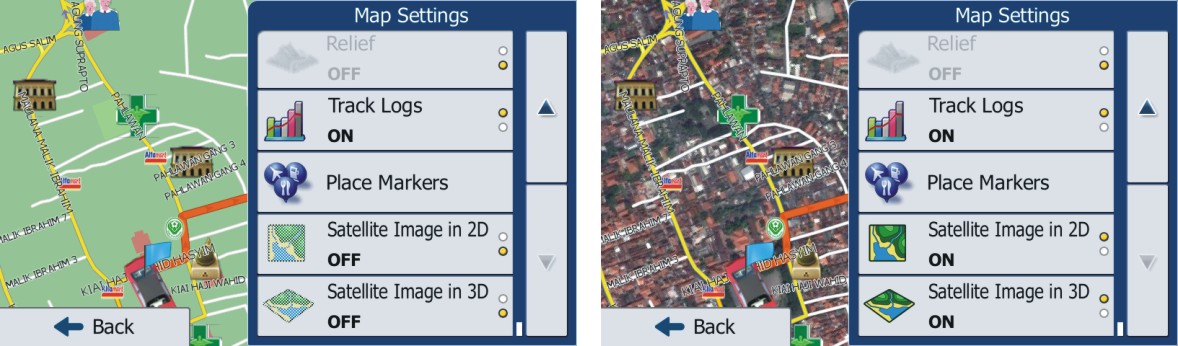
Who wants their maps to look like the right side?! i know I did! Read on!
Been a long time since ive been on here.. and im glad I did. I found chucks mod and unlocked a WHOLE new level of awesomeness to my avic! iGo Primo is great! First of all you use satellite images to create the raster files that overlay on your regular maps! Its not very hard to do.. you just need a few tools which I attached to this post, and a license file that allow for raster images which I cant post here but the full file name is below and a simple google search should allow you to find it easily. http://wisnata.blogspot.com/2012/09/raster-maps-untuk-igo-primo_8613.html is the best tutorial that I have seen. You will probably need to use Google Translate or something similar.. i did haha. In the SAS Planet program "Satellite (Yahoo)" seems to be the best as Google's satellite no longer works in the program. You can probably use Google Earth software instead of SAS Planet but I havnt tried it so im not sure how to do it..
First I tried using 16x zoom on the maps and while it works, detail when zoomed in on the nav pretty much sucks. At 16x zoom my area which consisted of 6 tiles churned out a 77mb .raster file at HQ settings. But like I said zoomed in colors just blend and its not very good. So onto 18x zoom which is what Im currently using at HQ setting churned out a 124mb .raster file and my F series handles it just fine and I can actually see individual homes on my street. I am going to try 20x but its going to take probably all nite to get all the images down in SAS Planet. The size of the download for 20x is pretty large download it was going to take hours when I tried earlier.. so im just gonna set it to download before I goto bed tonite. Im also not expecting the avic to handle it very well due to what im expecting to be at least a 250-300+ file size and limited RAM.. but im gonna try none the less just to see. Im completely happy with 18x anyways. When using the NNG Raster program always use to "bicubic" filter setting as it has the best results hands down.
iPhone_Primo_ISR_1101__NNG__DEM__3D__PST__CAR__JV_ _Google__TMC___v2.1__.lyc <-- the name of the license file you will need to enable raster maps.
Let me know if you have any questions and ill try to answer them.
 .
.