Search Archive

Reversing camera.. I'm confused.

By mibes · Jan 22, 2013in AppRadio, AppRadio 2, AppRadio 3💬 16 posts👁️ 19,116 views
Posted Jan 22, 2013 · 16:32 UTC#1

I'm a little bit confused about installing my reversing camera (the photocopied instructions that came with the camera are unreadable). The camera has video signal, 12v and earth wires coming from it. I've connected the 12v and earth to the reversing lights 12v and earth and then run the video signal cable to the head unit (SPH-DA02). I'm a bit confused as to what to do with the pink cable from the HU what can I attach it to? I've tried earthing it and adding 12v to test the camera but as yet I haven't seen a picture from the camera. The other thing I'm not sure about is is the RCA plug carrying the video signal has a short red wire coming I've no idea what this is for!


Ideally I'd end up with the HU automatically switching to the camera when I go into reverse but I'd also like to be able to switch to it using the onscreen button. I'm not sure how this is supposed to work as surely any time the camera is powered my reversing lights would also be on?


Any help would be much appreciated!!
Edited Jan 22, 2013 by mibes
Posted Jan 23, 2013 · 04:09 UTC#2

I would assume the red wire is a feedback from the back (camera) that feeds the sense line from the head unit (the pink wire). If I recall, there may be a setting with the Appradio that you need to set to enable the camera. Put a volt meter on the red wire from the camera (the other to GND) and see if it energizes when you put the car in reverse.

Posted Jan 23, 2013 · 12:33 UTC#3

To have the camera do what you want, you need to power your camera with acc power (like the red wire from your appradio) The violet/white wire from your appradio needs to be hooked to a wire which changes voltage when the car is put in reverse. Your backup light wire will be a good choice for this. Now, since your camera is powered when your car is on, you can use the camera icon on the main screen, or it will automatically turn the camera on when you put your car in reverse. I hope I've explained this clearly because many people are over complicating this and it's not that bad. The hardest part is finding a wire under the dash that corresponds to your back up lights. A meter helps a lot.

Posted Feb 01, 2013 · 17:12 UTC#4

camera needs +ve (ignition) and -ve (ground to body work) so that is powered when the radio is on.


then the signal wire from the radio is then connected up to the reverse light and the signal goes from the reverse light to the radio and switches the screen over to the camera which is always powered (so you can press the camera button on the screen)


if you google rear view cameras, there are lots of wiring diagrams.


JJ

Posted Feb 02, 2013 · 04:59 UTC#5

I just installed a camera today with my app radio.


Connect camera 12v+ to 12+ reverse light and the camera GROUND- wire to a ground source. It could be the - "negative" of the reverse light, or, you could make yourself a ground, by scraping the paint on the body of the car and check clearance then drill a small screw into the area you scraped and put the ground- wire there.


Then at the app radio, go to settings, polarity, select Positive or negative, doesn't matter, this will enable the camera. Then at the home screen at the app radio, tap the camera button on the top right corner and it will be blue. If you connected the appradio to the correct REVERSE signal wire of the car, then every time you shift reverse it will automatically bring the camera, and the reverse light at the camera will turn the camera on, and you will have a picture.


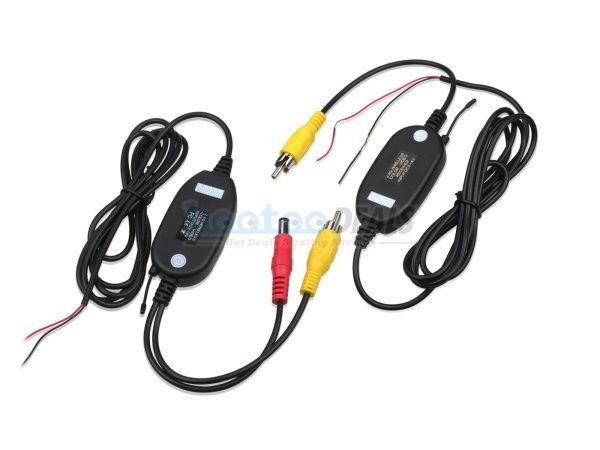
I used this, instead of running wires. It is a wireless video kit. I bought it on ebay:

imagehootoocom.jpeg

Posted Feb 02, 2013 · 10:18 UTC#6

nice idea the wireless !! , didn't expect that exists !

thx

Posted Feb 06, 2013 · 02:56 UTC#7

I just installed a camera today with my app radio.


Connect camera 12v+ to 12+ reverse light and the camera GROUND- wire to a ground source. It could be the - "negative" of the reverse light, or, you could make yourself a ground, by scraping the paint on the body of the car and check clearance then drill a small screw into the area you scraped and put the ground- wire there.


Then at the app radio, go to settings, polarity, select Positive or negative, doesn't matter, this will enable the camera. Then at the home screen at the app radio, tap the camera button on the top right corner and it will be blue. If you connected the appradio to the correct REVERSE signal wire of the car, then every time you shift reverse it will automatically bring the camera, and the reverse light at the camera will turn the camera on, and you will have a picture.


I used this, instead of running wires. It is a wireless video kit. I bought it on ebay:

imagehootoocom.jpeg

MrKO: How does the wireless reverse camera work? I installed a regular one on my old truck and man what a pain in the ass running the cable was

Posted Feb 06, 2013 · 07:58 UTC#8

MrKO: How does the wireless reverse camera work? I installed a regular one on my old truck and man what a pain in the ass running the cable was


The wireless kit works great. Simple installation and it cost $16.

Posted Jun 20, 2013 · 12:46 UTC#9

I'm still baffled what the wire from the appradio has to go, my crazy wife has misplaced my appradio manuals GRRR!!!!

Posted Jun 20, 2013 · 17:41 UTC#10

Download the manual form Pioneer's site. And to all of those that say connect the cameras power wire to the car's reverse wire........THAT IS WRONG!

Posted Jun 21, 2013 · 07:27 UTC#11

Manual says connect the appradion violet/white wire to the cars wire who's polarity changes when I put it in reverse?

Posted Jun 21, 2013 · 08:33 UTC#12

Manual says connect the appradion violet/white wire to the cars wire who's polarity changes when I put it in reverse?

The backup lights.

Posted Jun 21, 2013 · 12:16 UTC#13

MrKO: How does the wireless reverse camera work? I installed a regular one on my old truck and man what a pain in the ass running the cable was

Do you have a link to the kit?

Posted Jun 21, 2013 · 18:56 UTC#14

To have the camera do what you want, you need to power your camera with acc power (like the red wire from your appradio) The violet/white wire from your appradio needs to be hooked to a wire which changes voltage when the car is put in reverse. Your backup light wire will be a good choice for this. Now, since your camera is powered when your car is on, you can use the camera icon on the main screen, or it will automatically turn the camera on when you put your car in reverse. I hope I've explained this clearly because many people are over complicating this and it's not that bad. The hardest part is finding a wire under the dash that corresponds to your back up lights. A meter helps a lot.

thanks for all the help got it sorted in the end, ^^this^^ was the way to go,

it just took VBLUE explaining it to me, for it to make any sense in my tiny brain lol

Posted Jun 26, 2013 · 13:59 UTC#15

Nice find on the wireless kit!

'My plan' is to install an infrared camera in the front and display with a switch i control...   Just to be cool...

Posted Jun 28, 2013 · 15:09 UTC#16

You shouldn't need a switch as you can turn camera on by pressing the camera icon top right of screen, you won't need to connect the reverse wire either if your not putting the camera at the back