Search Archive

X950BH iPod NIGHTMARE! HELP!

By MJ1988 · Apr 23, 2013in Problems/Troubleshooting💬 21 posts👁️ 4,696 views
Posted Apr 23, 2013 · 22:04 UTC#1

Hi guys,


I apologize if this problem has already been posted about and solved in advance. I just had the X950BH installed in my 07 Scion tC. Unfortunately I am having major issues right now with getting my regular iPod controls to work (30 pin iPod not iPhone 5).


On my old AVIC F700 I was able to use a REGULAR 64GB iPod plugged right in to the connection and be able to go to my playlists, artists, songs ect. right on the touch screen. My issue is with the new X950BH for some reason I cant figure out what is going on. I purchased ALL of the extra accessories that were stated on the Pioneer website but yet I still have NO access to using my iPod on the touch screen itself. It works through my iPod (physically picking songs from the iPod itself) but when I hit the AV Mode the screen goes blank.


All I want to do with this system is use my iPod ON THE TOUCH SCREEN like my old system use to do. Are the guys at Best Buy who installed the device messing wires up or is it just not possible to use a regular iPod on this device?


Please if anyone can help it would be greatly appreciated!
Posted Apr 23, 2013 · 22:56 UTC#2

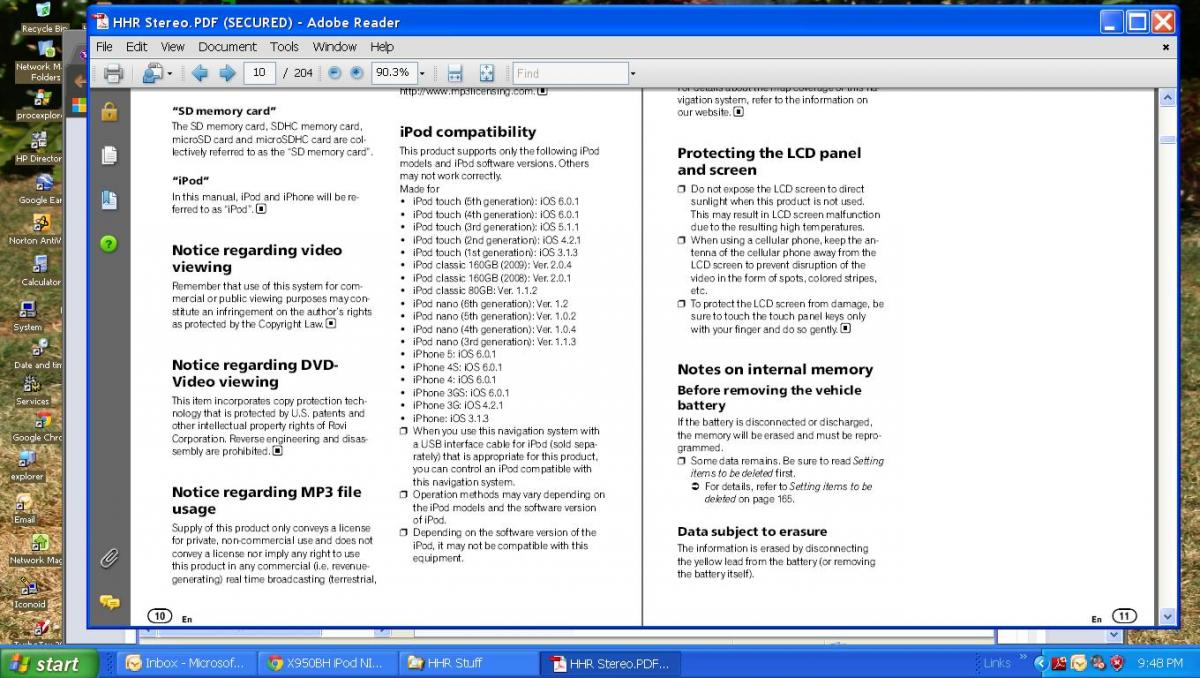
On page 10 of the user manual it lists the iPod versions and iPhone versions supported (12). It mentions that you have to use the "USB interface cable for iPod" sold separately then all will work. I think that is the two part cable I had to get so I could play my MP3 and videos from a USB thumb drive, around $90 or something. It has the 90 degree connector where it plugs into the back of the X950BH.

Posted Apr 23, 2013 · 23:13 UTC#3

I just looked at the manuals from the x950BH and no page 10 tells me about iPod versions. I did however find that I might possibly need an adapter called CD-IU201N? Does that sound like what you had to get?


1 more side note - I had Best Buy install the system, I notice when the car is DRIVING I get a warning about not being able to view the system while moving, could it be I do not have a bypass running with the system?

Posted Apr 24, 2013 · 02:13 UTC#4

Yeah, that's the cable you need. I use the same one + an adapter with my iphone 5, so I'm sure it will work for your typical 30 pin iPod.

Posted Apr 24, 2013 · 02:56 UTC#5

Yeah, that's the cable you need. I use the same one + an adapter with my iphone 5, so I'm sure it will work for your typical 30 pin iPod.


Hey bro so what your saying is you used that connection stated above and used the regular Apple converter for the plug to hook up your iphone right? Do you use AppRadio with that? Also, do you use a bypass for your unit? Just trying to make sure I get all the info because I've already had to pull this thing apart twice lol...

Posted Apr 24, 2013 · 04:47 UTC#6

Here you go, I did a screen snapshot from my manual. The shop I bought my unit from took the cable from a X940 for me to test and then I bought the two piece one. They could not figure why Pioneer left that one out?


post-67950-0-31812300-1366778760_thumb.jpg

Posted Apr 24, 2013 · 10:52 UTC#7

Hey bro so what your saying is you used that connection stated above and used the regular Apple converter for the plug to hook up your iphone right? Do you use AppRadio with that? Also, do you use a bypass for your unit? Just trying to make sure I get all the info because I've already had to pull this thing apart twice lol...


Yep, I use CDIU201 cable + an apple 30 pin to lightning adapter for my iphone 5.  That won't ever give full appradio support, though, because there's no way to carry the video over lightning (like there used to be with the 30 pin). To get full appradio support, you need CDIH202, which includes an HDMI cable, but you also have to buy an apple lightning AV adapter, AND another lightning cable...and you need a firmware update that pioneer has yet to release... So I chose to skip the video features for now because they're just not that important to me.  For you, though, with your regular iPod, the CDIU201 should be fine by itself!


There's a decent chart that lays it all out here for iphones:

http://www.pioneerelectronics.com/PUSA/2013+Pioneer+and+Apple+Compatibility - just keep in mind that when they say "with 30 pin to lightning adapter" they mean ALSO with the CDIU201, which is the 30 pin interface cable.


Also, in terms of a bypass, I followed these instructions and I've had full control, no warning messages, nothing!  


http://avic411.com/index.php?/topic/36184-avic-x850bt-bypass

Posted Apr 24, 2013 · 21:08 UTC#8

Ok I ordered the CDIU201N cable. Now as far as bypass is concerned...do I need that in order to work the touch screen (pick songs, playlists & search)? My older F700BT model was used when I got it off eBay and I didn't use any type of a bypass it just worked. I don't know much about these systems so if I HAVE to do a bypass im going to need to find a place to do it.


Do you have to purchase a bypass separately?

Posted Apr 24, 2013 · 22:53 UTC#9

Honesty, I don't know what gets locked out - I just did the bypass the first time. And the directions from the forum tell you how to do it without buying anything else (thanks everyone here before me!)

Posted Apr 25, 2013 · 03:20 UTC#10

Ok well I have that cable it should be here by Friday. Do you think the guys at Best Buy would know how to bypass my unit? I saw it on YouTube and it looks simple but I am not very good with those kind of things and it probably be best if some type of a pro did it...Hopefully after this weekend I won't have to deal with this thing anymore!

Posted Apr 25, 2013 · 03:43 UTC#11

You could call the Best Buy techs and ask but I'll bet a Mexican dinner they will say no as it would probably violate some "policy" they have. You could probably see if one of the guys would do it on their own time for some $$$$ but that might get him fired so you'll have to learn how or find a stereo shop such as those in the videos and they would do it.

Posted Apr 25, 2013 · 04:01 UTC#12

Bypassing the motion lockout is against Best Buy's policy.

Posted Apr 25, 2013 · 16:40 UTC#13

I work for Best Buy and we will NOT bypass the units.  It is against our policy because it is illegal.  Also based on some of the questions and comments posted on here I wouldn't want the majority of those peaople able to watch video while driving.  The p brake connection however has nothing to do with ipod control for music.

Posted Apr 26, 2013 · 04:29 UTC#14

Whoa don't bite my head off people. I think 1 post would have sufficed about the Best Buy stuff. Like I said I don't know much about installing these things so yeah. I don't play videos ever I just listen to music all I want this god damn machine to do is play my music and allow me to use the touch screen to control what songs I want next. That's it.

Posted Apr 26, 2013 · 04:31 UTC#15

You have nothing to worry about and calm down. I don't think anyone was "biting your head off".

Posted Apr 26, 2013 · 04:33 UTC#16

Wasn't trying to be rude, just very frustrated by this whole thing. If I knew it was going to be this much of a hassle to swap out the systems I would have never done it lol. The part comes tomorrow so I might just try and swap it out myself after work if Best Buy can't squeeze me in.

Posted Apr 26, 2013 · 21:43 UTC#17

If you had Best Buy do the original installation, I would recommend taking it back and having them install the correct cable for you.  The main reason is we offer a lifetime workmanship warranty on product we install, provided no other work takes place other than by a Best Buy.  If you pull the deck out and change or add cables, and then it stops working on you, Best Buy isn't going to be responsible since you changed the work they did.

Posted Apr 27, 2013 · 17:31 UTC#18

If you had Best Buy do the original installation, I would recommend taking it back and having them install the correct cable for you.  The main reason is we offer a lifetime workmanship warranty on product we install, provided no other work takes place other than by a Best Buy.  If you pull the deck out and change or add cables, and then it stops working on you, Best Buy isn't going to be responsible since you changed the work they did.


The installer at Best Buy was the one who told me to swap them out. They actually helped me a lot since the first install I had to go back twice for them to try and find the solution and they did not charge me a dime. I ended up hooking up everything fine the only thing I forgot was to plug my subwoofer back in. Other then that the system works flawlessly now & I am extremely happy. Maybe when they make an iPhone that has over 100GB ill swap out the cables again for APPRADIO but right now it's not worth it. Thanks everyone for the assistance.

Posted Apr 27, 2013 · 18:11 UTC#19

They do make an iPod that is over 100gb.

Posted Apr 28, 2013 · 21:36 UTC#20

They do make an iPod that is over 100gb.


I said iPhone. The new 5S that is coming out will be over 100 GB but right now the 64 GB is the largest they make. I have almost 5000 songs and my iPhone is pretty much maxed out. I checked out the APPRADIO Apps and there wasn't anything that I liked besides usage so i'll probably skip out on that.

Posted Apr 29, 2013 · 00:09 UTC#21

Spend 25 bucks and go with iTunes Match and problem solved.