Search Archive

AppRadio2 or AppRadio3... or something else?

By OldTimer · Sep 18, 2013in AppRadio, AppRadio 2, AppRadio 3💬 24 posts👁️ 5,629 views
Posted Sep 18, 2013 · 20:24 UTC#1

Currently have a Alpine 1DIN HU in my truck but have room for a 2DIN.  Baffled by the technology can someone explain whether I can get by with one of the AppRadios?  Here's the deal:


I have an iPhone4, not really interested in the 5S yet so I'm sticking with this phone until Apple at least makes the entire screen active.


Primary Stuff:  I'm confused about using the combo of the AppRadio and the iPhone... for instance, I need some navigation, but I'm not pulling over to monky with my iPhone keyboard every time I want to look for a gas station, hotel or someplace to eat.  I also don't want to _lose_ my GPS routing when answering the phone or calling.  And of course, I need the phone to be hands-free.  I don't mind connecting the phone bc I'm the only person driving the truck, and of course I'd like to be able to access my contact list and select the call from the HU screen/controls, so again... I don't want to have to monkey with the iPhone while driving.


Minor Stuff:  It looks like the big difference in the Gen3 vs the Gen2 is the DVD/CD player?  I'm not bright enough to shrink a movie onto my iPhone so my grandkids can watch it if they're riding with me.  So I think I need one of those brake bypass gadgets and maybe the AR3 with the DVD player built-in?


So when people say the iPhone is "mirrored" on the AppRadio's screen, does that mean I'll see emails that I can respond to, an interactive Safari browser, and other functions like streaming my iPhone's music?  Also, with regard to navigation, does the AR3 come with real built-in navigation, or is it piggy-backing Google Maps or something like that?


I was in a friend's truck and he had a Kenwood DNX 7100 with built-in Garmin Nav, guess it gets updated by a SD card slot behind the face.  He said it was "older" technology and that I might be better off with a AppRadio.  So can someone school me on Pros/Cons?
Posted Sep 20, 2013 · 16:21 UTC#2

Primary Stuff:  I'm confused about using the combo of the AppRadio and the iPhone... for instance, I need some navigation, but I'm not pulling over to monky with my iPhone keyboard every time I want to look for a gas station, hotel or someplace to eat.  I also don't want to _lose_ my GPS routing when answering the phone or calling.  And of course, I need the phone to be hands-free.  I don't mind connecting the phone bc I'm the only person driving the truck, and of course I'd like to be able to access my contact list and select the call from the HU screen/controls, so again... I don't want to have to monkey with the iPhone while driving

The appradio has an app on your phone that launches on your radio screen.  This will allow you access your compatible apps via the touch screen.  Once in a nav app like waz you will be able to look for hotels and type in address via the radio not your phone.  Appradio does support hands free. If you are on the phone I am not sure if it will announce directions.


Minor Stuff:  It looks like the big difference in the Gen3 vs the Gen2 is the DVD/CD player?  I'm not bright enough to shrink a movie onto my iPhone so my grandkids can watch it if they're riding with me.  So I think I need one of those brake bypass gadgets and maybe the AR3 with the DVD player built-in?

If you want to watch regular dvds the AR3 would be your best bet. For the bypass your are looking for a micropass. They are about $20  


So when people say the iPhone is "mirrored" on the AppRadio's screen, does that mean I'll see emails that I can respond to, an interactive Safari browser, and other functions like streaming my iPhone's music?  Also, with regard to navigation, does the AR3 come with real built-in navigation, or is it piggy-backing Google Maps or something like that?

The iPhone can not be truly mirrored unless you have your phone jailbroken and using appradio extensions.  It will only mirror compatible apps  List of the apps http://www.pioneerelectronics.com/PUSA/Car/AppRadio

. 

Posted Sep 20, 2013 · 22:05 UTC#3

It will mirror without a jailbreak.

Posted Sep 25, 2013 · 01:02 UTC#4

Hey Guys... Thanks for the feedback and advice. I'd like to pick your brains a little more, but it looks like I'll go with the AR3 with the DVD capability.  So the key questions are:


1. Will probably order from Amazon... do i need to order a extra cable that connects the AP3 HU to my iPhone4?  What comes in the box?


2. What combination of NAV apps would I need to at least approach a comparable level with my ancient Garmin Nuvi 460?


3. Can I go to the app store and get the apps before I get the AR3 installed?


4. I may skip the backup camera now, but can it be pigtailed so that installation is easier down the road if/when I want to install? 


5. Any tips or tricks to the installation that would make it go smoother?  Does the mounting cage come with it?


Thanks again for the help. -Mike

Edited Sep 25, 2013 by OldTimer
Posted Sep 25, 2013 · 04:02 UTC#5

1. Yes.  http://www.pioneerelectronics.com/PUSA/Car/Accessories/Smartphone-and-iPod-Cables/CD-IU201N


2. Any iOS navi app compatible with the unit will far exceed any older hand held unit. Some examples are iGo Primo (purchase), Sygic (purchase), Nav Free (free), and Waze (free) Be aware that some of these apps will  

    need an in-app purchase to offer unit control.   


3. Yes.


4. Depends on camera but not usually. The reverse wire can be wire during install though.


5. No mounting cage. Its a standard install and pretty easy if you've done this before. If not pay someone to do it the right way the first time.

Edited Sep 25, 2013 by VBLUE42
Posted Oct 01, 2013 · 23:42 UTC#6

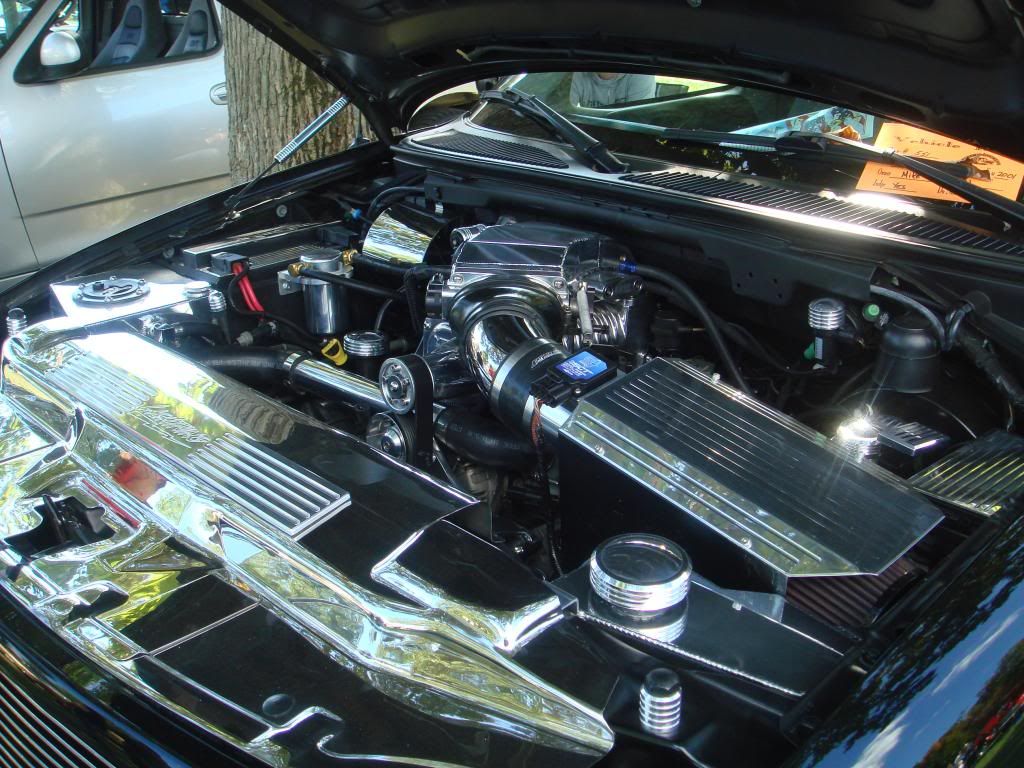
VBlue... Thanks so much for the advice.  Ordered the Pioneer/iPhone4 cable model you suggested, also got the micro bypass. May try an eBay backup camera, but just for kicks, I may put it under the hood.  My truck is a show vehicle and the underhood is all sorts of blinged out LOL.


DSC08507_zpsabaa7c10.jpg


Could be cool to see if there's a way to select the camera and show the engine running, but thats not really important.  What I'm somewhat concerned about... is connecting the APPRadio3 to my truck's custom stereo system.  I don't have a drop of Ford audio equipment in my truck.  I have a custom dual sub stereo cabinet built into the back of the cab, and right now its connected to my current Alpine head unit. So since I haven't had the unit delivered yet, whats typically in the box with regard to wiring?  One of my friends said I might need a "Pioneer to Ford" adapter?  Amazon didn't mention this, so what am I looking for?


And again... thanks in advance for your help. -Mike

Posted Oct 02, 2013 · 00:28 UTC#7

Could be cool to see if there's a way to select the camera and show the engine running, but thats not really important.

As long as the camera is wired properly it can be done easily.


One of my friends said I might need a "Pioneer to Ford" adapter?

There should already be a vehicle specific harness connected to the Alpine unit. Disconnect the alpine unit and wire the Pioneer in its place.

Posted Oct 02, 2013 · 03:09 UTC#8

As long as the camera is wired properly it can be done easily.


There should already be a vehicle specific harness connected to the Alpine unit. Disconnect the alpine unit and wire the Pioneer in its place.

 On the adapter... the piece that plugs into the Alpine is a universal component that will just plug in?  Or are you saying cut/strip the wires and connect the pigtailed Ford end wires to all the Pioneer plug pigtail?  Is that what you did with your Scion and AR2? If I go to Best Buy would they have a ready-made Ford to Pioneer connector?


TIA - Mike

Posted Oct 02, 2013 · 03:25 UTC#9

Pretty much there is a harness for all cars. When you remove your factory stereo you unplug the factory harness from the stereo. You take the add-on harness and plug it into the factory harness. The wires coming off of the add-on harness get wired into the aftermarket stereo (Pioneer) There is no Ford to Pioneer harness as opposed to a Ford to aftermarket/add-on stereo harness. So, in order for the Alpine to have been installed in the first place that aftermarket or add-on harness is already there. Just cut the wires where the Alpine and add-on harness meet and wire the Pioneer in its place.


And yes, Best Buy will either have what you need or will get it for you.

Edited Oct 02, 2013 by VBLUE42
Posted Oct 02, 2013 · 23:17 UTC#10

OK... thanks VBLUE... They had the Ford 98 & Up connector with pigtails at Best Buy.  We're installing Staurday, and I have all the parts and the radio now.  Next step is to figure what APPs I should be picking up to make sure my iPhone4 provides the intelligence the AR3 needs.  I gather the first APP should be the pioneer APP?  And for GPS use, do most people prefer WAZ or MotionX GPS Drive... or both?  And do they operate simultaneously as two integrated programs?  My primary use as mentioned before, will be to have hands-free phone capability, and GPS functions as good as my 10 year old Garmin Nuvi.  Everything else is gravy LOL.


Mike

Posted Oct 03, 2013 · 00:43 UTC#11

Waze is by far the most popular.

Posted Oct 03, 2013 · 15:19 UTC#12

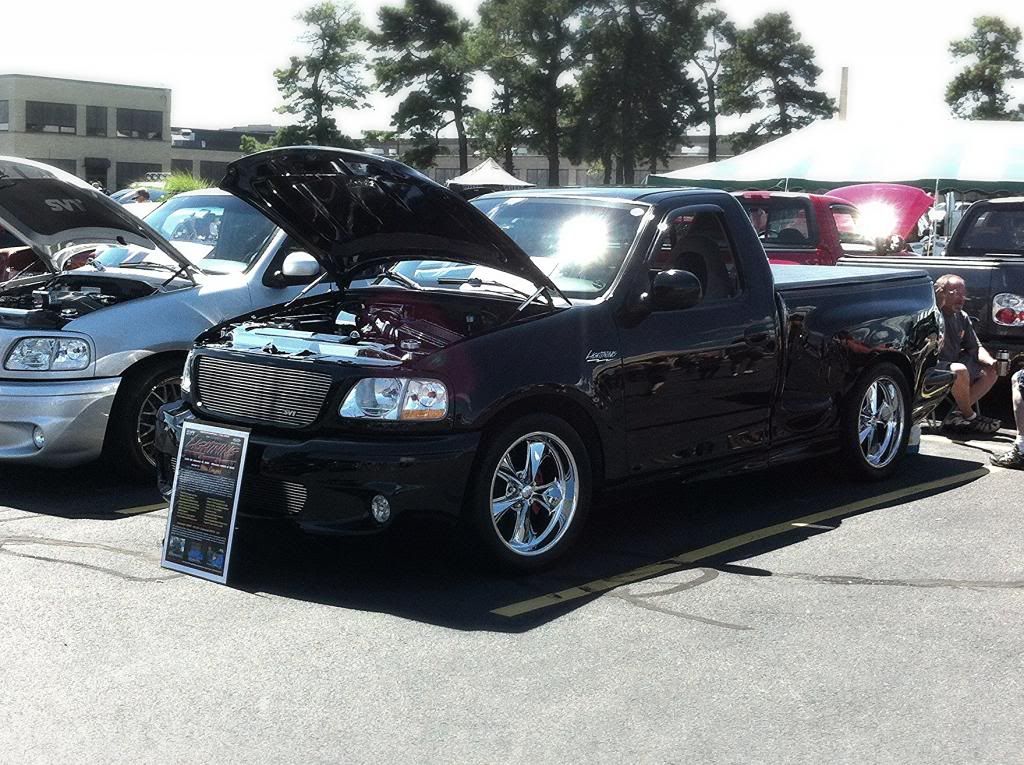
Im not a fan of chrome, but that looks mint, is that the S/C Harley Davidson or the Lightning?


Im not sure if you know that fitting a double din in that dash requires cutting and Metra carries the right kit to trim out a double din in the 97-03 F150's http://www.metraonline.com/part/95-5818

Posted Oct 04, 2013 · 00:53 UTC#13

Im not a fan of chrome, but that looks mint, is that the S/C Harley Davidson or the Lightning?


Im not sure if you know that fitting a double din in that dash requires cutting and Metra carries the right kit to trim out a double din in the 97-03 F150's http://www.metraonline.com/part/95-5818


The truck's a 2001 SVT Lightning F150 chassis #83 of 6783 built w/35K on it, garage queen that sometimes works and gets dirty, but she's stored winters. Most of the bling is polished billet.  Blower is a Magnum Powers not the stock Eaton, Plenum is a JLP Racing piece.  She's making about 440-450 to rear wheels.  Truck is dropped 2/4, rides on 20" Foose Nitrous II chrome wheels.  Has full custom Bassani exhaust. Loud & Fast... just like the TV show LOL.


bb7b24b6-6a72-44d6-a7e9-d9881fe3324b_zps


Thanks for that link on the bezel. Don't know where I can pick that up locally though.  We'r installing it on Saturday at a Mod Party & BBQ we're having South of Boston.  Would that be available at Best Buy or maybe a typical Car Radio shop? Or is it an Amazon/eBay item? My buddy who has a AppRadio(1) in his Lightning never mentioned the need for a bezel, but did mention that we'll have to use a rotary tool to cut some stuff inside the dash to mount it.


Mike

Posted Oct 04, 2013 · 13:55 UTC#14

Beautiful truck, my reference to the bezel was from an f150forum.com radio install post, I havent installed a double din in my truck yet just my Lincoln LS V8.

They mention getting a gap around the radio w/o the expedition/Navigator bezel.


I dont have a chance with looking as good as that lightning but here is my 2k Lariat 5.4L, its a rust free TX truck.

newrims_zps5eb464af.jpg

Posted Oct 04, 2013 · 14:06 UTC#15

Here was my toy till a few months ago when i sold it.

She ate a few corvettes, with little effort.

It wasnt fun driving it around because the sound and the stance scared people off, i couldnt get people to play.  :mrgreen:

gt2_zps5f5483dd.jpg

Posted Oct 06, 2013 · 02:04 UTC#16

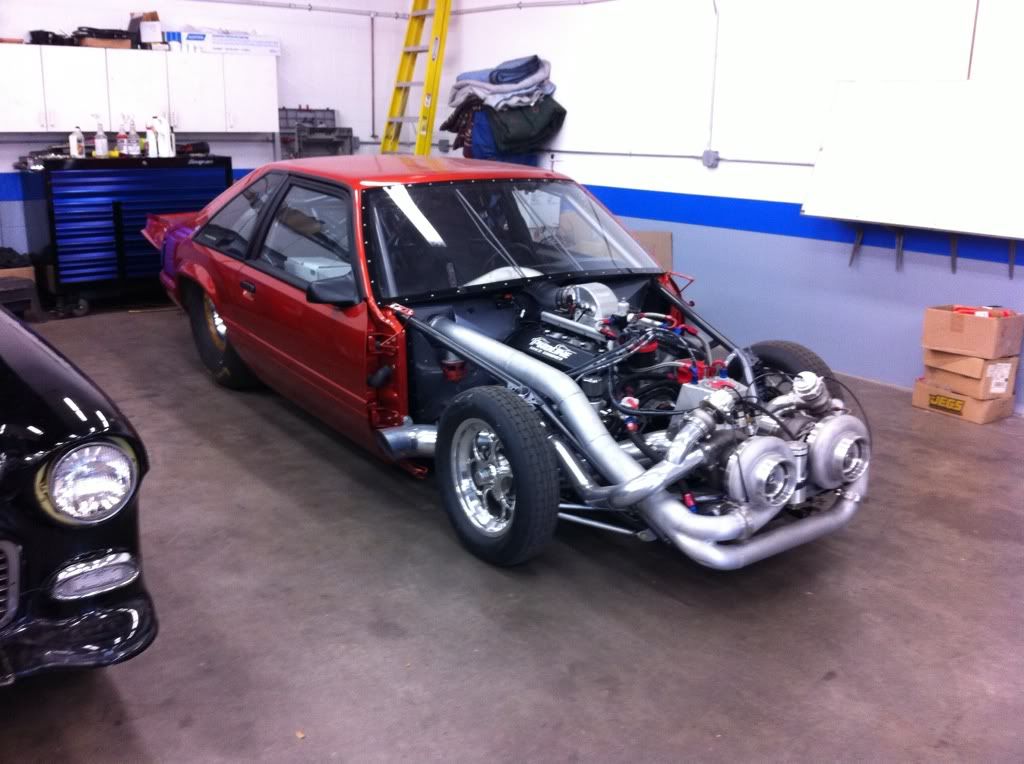
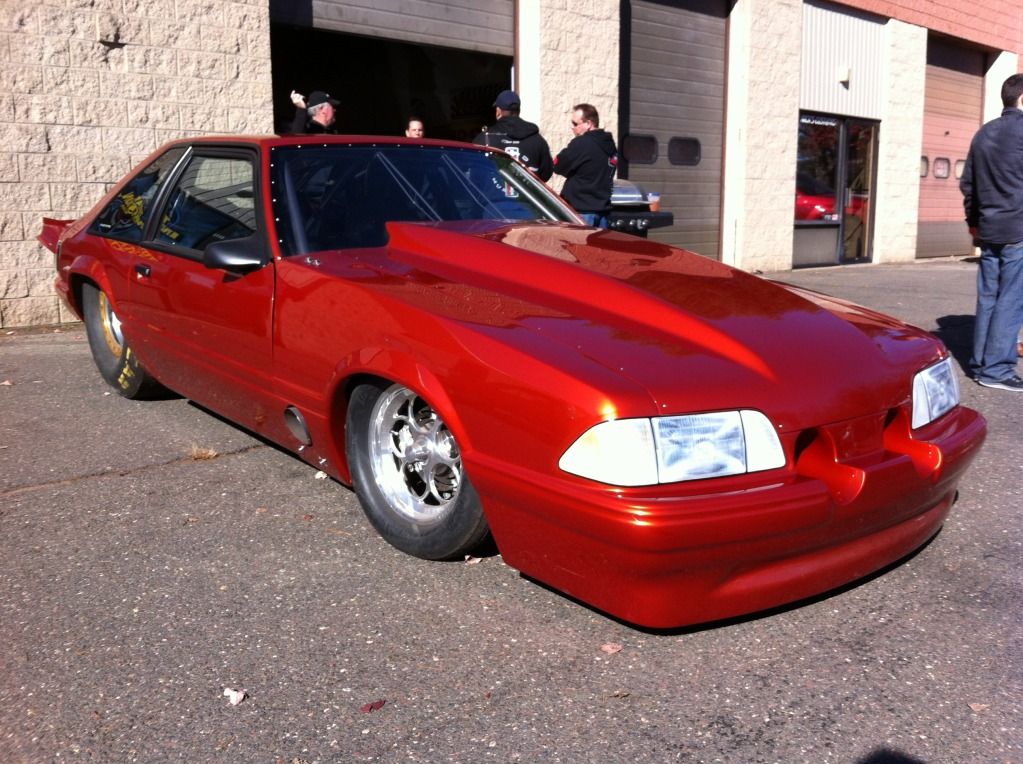
I like that Mustang!!!!  Yeah... the stance is perfect.  Mustangs are perhaps the best sounding of all the "muscle" cars, and they can be tweaked to run like the wind.  I have a Tuner/Builder friend with a Pro-Mod your body style twin turbo with about 2200 RWHP twin turbo, basically a race car.


66679ff5.jpg?t=1319324006


IMG_3101.jpg


I wound up getting the 2-bezel kit from Amazon, used one of the bezels, it seemed to fit better.  Go figure.  The radio is installed, powers up, and pairs with my iPhone, but thats where it stops.  Can't get it to acknowledge the Apps on the iPhone.  I suspect that the radio doesn't have the latest firmware that works with my iPhone's new IOS v.7.0.2.  The Firmware in the AppRadio3 is v.8.02 and when I went to their website there's no mention of IOS v.7.X but I did see a Firmware v.8.30 unfortunately it said it was for the AppRadio2.  Didn't want to take a chance.


I still have to pull the bezel back off and see if I can tweak the fit a tiny bit, plus we spent so much time going nuts with the Cable Handshake and Apps that I never connected/mounted the microphone or the backup camera.  The bluetooth worked as I got a phone call and it was on the speaker and the radio auto-muted, but I forgot to mount the microphone LOL.


I figure I'll call Pioneer on Monday to ask if there's a mistake we made or the problem is in the firmware.  Hope its the firmware.  Left the USB pigtail in the PS air vent so when I pull the bezel I'll be able to either extend the USB cable into the glove box or update the firmware then and there.  My only dissapointment with the radio was that it only has four (4) regular speaker inputs.  My truck has 2 speakers in each door, and then there's another speaker in each of the back corners of the cab.  I'm not a crazy audiophile, so we split the speakers so the door and cab corners are fed by a 1 to 2 RCA pigtail.  


Tomorrow I'll play with it, learn how to set the clock, maybe install the microphone and camera. -Mike

Posted Oct 06, 2013 · 05:03 UTC#17

Your problem is not iOS 7.0.2 Something else is wrong. Check all of your connections and do resets on both devices if necessary. Where did you get all of your cables?

Posted Oct 06, 2013 · 17:06 UTC#18

Your problem is not iOS 7.0.2 Something else is wrong. Check all of your connections and do resets on both devices if necessary. Where did you get all of your cables?


Cables? While I did have the Ford Pigtail that I picked up at BestBuy (IBR-WHFD3) which their installer said was the right one, but there was one already in the truck with long enough leads (and connections to my Alpine HU), so we snipped and match connected/soldered/heat shrunk all cables.  Radio works, Bluetooth Works, Phone Works although I have yet to connect the microphone.  The iPhone cable I ordered from Amazon was the Pioneer CD-IU201N AppRadio Mode USB to 30-Pin Interface Cable.  All the speaker wires were simply plugged in to their respective spots.  When BT is paired, I can stream music from the iPhone, but should I be able to select "iPod" and have it play songs from my iPhone without bluetooth? It doesn't right now.


As far as resetting, do you mean reset my iPhone (power off then power on) and reset the AppRadio3? Don't have a clue as to how to "reset" the radio, the instruction folder doesn't have much in the way of troubleshooting... I can't even find out how to set the clock or change the day on the screen.


Still trying to google instructions on the reset of AR3.  There's stuff on the previous two models, but each AR seems to have a different menu system.  I found a "RESET" selection but like a few other settings menu items, its grayed out and inactive.

Edited Oct 06, 2013 by OldTimer
Posted Oct 07, 2013 · 20:56 UTC#19

Found the RESET selection, but for some reason I can't get to use it.  When the screen says:  "Reset all to default values?" and there's a button for "OK" and "Cancel" the "OK" is grayed out and inactive.  Also, when I look at the bottom menu where the icons are... the Speaker icon with the red "Off" logo is also showing a ghosted "OFF" in white with a blue line under it.  Waiting for Pioneer to come back from lunch UGH.  Amazon is giving me a full refund if I want so I can buy another cable if this one is defective.  They did confirm that it was indeed a Pioneer component.


Mike

Posted Oct 07, 2013 · 22:28 UTC#20

Did you pull your parking brake?

Posted Oct 07, 2013 · 22:42 UTC#21

Did you pull your parking brake?

Does the AppRadio only communicate if the parking brake is on?  Because its off.  Could the micro bypass be the cause of non-communication?

Posted Oct 08, 2013 · 01:17 UTC#22

Could the micro bypass be the cause of non-communication?

Could be.

Posted Oct 09, 2013 · 22:53 UTC#23

OK... I finally got it to show the Apps!  Matt from MicroBypass responded to an email I sent him in less than an hour, explained that ALL AppRadio 3 units are shipped set up and expecting an iPhone 5/5s.  So you have to go into Settings in the phone selections and leave the word "Other" showing, then just exit.  Apps Icon illuminates and gets me to my purchased (related) Apps.


Now I have to learn how to use MotionX Drive GPS so I can enter a destination and tell it what information I want it to display.


Pandora works great, Calendar, and BT streaming from my iTunes also works great.  Haven't figured out Photos yet LOL.

Edited Oct 16, 2013 by OldTimer
Posted Apr 12, 2014 · 15:38 UTC#24

OK, this past weekend I took the truck out of storage, been there since Thanksgiving. The battery had gone dead a couple months back so I installed a Battery Minder.  So I think the settings on the radio are screwed up.  Can't figure out how to get the "Other" selection, it keeps defaulting to the iPhone5 when I'm using an iPhone4.  Anyone have a clue as to how to get the settings to show "Other"?  Can't find a manual LOL.


I'm also seriously thinking of bringing the truck to a audio shop to check my install.  I cannot for the life of me get it to not use too much bass.  My system sounded great with my old Alpine, but this is so annoying no matter if I use the equalizer or the settings to try and minimize bass the thing sounds muddy and throbbing.

Edited Apr 12, 2014 by OldTimer