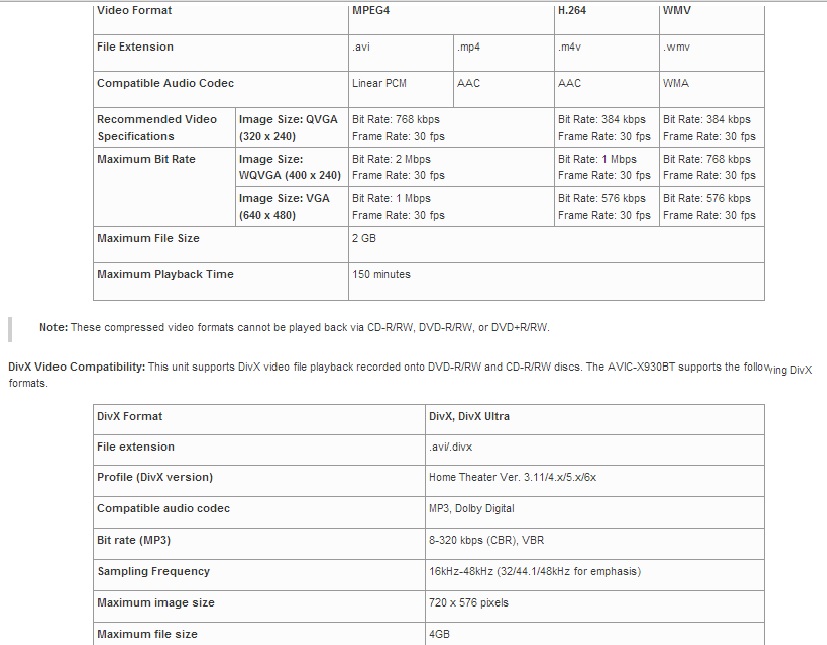
Most of my videos would get an error messages and I kept looking online for the video resolution and formats and after few days found this and wanted to share with you all.
Video Playback: The Pioneer AVIC-X930BT supports the following video files recorded onto a USB storage device or a microSD/microSDHC memory card:
Video Format MPEG4 H.264 WMV File Extension .avi .mp4 .m4v .wmv
Compatible Audio Codec Linear PCM AAC AAC WMA
Recommended Video Specifications Image Size: QVGA (320 x 240)
Bit Rate: 768 kbps
Frame Rate: 30 fps Bit Rate: 384 kbps
Frame Rate: 30 fps Bit Rate: 384 kbps
Frame Rate: 30 fps
Maximum Bit Rate Image Size: WQVGA (400 x 240) Bit Rate: 2 Mbps
Frame Rate: 30 fps Bit Rate: 1 Mbps
Frame Rate: 30 fps Bit Rate: 768 kbps
Frame Rate: 30 fps
Image Size: VGA (640 x 480) Bit Rate: 1 Mbps
Frame Rate: 30 fps Bit Rate: 576 kbps
Frame Rate: 30 fps Bit Rate: 576 kbps
Frame Rate: 30 fps Maximum File Size 2 GB
Maximum Playback Time 150 minutes
Note: These compressed video formats cannot be played back via CD-R/RW, DVD-R/RW, or DVD+R/RW.
DivX Video Compatibility: This unit supports DivX video file playback recorded onto DVD-R/RW and CD-R/RW discs. The AVIC-X930BT supports the following DivX formats.
Note: DivX files cannot be played on a USB memory device or SD memory card.