I just purchased a WD My Passport Ultra 1TB external hard drive to use with my 8000NEX. I started out by putting a few albums on it to test it out, plugged it up and the HU said incompatible USB. Next I reformatted the drive which erased all the factory junk that was on it, I kept it NTSF though, put the albums back on there and it seems to be working now. I put 1 album each of ALAC, FLAC, WAV, and MP3 and they all played. I also put 2 videos on there, 1 MKV and 1 AVI but neither of them showed up. I read another post where someone mentioned that you can't use the same USB device for video and audio, so I'll have to keep playing around with that to see if I can get it to work. If not, I'll just get another hard drive for video. Right now I'm loading the thing up with 200GB of music (14,000 files...1,500 folders) and I'm gonna see how the HU handles that. I'll post back with results.
WD Passport on 8000NEX
Video and audio work on the same device; I have both on my NTFS-formatted SSD running into my 4000-NEX and it's fine.
Just be careful with an actual HDD. There is a power requirement problem with them when no external power is available in that the available power down a USB cable is marginal at best. Insufficient power at best leads to drive disconnects under load (e.g. when actually trying to use them) and at worst can cause corruption of the format and loss of data.
SSDs require much less power and are fine, but I would not use an actual rotating disk for this reason unless you also rig external power to switched accessory power. Most external HDDs come with either a brick power adapter or a USB cord with two plugs (so it can draw double the DC power) for this reason.
There is also a video format issue with the NEX units; it apparently can only read H.264/WMV or DivX format, and MAY be able to read MPEG-4. Not sure on the latter; it claims to be able to to for audio but I don't know if it can for video files. Let me go check that -- give me a few minutes ![]()
Update: It will NOT play a high-def MPEG-4; says the file is incompatible. There's your problem; you need DivX or H.264/WMV.
Thanks for the info, the HU is new to me so maybe I just need to learn how to get to the video on the USB. If I have any problems with the HD then I'll try out an SSD. I know the passport is rugged enough to handle being in a vehicle but I'll have to see how the power supply works out. Initial testing was just a few minutes connected solely to the HU via USB and it worked fine. I'll play around with a few different video files to see what I can get to play.
Disk-in-a-vehicle works fine with 2.5" (laptop-sized) HDDs -- I've had one in my Jetta for close to 10 years in a Phatbox without problems. The issue is power consumption on a USB attached device. In theory the NEX units can drive 1.5A down the USB ports but the problem is that the USB spec where data is also available says there's only 500ma. 500ma @ 5V = 2.5 watts before losses.
Unfortunately when you look at the specs for most 2.5" disks they claim idle power is ~1 watt (fine) but max power during seek is somewhere around 3 watts (not fine!) This can lead to some really interesting issues where the drive appears to work perfectly well right up until you do something that loads it heavily and it "disappears" off the USB bus.
Incidentally the way you get a device into "high power" mode is by SHORTING the data pins on the USB connector; that's how the device on the other end "knows" it can draw more than 500ma.
Obviously if you're passing data down the cable you can't short the data pins ![]()
USB-3 gets around this problem (and has a different connector on the "device" end to enforce it by separating power and data lines into two plugs so you have backward compatibility) but the ports on the back of the NEX units are USB-2. USB-3 enclosures plugging into a USB-2 equipped host typically consume two slots; one connects power only, the second connects power and data. That gets you to 5 watts available (2 x 500ma @ 5V), which is enough to run a laptop (but not 5.25" desktop, many of which pull ~8 watts!) disk drive.
BTW on SSDs that comment about them being perfectly fine on USB power only applies to typical consumer units. Some of the better units (e.g. Intel's S3xxx series) spec up to 6 watts of power consumption under certain circumstances, which is definitely not ok on a USB2 port! Intel's "530" Series devices, for comparison, only pull 200mw..... leaving plenty for the enclosure electronics.
Ok, so i figured out that ALAC doesn't play, I thought I tried it out the first time but I guess I didn't. I was already expecting that though since it wasn't mentioned as a supported format in the manual. I did get the videos to work just fine, I only tried a few and didn't pay attention to what format they were but there was a mixture of mkv and avi including 720p and 1080p. I didn't check to see if any over 4gb would play, probably not but I'll check later.
@tickerguy The hd I have is USB 3.0 with 2.0 compatibility. It's got the firewire plug on the device end and a usb plug on the other end, just 1 cable with no splitter. I'll just have to wait and see how it performs under load.
It's not the drive, it's the USB 2 connection on the head unit. The spec says that USB 1 and 2 can only deliver 500ma down the port if there is data running on the cable, and to get the port into high current mode the data lines have to be shorted. (Apple, by the way, puts a specified set of resistance on the data pins instead of a short to indicate one of TWO high-rate charge options -- 1A and 2.1A for iPhones and iPADs, respectively. If you're wondering why your "iPAD" USB charger won't charge your standard device at high speed, that's why -- Apple intentionally broke compatibility. Shoot Jobs for that crap -- oh wait, he's already dead.)
TECHNICALLY the unit should refuse to deliver more than 500ma and the interface on the device should refuse to try to sink more than 500ma. I know it does with my BlackBerry Z10, which is happy to accept a high-rate charge but when plugged into the NEX refuses to take one as it sees the active data connection on instead of a short and says "500ma max charge rate available."
It sounds like you have a lot of knowledge about these things and I don't have a clue so everything you're saying is goin right over my head lol. I get the jist of it but for now it seems to be working and I'm happy. If I start to have problems, then maybe I'll try to educate myself a little better to understand what you're getting at. TBH I was a little disappointed with Pioneer that ALAC wasn't supported, then I got to thinking of why I had to save all my music to ALAC in the first place, because of Apple's proprietariness and the fact that I coudn't put FLAC on my IPod. If I can get this HD setup to work like I want I will be Apple free once again.
Beware that a good install with these head units will disclose flaws in your source material, and those flaws have a decent shot at annoying you.
FLAC in particular is good for that..... ![]()
I have a nicely-balanced system in my car and while it's not the KEFs that I have in my main listening room it's pretty darn close....
One hint: Get everything under 100Hz off your door speakers. Anything under ~200Hz is non-directional; you cannot localize it in the audio image, so there is no acoustic penalty to doing this, and door speakers are simply incapable of cleanly reproducing that material (nor for that matter is any other speaker where the rear wave can reach your ears -- which is basically all of them in a car other than a dedicated sub.) The NEX series have exceptional digital crossover systems built into them that make this easy, and a SMALL sub under the seat of the car is exactly what the doctor ordered for this sort of thing. It will make a quantum difference in your sound quality.
Thanks tickerguy, i followed your lead, my system and I are happy. I have learned alot from your posts. Usb and speaker knowledge is appreciated. I look forward to seeing more of your posts.
When playing music with a HD or SSD, does it still show album art, and can you search by artist, album, genre, etc?
Koush
Yes; it indexes the drive on first connection (will take a few minutes) and then again when disconnected and reconnected (much faster; it keeps a cache, provided you don't reformat it.)
Startup time for me with ~80gb on the SSD is in the ~10-15 second range from a cold turn-on.
Note that unlike many devices the Pioneer NEX units only will show album art if it is in the tags of the individual song file. It will not look to the folder directory for a JPEG if that data is missing from the individual file itself.
Thanks for that, is there a size limit on the hdd or ssd?
Koush
Not that I'm aware of, but there is a limit to the number of directories and entries the head unit can index. It's very large though (something like 50k songs.) Over 100GB and you must format with NTFS (exFAT is not supported.)
Note that HDDs will likely be trouble as their power consumption exceeds USB limits. I would not use one for this reason.
Consumer-grade SSDs should be fine; I'm running a 120GB Vertex II.
Thanks for the info.
Koush
My only experience is with the 8000 and I've only had it for a week or so, but here's what I know so far...As far as indexing, you can switch on the fly between tags (artist, album, genre, title) and files (folder\filename). With "tags" selected, when a song is playing you can click on any of the fields in the media player and it will open that particular directory to browse (artist, album, song, genre). If you choose "files, when a song is playing you have to click on the list icon to browse for other music. Clicking on the artist name or album in the media player becomes non functional.
And as far as size limit, this is what I read in the manual for USB\SD
Maximums
1500 folders
15000 files
audio playback time 7.5 hrs. (per file)
video file size 4gb
video playback time 150 min (per file)
I don't think it matters how large the actual drive is just as long as you stay within those parameters.
To look for your video files. There's a folder icon on the music timer bar. It separates the file format to MUSIC VIDEO PHOTOS
I could not get the 8000nex (new to me 8-7-14) to recognize a 1tb my passport ultra drive (new to me 8-8-14) as either fat32 or ntfs.
but the fact that usb2 was an option leads to be believe the 8000 knows something is there...
that to me screams a power issue... so I found a Y cable for the drive on ebay. in a week I will report my findings
PS: fat32 supports drives up to 2tb.. you just need a 3rd party application to do the format (I use partition wizard)
edit: yes, the Y cable works perfectly.. but it takes a terribly long time to read a 1TB before its accessible.
Update: It will NOT play a high-def MPEG-4; says the file is incompatible. There's your problem; you need DivX or H.264/WMV.
The manual says maximum resolution of mpeg4, H.264, wmv encoded video is 400 x 240 pixels, on USB/SD. DivX max is 720 x 576... but manual says no playback from USB/SD.
The manual is wrong.
However -- there IS a maximum, it's just not what the book says it is..... "Normal SD" (e.g. ~720x480, etc) resolution works.
....
One hint: Get everything under 100Hz off your door speakers. Anything under ~200Hz is non-directional; you cannot localize it in the audio image, so there is no acoustic penalty to doing this, and door speakers are simply incapable of cleanly reproducing that material (nor for that matter is any other speaker where the rear wave can reach your ears -- which is basically all of them in a car other than a dedicated sub.) ...
While I agree with this in principle, it is not an absolute.
Everything under 100Hz off the door speakers is a good recommendation for doors that don't have special treatment to mitigate rear wave returning to passenger cabin. Door speaker systems as furnished from the factory provide, at best, only minimal mitigation of rear wave return. Increased SPL requires more mitigation. Most OEM systems are not designed for substantial SPL.
It's very difficult to get decent return-wave isolation with a car door. You can certainly do better than the factory in most cases (I've pulled my door cards and done quite the number on them in my Mazda) but then you have the second problem that comes up which is that the volume of the cavity is almost-certainly going to be wrong for the driver, and that will produce some nasty peaks in the mid-bass.
This is one of the reasons for excessive "boominess"; some people like that (the old "louder is better" thing) but I'm not one of them. Quality over quantity please!
The easiest solution for moderate-to-quite-loud SPL levels (or where SQ is more important than raw SPL!) is to use a sub and route all the low frequency energy to it. Kenwood makes a decent little one that will fit under nearly any seat; I have one in my car and it makes a quantum difference in the quality of the sound. The NEX's active crossover setup works really well and is flexible enough to tailor what goes where in a nice way.
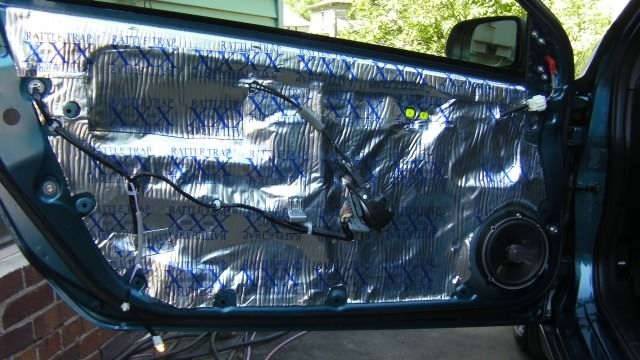
It's NOT difficult to get decent return-wave isolation with a car door... just becomes more difficult with increased SPL. Here's what I did for my car...

The dampening material you see is also installed on the inside of the door skin. Granted, it's not perfect isolation, but it is a definite improvement over OEM... so in that respect you are correct. (BTW, the driver pictured is not what I currently have installed.)
Another issue is to securely mount the driver to the metal chassis, even if you have to build it out to mate with the door trim. If the driver is just mounted to the trim, the trim just acts like a flimsy infinite baffle, and you definitely will not get decent rear wave isolation.
Using a sub (or more than one) is a must even for SQ. I design my systems to achieve no less than 120dB with SQ performance. My car has a 1400 Wrms system and my full-size van has a 14,000 Wrms system. ![]()
@tickerguy
just to validate what you wrote earlier, I created several 720x404 mp4 files put them on a usb thumb drive and they worked perfectly on the 8000nex.
and thank you for the tip, I thought I was still going to be stuck at the 320x240 ipod classic resolution through the usb inputs (same as my old z140)...
This is a pretty old post but you guys all seem really knowledgable so i'm hoping you can help. I have a Jeep Wrangler unlimited with a Pioneer NEX 8200. I use carplay on my iphone in USB 1 and am trying to get my seagate 2TB portable loaded with videos to occupy USB 2. I know that this will work because i had the 8100 several weeks ago with this setup and everything was working fine. my 8100 had some issues with skipping that the installer couldn't fix so he replaced it for me with the 8200 but now i can't get my seagate to play videos any longer. I've tried every format i can think of (i use a Mac by the way). The initial setup was with MP4s but i can convert to anything if that would make this work. I'm hoping that i'm just missing a setting in the menu or something but any help would be appreciated (especially by my kiddos ![]()