Search Archive

8000NEX Loudness?

By jhren · Jun 20, 2014in NEX Series💬 17 posts👁️ 4,451 views
Posted Jun 20, 2014 · 07:02 UTC#1

Hello everyone!


Recently purchased an 8000NEX but have yet to install it.  I was reading through the operation manual and I did not see anything on it having a Loudness function.  Actually searched for word and Acrobat said it didn't find it.  Can someone with the unit installed and operating confirm presence or absence?

Posted Jun 20, 2014 · 08:24 UTC#2

What does a "loudness" function do?

Posted Jun 20, 2014 · 12:05 UTC#3

I don't see that function or even a bass boost on my 8000

Posted Jun 20, 2014 · 15:58 UTC#4

I think it's called the 'Volume Button'  <duck>

Posted Jun 20, 2014 · 16:31 UTC#5

I think it's called the 'Volume Button'  <duck>

LOL, I think they did away with the loudness button, thank God

Posted Jun 20, 2014 · 18:52 UTC#6

What does a "loudness" function do?

In short, and perhaps not quite accurate, it adjusts tonal balance in response to volume change to match the perceived loudness of the human ear.


For a more technical description:


http://www.extron.com/company/article.aspx?id=loudnesscontrol_ts

Posted Jun 20, 2014 · 19:06 UTC#7

LOL, I think they did away with the loudness button, thank God

Apparently you've never experienced a good loudness function.  I admit, some are essentially useless because they are incorrectly implemented.


I have a Kenwood DNN990HD HU in my other car that has a great loudness function with Off/Low/High setting. Unit also has Bass Boost with Off/Level 1/Level 2/Level 3 settings.  The sound quality is excellent how I have it set, and maintains the tonal balance at all volumes.  However, the unit has to other quirks, which contributed to my decision to buy the 8000NEX for my other vehicle.

Edited Jun 20, 2014 by jhren
Posted Jun 20, 2014 · 19:35 UTC#8

Apparently you've never experienced a good loudness function.  I admit, some are essentially useless because they are incorrectly implemented.


I have a Kenwood DNN990HD HU in my other car that has a great loudness function with Off/Low/High setting. Unit also has Bass Boost with Off/Level 1/Level 2/Level 3 settings.  The sound quality is excellent how I have it set, and maintains the tonal balance at all volumes.  However, the unit has to other quirks, which contributed to my decision to buy the 8000NEX for my other vehicle.

If its some thing you really need just program one of the eq memories, loudness is just an eq change.

Posted Jun 20, 2014 · 19:45 UTC#9

If its some thing you really need just program one of the eq memories, loudness is just an eq change.

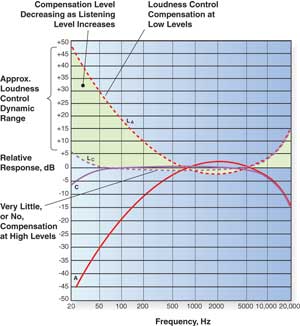
Not the same as loudness.  Loudness is dynamic, i.e. [supposed to  :shock: ] vary the tonal balance as you turn the volume up and down.  No equalizer or bass boost that I have run across functions that way.


loudnesscontrol_ts_4.jpg

Edited Jun 20, 2014 by jhren
Posted Jun 21, 2014 · 07:25 UTC#10

Sorry for your loss. 

Posted Jun 21, 2014 · 13:45 UTC#11

loudness button = AUTO EQ function. I calibrated using the their MIC. sounds okay. I like my settings better

Posted Jun 21, 2014 · 16:01 UTC#12

Sorry for your loss. 

Small consolation, but I appreciate it all the same.  :)

Posted Jun 21, 2014 · 16:13 UTC#13

loudness button = AUTO EQ function. I calibrated using the their MIC. sounds okay. I like my settings better

Probably the trade off from a Pioneer's engineering and manufacturing perspective... but still not the same.  Haven't installed the 8000NEX yet but I have older Pioneer HU's with AEQ. The measurement process is misleading as it tests several volume levels during measurement... but the end result is a single static EQ curve that doesn't change with volume.  I've never had AEQ sound anywhere near respectable without additional EQ'ing, so what's the point if we have to adjust anyway  Even if you like the resulting EQ, it's only good at one volume level.

Posted Jun 22, 2014 · 00:14 UTC#14

Ill admit im not overly impressed with the aeq on the 4K nex but on my Elite home receiver it works great.


I had my DEH-M8200 in my my dash for 16 years and I think I hit the loudness once by mistake and sounded terribly boomy. I also had a 15 band pioneer eq that did the fine adjustments. Now I have the auto eq and a 13 band on top of that.

Posted Jun 22, 2014 · 20:26 UTC#15

I had my DEH-M8200 in my my dash for 16 years and I think I hit the loudness once by mistake and sounded terribly boomy. I also had a 15 band pioneer eq that did the fine adjustments. Now I have the auto eq and a 13 band on top of that.

For a proper use of Loudness, you should turn it on with all other enhancements off or set to flat... then make any additional adjustments.  Turning Loudness on after having made other adjustments to your liking, it will sound boomy.


Another issue will be outboard amplifier's gain setting.  Most autosound pro's will tell you to set your gain so max clean output from the amplifier is achieved at approximately 75-80% of the HU's volume control.  While this should be the volume level at which Loudness suppose to have no effect if properly implemented, the just stated setting of the amplifier gain is not correct for a Loudness ON operation.  If you read the web page I linked in my earlier post, you'll realize the dynamic tonal contouring is relative to decibels at your ears.  The electronics of your system have no way of knowing what the decibel level is at your ears.


To properly set your amplifier gain, you'd have to do a C-weighted frequency response testing at several HU volume settings to get the setting right (or as close as reasonably achievable).  That said, if AEQ setup was properly implemented, it should do its measurement with Loudness enabled.  I don't know whether it does or not, but IIRC, the AEQ setup process disables all enhancements... and IMO judging by the results, it also disables Loudness.

Posted Jun 23, 2014 · 04:44 UTC#16

@Drey


What mic did you use to calibrate EQ?  I have really been struggling to get mine worked out.  It has been tinny and the presets they ship with don't work in my car.  


Been playing with the sub and crossover levels.  Also with the ASL positions and the settings for low, mid highs and stuff like that.  I have a couple that are close but I can still tell it isn't quite where I would prefer.


It is a 2006 Lincoln LS that I put it in.


OP

Posted Jun 23, 2014 · 14:03 UTC#17

@Drey


What mic did you use to calibrate EQ?  I have really been struggling to get mine worked out.  It has been tinny and the presets they ship with don't work in my car.  


Been playing with the sub and crossover levels.  Also with the ASL positions and the settings for low, mid highs and stuff like that.  I have a couple that are close but I can still tell it isn't quite where I would prefer.


It is a 2006 Lincoln LS that I put it in.


OP

ive used the pioneer MC20. in order for it to work hit the home button/ av settings off (just like your doing the bypass trick) then go to settings and the auto eq calibration will be highlighted. just follow the steps on the screen