Search Archive

5000 navigation questions..

By mnsweeps · Jul 05, 2014in NEX Series💬 13 posts👁️ 1,447 views
Posted Jul 05, 2014 · 20:18 UTC#1

1) How do I make the lady read the street names while routing? I don't want her to say " Please leave the freeway" instead of "Take the McBean Pkwy exit"


2) I have saved an address as my home address. How do I ask navigation to go back to my HOME destination from say a different address. Right now when I want to go back home, I hit SAVED LOCATIONS and then pick HOME. But all it does it says "Do you want to save the saved location" or something like that. Why doesn't the nag pick my HOME location and automatically set it up as destination and start the routing?


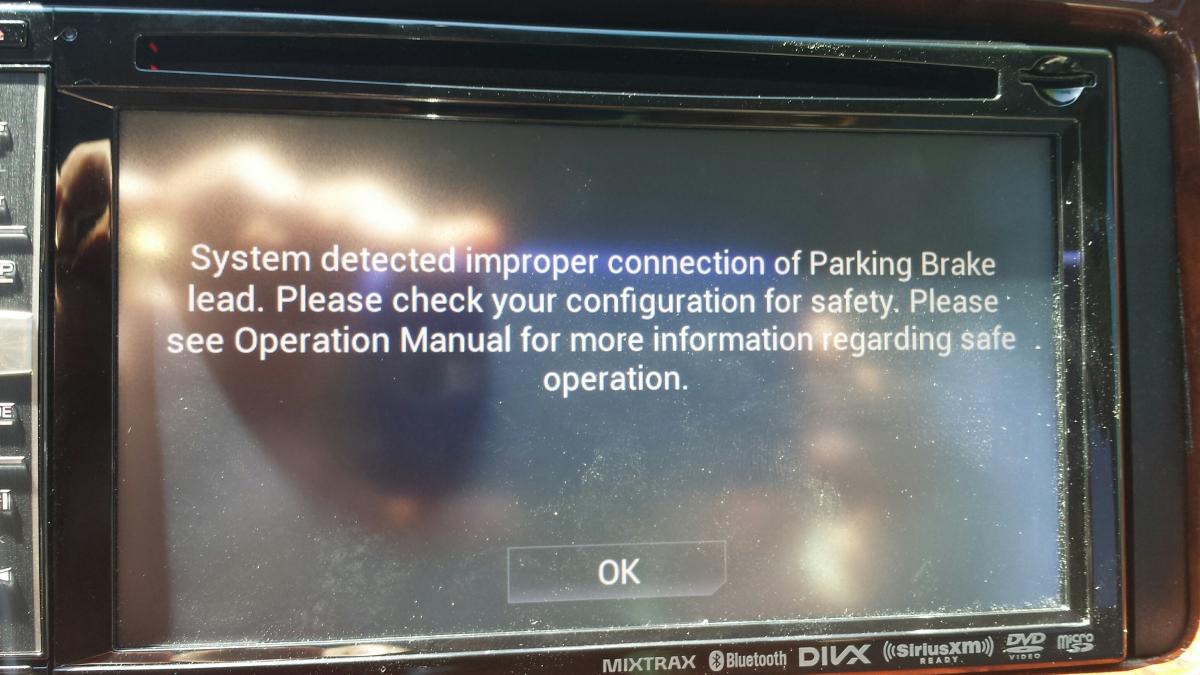
3) After a few minutes of starting the engine, I see this message (check attached file). I have to hit OK to proceed.

"System detected improper connection of the parking brake lead........" What is this?


post-17987-0-83827000-1404591510_thumb.jpg

post-17987-0-67927500-1404591690_thumb.jpg

Edited Jul 05, 2014 by mnsweeps
Posted Jul 05, 2014 · 22:25 UTC#2

1) Select TTS as the voice type


2) Not sure, works fine for me following the same steps as above.


3) Have you grounded the PB wire?

Posted Jul 06, 2014 · 00:54 UTC#3

3. Perform the proper bypass detailed on this forum.

Posted Jul 06, 2014 · 01:53 UTC#4

1) Select TTS as the voice type


2) Not sure, works fine for me following the same steps as above.


3) Have you grounded the PB wire?


1) and 2) are now working fine. I had not set it up right.


I did work through an installer and I have no idea what he did to the PB wire. I will check with him early next week. So if its grounded, where should that PB wire be going?

Posted Jul 06, 2014 · 01:55 UTC#5

3. Perform the proper bypass detailed on this forum.


Once my issue 3) is fixed (PB correctly wired and not grounded), I understand I have to hold the left bottom corner (an inch above and on side) for 10 seconds to see a SET ON message. Once I see that message I guess I have done the bypass and can play videos when running the car. Please let me know if my understanding is correct.

Posted Jul 06, 2014 · 01:56 UTC#6

Grounding the wire will do nothing for you. Refer to my last response.

Posted Jul 06, 2014 · 01:57 UTC#7

Once I see that message I guess I have done the bypass and can play videos when running the car. Please let me know if my understanding is correct.

That is correct.

Posted Jul 06, 2014 · 01:58 UTC#8

And dont worry about the parking brake wire at all. It has no affect on the bypass.

Edited Jul 06, 2014 by VBLUE42
Posted Jul 06, 2014 · 02:04 UTC#9

And dont worry about the parking brake wire at all. It has no affect on the bypass.


But after doing bypass would the warning I get go away?

Posted Jul 06, 2014 · 02:06 UTC#10

Yes.

Posted Jul 06, 2014 · 03:35 UTC#11

Yes.

sweet. I will try and let you know. However I think PB wire should also be grounded cos when I play no music I heard lot of hmmm or noise through speakers which is irritating.

Posted Jul 06, 2014 · 06:37 UTC#12

Grounding the wire will do nothing for you. Refer to my last response.

I wonder why the US & EU versions are so different? The software bypass doesn't work but grounding the PB wire definitely does.

Posted Jul 06, 2014 · 06:40 UTC#13

sweet. I will try and let you know. However I think PB wire should also be grounded cos when I play no music I heard lot of hmmm or noise through speakers which is irritating.

I'd go back to your installer and tell him to sort it out!