Search Archive

Anyone Else Having Sirius XM Album Art Glitches?

By Sparky 1320 · Jul 10, 2014in NEX Series💬 13 posts👁️ 6,960 views
Posted Jul 10, 2014 · 19:35 UTC#1

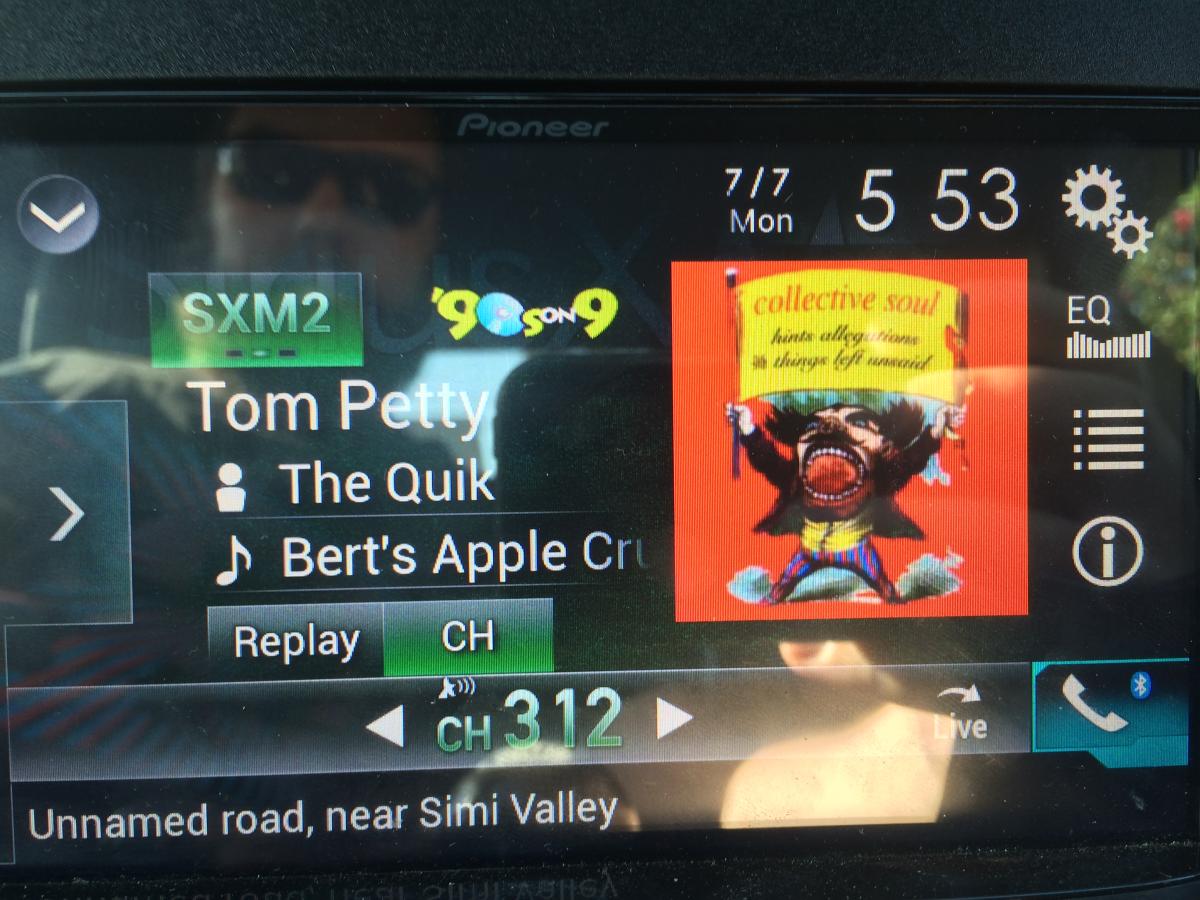
As time goes on, I'm noticing that both the album art and channel icons aren't properly represented for certain stations.  I certainly haven't checked all stations; and it doesn't even happen with all of my presets.  But for some stations, it does happen consistently.  You can see the station's number indicated on the bottom.  Titles for station, artist, and song are also always correct.  (In fact, tags still work).


I snapped a few photos with my iPhone to show you what I mean.  One photo shows Station 312 (Tom Petty's Buried Treasure) but the station icon for '90's on 9 is present as well as the album art for Collective Soul song that is currently playing on Station 9.  The next photo shows Station 319 (Classic College Radio) but the station icon is for '40's on 4.  I didn't look to see if the song that was playing on Station 4 at that time had any album art to display.  The last photo shows Station 316 (Sirius XM Comes Alive) and the album art is even correct.  But the station icon is for Today Show Radio.


I've also seen this with Channel 313 (RockBar).


Other things worth mentioning:

  • Not only do station icons exist for the affected stations, but everything is usually exactly as it should be when I initially tune into the station.  It's only seems to be when the next song starts is when things start getting screwy.
  • Incorrect station icons are not always the same for a given station.  Example:  Sometimes RockBar will go to '90's on 9 with incorrect album art.  Sometimes RockBar won't show album art but the station icon will be NBA Radio.
  • I know that station numbers for the examples that I've given are all in the 300's.  (Are those the stations that are exclusively for Sirius XM as opposed to Sirius or XM?)  Could that have something to do with it?  I don't know.

Just thought that I'd throw this out there to see if others are seeing what I'm seeing.
post-50048-0-42086800-1405020848_thumb.jpg

post-50048-0-95228900-1405020885_thumb.jpg

post-50048-0-60670900-1405020926_thumb.jpg

Posted Jul 10, 2014 · 21:07 UTC#2

I have never seen this kind of channel art/station issue on my 8000NEX. I never go to channel 313 though (I tend to stay in the 1-100 range). Have you ever done a full reset on your head unit? Which unit do you have?

Posted Jul 10, 2014 · 21:30 UTC#3

Sorry.  I should've mentioned that.  It's an 8000.  I haven't done a Master Reset either.  I'll give that a shot later and see if it changes anything.

Posted Jul 11, 2014 · 03:21 UTC#4

I haven't seen this issue, and I listen to SiriusXM extensively.  The only thing I've seen is when the unit (6000) powers up and it's already set to SXM, the channel name displays as Channel XX, where XX is whatever the channel number is.  It won't show the actual channel name until I change the station.  If I go back to the original channel, it will display the name correctly.

Posted Jul 11, 2014 · 23:32 UTC#5

I have the same issues - it randomly doesn't show album art.  I couldn't guess what the issue is.    However, I mainly expand the presets so that the various channel logos show, causing the album art window to be pushed out anyway.  

Posted Jul 14, 2014 · 05:40 UTC#6

Some channels of SXM have poor "dj" enabled artwork... in otherwords, often the artwork has not been assigned to the song by the service "dj" or admin. Also channels like the LA and NYC stations are streaming audio based, thus they do not have artwork except upon the start of a stream (which will cause the situation such as Shakira showing in artwork long after Shakiras song is gone. This is often a problem of a non "in house" station being broadcast over SXM.


I just returned from about 9 hours of driving this weekend, all in SXM mode. I intentionally dabbled in the 300 channel range, though I never saw the issue that Sparky has. Sparky, were you able to complete a system settings reset to see if that fixed your issue?

Posted Jul 25, 2014 · 01:24 UTC#7

The manual tells you to do a master reset before using the unit the first time or you can get "unpredictable results", sounds unpredictable to me!

Posted Jul 27, 2014 · 03:03 UTC#8

All,


Sorry to have gone AWOL.  I hopped in the car and drove about 2000 miles.  I'll get around to the Master Reset and report back.  During my absence, the phonomena I described continue to be present.  But I've been hanging out in the lower channel numbers and everything is fine.  (Maybe this is constrained to Sirius XM only channels?)  Hang on, I'll report back tomorrow.

Posted Jul 27, 2014 · 16:19 UTC#9

I see this from time to time but I believe it has more to do with how SXM buffers the album art. If I get to a channel without album art after scanning for awhile the art will eventually load and be constant as long as I remain on a given channel. The art may preload in a range of channels. It's nothing I lose sleep over as we never had album art before so it's a bonus. BTW, Bring Back Ant!

Posted Aug 06, 2014 · 15:25 UTC#10

Didn't explicitly "Master Reset", but had battery disconnected long enough while doing something else so that the NEX head unit went through initial setup steps once I reconnected the battery.  However Sirius XM presets were retained.  Checking the art on stations that I'd mentioned yielded the same results as before.  One thing that I did notice was that if I went from one preset with incorrect art, to the next preset, and back the prior station, that the album art appeared properly.  And all issues were still confined to "3XX" stations.


Not going to sweat it much further.  Just wanted to follow up . . . 

Posted Aug 06, 2014 · 17:14 UTC#11

I haven't seen any issue like this with album art, but I had to reset because my station icons/art were all messed up in my presets for some reason. I think this had to do with sirius adding/changing some station numbers a couple weeks back though.


I have more or less stopped listening to SXM because it is sooooo quiet it's crazy. I usually have the volume between 10-22 when listening to a disc/ipod/HDD source but I need to crank it up to 30-40 when on SXM.  :x

Posted Aug 06, 2014 · 19:16 UTC#12

I hope you adjusted the volume for the source. SXM is definitely a few db's lower. You should be adjusting all your inputs to match FM As closely as possible.

Posted Aug 06, 2014 · 22:15 UTC#13

Doh, I should check the levels as I have done a few hard resets since my initial install.  :oops:  I just didn't think to check because even after a hard reset most of my settings seem to stay in place. 

Edited Aug 06, 2014 by kadernal